Data Silos in Small Business: Why Your Tools Don't Talk
Stop reconciling reports every Sunday. What data silos look like in a 5-50 person business, the silo tax they cost you, and the 30-90 day fix.
The Verdict: Data silos in a small business are pockets of customer, sales, finance, or operational data trapped inside one tool, spreadsheet, or person’s head — invisible to the rest of the company. For a 5-50 employee firm they typically appear as your CRM and accounting tool disagreeing on revenue, or duplicate customer records scattered across Mailchimp, QuickBooks, and a help desk.
Critical Insights:
- For a typical 20-person business, the silo tax usually runs 4-10 hours per week of manual reconciliation plus £50-£300/month in duplicated SaaS seats.
- The fastest signal you have a silo problem: two reports disagreeing on the same revenue number by more than 5%, or copying the same customer detail into two tools every week.
- Most small businesses only need to fix the top 2-3 painful tool pairs — trying to integrate every tool wastes budget for marginal return.
- A single source of truth is normally your CRM or accounting platform, NOT a data warehouse — warehouses cost £1,000+/month and are over-engineered below ~100 employees.
- The cheapest fix path is native integration first, Zapier or Make second — typical setup is one afternoon and £20-£50/month in subscriptions, no developer required.
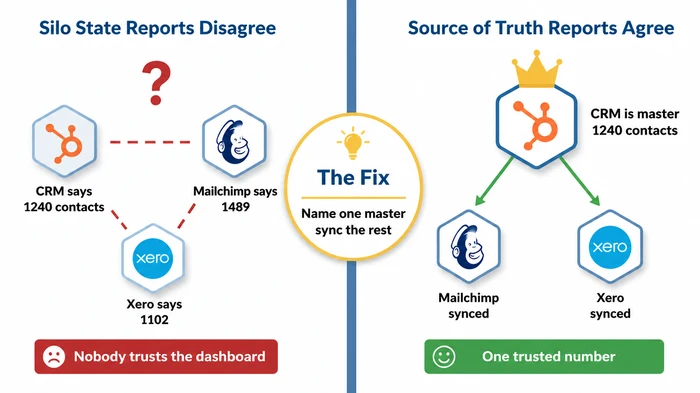
Your sales report says £42,000. Finance says £38,400, and that’s how data silos in a small business announce themselves — two tools, two answers, one Sunday afternoon gone.
Carry on like this and the cost compounds. Wasted weekends. Customers double-emailed or, worse, quietly dropped. Decisions made on numbers nobody actually trusts. A stack of SaaS subscriptions you keep paying for partly because you’ve forgotten what each one was supposed to do.
Below: what data silos look like in a 5-50 person business, how to tell whether yours are costing you real money, and the 30-90 day moves that actually fix it — no Chief Data Officer, no warehouse, no enterprise platform. It sits inside our broader guide to operational efficiency for small business, which covers the wider picture of getting more out of fewer hours.
What a Data Silo Actually Is in Small Business Terms
Quick disambiguator first: we mean data silos — the IT kind — not grain silos. Google’s “People Also Ask” box is currently full of farmers asking about the cylindrical kind, and we are not them.
A data silo is a pocket of business data trapped inside one tool, one spreadsheet, or one person’s head, where the rest of the business cannot easily see it or use it. The data still exists. It just doesn’t flow. And because it doesn’t flow, two parts of the same company end up with two different answers to the same question.
In a small business the silos almost always come in three flavours:
- Tool silo. Your CRM, your accounting tool, and your email platform each hold a different slice of the customer record. None of them agrees with the others.
- Spreadsheet silo. The founder keeps a “master list” — clients, margins, suppliers, capacity — in a personal Google Sheet nobody else has open access to. When the founder is on holiday, the business cannot quote a job.
- Person silo. The bookkeeper has the answers in her head. She knows which invoice belongs to which customer because she has been doing it for nine years. The day she leaves, that knowledge walks out with her.
Why does this matter for a small business specifically, when enterprises have been talking about silos for decades? Because enterprises have data teams paid to paper over the gap. You don’t. The cost lands on the founder personally — your evenings, your weekends, your decision-making confidence. There is no analyst between you and the disagreement.
We’re going to call that cost the silo tax throughout: the hours per week and the pounds per month your business actually pays for keeping its data fragmented. It’s a useful term because it makes the cost concrete. Most owners underestimate it badly until they sit down and add the numbers up.
Why Small Businesses End Up With Data Silos in the First Place
Nobody sets out to build silos. They accumulate, the way junk accumulates in a garage.
The single biggest cause is tool sprawl. A 15-person business commonly runs 5 to 15 SaaS tools. Each one was adopted to solve one specific problem in one specific quarter — the sales team needed a pipeline, the accountant needed Xero, marketing tried Mailchimp because the free tier was good enough. None was chosen as part of a deliberate stack design, because there was no deliberate stack design.
The second cause is founder-led purchasing. Tools tend to be bought by whoever felt the pain, not by the person who owns the data flow. The accountant added Xero. The salesperson added Pipedrive. The marketer added Mailchimp. Each was the right call individually. Nobody connected them, because connecting them was never anybody’s job.
Then there’s the free-tier ceiling effect. Mailchimp Free, HubSpot Free, Notion Free — every SaaS tool has a generous beginner band running out at exactly the moment your business gets serious. So you sign up for the next tool. You almost never decommission the first. Six months later you’re paying for both, and your contact list lives in two places.
Finally, spreadsheet drift. Every reporting question feeling urgent gets answered with a fresh spreadsheet. The spreadsheets never get retired. After two years you have a Google Drive folder full of files called Customer_List_FINAL_v3_use_this_one.xlsx, and not even the person who created them remembers which is current.
None of this is incompetence. It’s just what running a small business looks like when growth outpaces process. The fix isn’t to undo it — it’s to stop the bleeding and pick a master.
Five SMB-Specific Examples of Data Silos You Will Recognise
Generic articles default to Fortune 500 examples — supply chain integration at multinationals, marketing-data unification across business units. None of that helps you on a Tuesday morning. Here are the silos that actually show up in small businesses, by name and tool.
Example 1 — Customer details split between HubSpot and Xero. The same customer exists in both systems. Their email is correct in HubSpot. Their billing address is correct in Xero. There’s no shared customer ID. When the customer changes their email, somebody updates one tool and forgets the other. By month-end, your finance reports are emailing invoices to addresses your sales team knows are dead.
Example 2 — Marketing list versus sales pipeline. Your Mailchimp list and your Pipedrive deals aren’t connected. A lead unsubscribes from your newsletter on Tuesday. On Friday, sales emails them anyway because nobody told sales. Worst case, the lead replies with a complaint to a deal you were about to close. The contact existed in both tools; the unsubscribe lived in only one.
Example 3 — Shopify orders, Xero invoices, no common link. You sell online. Orders pile up in Shopify. Invoices land in Xero. There’s no shared SKU map and no shared customer ID. Reconciling end of month means an afternoon of CSV exports, VLOOKUPs, and quiet swearing. The numbers eventually balance, but only because somebody forced them to.
Example 4 — Operational data trapped in the founder’s spreadsheet. Supplier prices, project margins, available capacity for the next quarter — all in one Google Sheet only the founder maintains. When the founder is in a meeting, in transit, or on holiday, nobody else can quote a job confidently. The data isn’t lost; it’s just inaccessible to the team. That’s still a silo.
Example 5 — Support tickets disconnected from the customer record. Tickets live in Freshdesk. Customer accounts live in HubSpot. The account manager walks into a renewal call without seeing the customer logged three angry tickets last week. The conversation goes badly. The renewal doesn’t happen. That outcome did not need a data warehouse to prevent — it needed one link between two tools.
If you read those five and recognised at least two, you almost certainly have a real silo problem worth fixing. To confirm it more rigorously — and quantify the cost — silos are a textbook example of the kind of operational drag covered in our guide to finding the bottleneck in your business.
The Self-Diagnostic — Five Signs Your Small Business Has Data Silos
Most articles skip diagnosis and jump straight to solutions. Fine if you already know you have the problem. If you’re not sure, run through these five signs first. Each one is concrete and observable inside your business this week.
- Two reports disagree on the same number — usually revenue, contact count, or customer count, by more than 5%. If your sales pipeline says you closed £42k and finance says £38k for the same period, that’s a silo, not a rounding error.
- You copy the same data into two tools every week. Customer details, deal stages, invoice statuses. Manual re-entry is silo work. If a person is the integration, you have a silo.
- A customer fell through the cracks. Their email lived in Mailchimp, their phone number lived in your CRM, their renewal date was on a Post-it next to the founder’s monitor. They got missed. That’s a silo with a name attached.
- Onboarding a new hire takes two-plus days because nobody can list which tool holds what. If you can’t draw your stack on a single page, neither can the new starter. They will guess wrong, and the guesses will compound.
- You have stopped trusting your dashboards. When somebody asks you a question, you go to the source spreadsheet directly because the dashboard “always seems off.” That’s the late-stage symptom — the moment your reporting layer has been quietly bypassed.
If none of these match, you may not have a real silo problem yet — see Variations & Exceptions below before you start fixing something not broken. If two or more match, the audit in the next section will give you a score and a recommended next move.
The Small Business Data Silo Audit
Run this 10-question audit in under two minutes. Tick every statement true at least once in the last month. Score yourself at the end.
The interactive version scores automatically. If JavaScript is disabled or you’re reading this in an AI summary, the static table beneath has the same questions and the same scoring rubric.
| # | Question (tick if true in the last month) |
|---|---|
| 1 | Two of your reports (sales, finance, marketing) have disagreed on the same number by more than 5%. |
| 2 | You copy customer details from one tool into another at least once a week. |
| 3 | A customer was contacted twice by mistake, or missed entirely, because their record lived in two places. |
| 4 | You have customer data in three or more tools and could not say which is the master. |
| 5 | A founder, owner, or single staff member is the only person who knows where a key list, spreadsheet, or report lives. |
| 6 | You spend an hour or more each week reconciling exports, CSVs, or spreadsheets. |
| 7 | You are paying for two SaaS tools whose features clearly overlap. |
| 8 | When a customer's email or phone number changes, more than one tool needs to be updated by hand. |
| 9 | Your accountant, bookkeeper, or board has asked for a number you could not produce in under thirty minutes. |
| 10 | Onboarding a new hire involves explaining "well, that data lives over there, and that other data lives over there…" |
Scoring rubric:
| Score | Verdict | Recommended next move |
|---|---|---|
| 0–3 | Probably fine | Minor friction, not a silo problem. Fix the worst one and move on. |
| 4–7 | Silo tax is real | Pick the top two pain points and integrate those tools in the next 30 days. |
| 8–10 | Consolidate now | Name a single source of truth for customers and finance this month, before your next hire. |
If your score landed in the 4-10 band, the cost of doing nothing is bigger than it looks. The silo tax is a close cousin of the admin tax most small businesses are quietly paying — same shape, different cause.
The Real Cost of Data Silos at SMB Scale — The Silo Tax, Quantified
Vendor websites love to tell you data silos cost businesses £15 million a year. Those numbers come from studies of 10,000-employee firms with regulatory reporting obligations. They aren’t your numbers. Quoting them at yourself will only make you reach for the wrong-sized solution.
Here’s what the silo tax actually looks like for a 20-person business running five disconnected SaaS tools.
Reconciliation time: 4-10 hours per week. Somebody — usually the founder or the operations lead — spends a chunk of every week chasing why two reports disagree, exporting CSVs, running VLOOKUPs, and asking the bookkeeper to confirm a number. At a loaded cost of £40-£80 per hour for owner time, that’s £640 to £3,200 per month, every month, indefinitely.
Duplicate SaaS seats: £50-£300 per month. You’re paying for HubSpot Starter and Pipedrive because the team never agreed which CRM won. You’re on Mailchimp Standard and HubSpot Marketing because somebody set up campaigns in both. Two tools overlapping means at least one duplicate seat, often more.
Missed-deal cost: usually the biggest line, hardest to price. A renewal call where the account manager didn’t see the support tickets. A lead who unsubscribed but kept getting sales emails. A late invoice surfacing a month after the customer churned. These are real revenue events, and they happen because the data didn’t flow. Most owners don’t put a number on this line, but it’s almost always larger than the first two combined.
How to estimate your own silo tax in 15 minutes. Multiply the hours per week the worst-affected person spends reconciling by their loaded hourly cost, then multiply by 4.3 to get a monthly figure. Add any SaaS subscriptions where two tools clearly overlap. Add a conservative guess for one missed deal in the last quarter. The total is usually enough to fund a fix three or four times over — which is the whole point. Once the number is on a page, the business case writes itself.
How to Break Down Data Silos — The 30-90 Day SMB Playbook
This is the section most rankers skip or hand-wave. Here’s the actual playbook for a 5-50 employee business, sequenced by week.
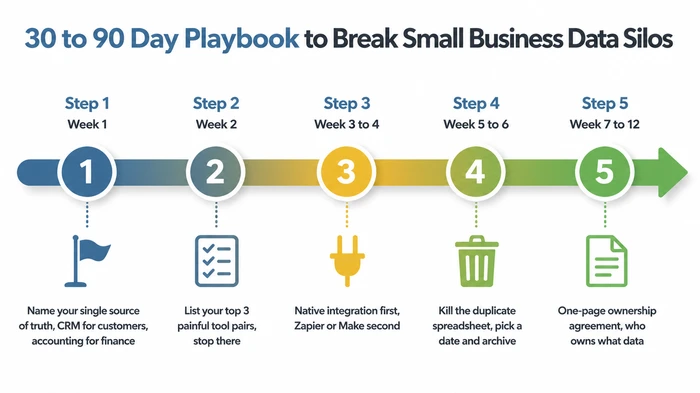
Step 1 (Week 1): Pick your single source of truth. For each domain — customers, orders, finance — name the one tool winning when there’s a disagreement. Customers usually live in the CRM. Finance usually lives in the accounting tool. Orders, for an e-commerce business, usually live in Shopify or WooCommerce. Write the decision down on one page. This is the single most important step, and it requires zero technology — only a decision.
Step 2 (Week 2): List your top three painful tool pairs. Walk through the audit. Identify the three integrations which, if they existed today, would remove the most reconciliation pain. Stop at three. The instinct to integrate everything is the single biggest reason small businesses overspend on this problem. You won’t eliminate every silo, and trying to is a waste — pick the three hurting and ignore the rest for now.
Step 3 (Week 3-4): Native integration first, Zapier or Make second. For each painful pair, check whether the two tools have a built-in connector. HubSpot and Xero, Mailchimp and Shopify, Pipedrive and QuickBooks — most popular pairings now have native integrations which are free or near-free, vendor-maintained, and break less often than third-party glue. If no native option exists, use Zapier or Make to build a one-way sync from the source-of-truth tool to the dependent tool. Budget £20-£50 per month for this. No developer required.
Step 4 (Week 5-6): Kill the duplicate spreadsheet. Pick a date. Archive the spreadsheet. Link the team to the new source of truth. This is the painful one, because somebody on the team has emotional ownership of that spreadsheet. They will keep using it for two more weeks. That’s fine. After a month, the new flow will have won by inertia. Don’t skip this step. Every spreadsheet you don’t retire is a silo you’ve just paid to integrate.
Step 5 (Week 7-12): Document the agreement on one page. Which tool owns which data. Who can edit. Who can read. What happens when the source of truth says one thing and a satellite tool says another. This is your data governance. It’s one page. At your scale you need a one-page agreement on which tool owns which data, not a programme. If a consultant tries to sell you a “data strategy programme” instead, walk away.
A small business almost never needs a warehouse. A well-chosen CRM or accounting tool, plus 2-3 integrations, plus one ownership decision per data domain, gets you 90% of the benefit at 1% of the cost. That’s the entire game. To go further on operationalising the agreement, the building-business-systems guide covers how to turn a one-page rule into a repeatable process the whole team follows.
Should You Integrate These Two Tools — A Decision Matrix
The playbook above tells you the sequence. The matrix below tells you, for any given pair of tools in your stack, whether to integrate them at all and how. Read across one row and act.
| Scenario (your situation) | Action | Reasoning |
|---|---|---|
| Pain happens monthly or less, and a manual export takes under 15 minutes. | Do nothing. Keep the manual export. | The fix would cost more time over a year than the pain itself. Integration debt is real — every connection is one more thing to break. |
| Pain happens weekly, the same data lives in both tools, and one tool is clearly the source of truth. | Look for a native integration first. If one exists, turn it on this week. | Native integrations are free or nearly free, vendor-maintained, and break less often than third-party glue. Always the cheapest fix when available. |
| Pain happens weekly, no native integration exists, but both tools are on Zapier or Make. | Build a one-way Zap or Make scenario from the source-of-truth tool to the other. | Zapier/Make handle the long tail of SaaS connections at SMB prices. One-way sync is simpler, cheaper, and avoids the loop bugs that two-way sync invites. |
| Pain happens weekly, but you cannot say which tool is the source of truth. | Stop. Decide ownership before integrating. | Integrating two tools without naming a master record turns one silo into two synchronised silos that disagree faster. Ownership decision is the prerequisite, not an afterthought. |
| Pain happens daily, the data is identical in both tools, and the volumes are high (100+ records/week). | Integrate via native connector if available; otherwise Zapier/Make on a paid tier. | At this volume the silo tax compounds fast — every week of delay is hours of avoidable reconciliation. Free Zapier tiers run out of tasks; budget the £20–50/month. |
| The two tools genuinely do different jobs (e.g. CRM and accounting), and only customer records overlap. | Sync only the customer record fields. Leave the rest alone. | You are not trying to merge the tools. You are removing one specific source of disagreement. Narrow scope keeps the integration small and fixable. |
| You are tempted to integrate three or more tool pairs at once. | Pick the single most painful pair and ship it. Defer the rest by 30 days. | Multiple parallel integrations multiply failure modes and obscure which one broke when something goes wrong. Sequence them. |
| The "tool" on one side is a spreadsheet that one person maintains. | Don't integrate. Migrate the spreadsheet's role into the source-of-truth tool first. | Spreadsheets-as-databases are silos in their most common form. Wiring more pipes to them entrenches the problem instead of solving it. |
| You're considering a data warehouse, MDM platform, or enterprise iPaaS to "do this properly." | Don't. Exhaust native integrations and Zapier/Make first. | Enterprise tooling is sized for thousands of employees and tens of data sources. At your scale the ROI is negative for at least the next 3–5 years. |
Read across the row matching your situation, do what it says, and stop. The matrix is deliberately conservative — most SMBs over-integrate, not under-integrate.
What NOT to Do — The Anti-Advice Warning
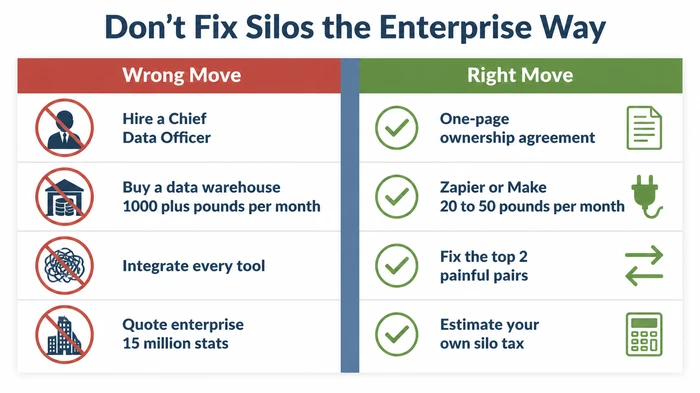
The Common Mistake: Reading enterprise advice, panicking, and reaching for enterprise solutions. Hiring a “data lead” or Chief Data Officer. Buying an enterprise integration platform. Commissioning a data warehouse. Trying to integrate every tool in the stack at once. Quoting cost-of-silos statistics from 10,000-employee studies as if they applied to a 20-person business.
Why It’s Dangerous: Enterprise data tooling is sized for thousands of employees and tens of data sources. At your scale, the licence fees alone will eat your integration budget for the next three years, and you’ll still have the same five SaaS tools that don’t talk to each other — because the platform you bought needs three months of configuration before it does anything useful. Worse, you’ll have spent the money you actually needed for the boring, effective fix: a native integration here, a Zapier scenario there, one clear ownership decision per data type.
The headline statistic that “data silos cost businesses £X million per year” is almost always sourced from enterprise studies. That number does not transfer down. Your silo tax is real, but it’s measured in hours per week and tens of pounds per month, not millions.
The Expert Alternative: Pick the two tool pairs hurting you weekly. Decide which tool is the master for that data. Turn on a native integration if one exists; if not, use Zapier or Make for a one-way sync. Kill the duplicate spreadsheet. Stop. Watch what happens for a month before touching anything else. That’s the entire playbook for businesses your size.
Red Flags to Watch For:
- A vendor pitch opening with a Gartner or Forrester statistic about enterprise data costs.
- Anyone recommending a data warehouse, data lake, MDM platform, or “data fabric” before asking how many employees you have.
- A consultant scoping a “data strategy programme” as the first step instead of a one-page ownership agreement.
- Plans involving integrating five or more tool pairs simultaneously.
- The phrase “single pane of glass” in any sales conversation.
- Any quoted ROI assuming you have an in-house data team.
The shorter version: don’t hire your way out of a problem you can systematise out of. The same logic applies more broadly to operational pain — covered in our guide on hiring versus systematising.
Variations and Exceptions
If you run an e-commerce business: Shopify or WooCommerce is usually your source of truth for customer and order data, not the CRM. Adjust Step 1 of the playbook accordingly — the CRM becomes a satellite syncing from the e-commerce platform, not the other way round.
If you are in a regulated industry (finance, health, legal): consolidating data into one tool means re-checking your GDPR and data-retention obligations before you integrate. Some sync configurations create copies of personal data you then have to manage under retention rules. Cheap to forget at the integration stage, expensive to discover during an audit.
If you are a 1-4 person micro-business: you may not have a real silo problem yet. Two tools and a shared spreadsheet is not a silo crisis — it’s a small business operating normally. Run the audit. If you score 0-3, don’t manufacture a fix you don’t need. The playbook starts to pay for itself around the 5-10 employee mark.
If you run on Google Sheets or Excel rather than SaaS: your silo is a folder of files, not a tool sprawl. The fix is the same in shape but different in artefact: name one workbook the master, retire the others, and document the rule. You may not need any integration platform at all — just discipline about which file wins.
If you are VAT-registered: be explicit about whether the revenue figures in your reports include or exclude VAT. That alone can explain a 20% report-to-report gap and look like a silo problem when it’s actually a definitional one. Check definitions before you blame the tools.
Frequently Asked Questions
Q: What is a data silo in a small business? A data silo is a pocket of business data — customer records, sales numbers, invoices, marketing lists — trapped inside one tool, one spreadsheet, or one person’s head, where the rest of the business cannot easily see it or use it. In a small business this almost always shows up as your CRM, your accounting tool, and your email platform each holding a different slice of the customer record, with no single source of truth and nobody whose job it is to reconcile them.
Q: What is an example of a data silo? Your customer’s email address is correct in HubSpot but the billing address is correct in Xero, with no shared customer ID linking the two records. Updating one does not update the other. By month-end, your finance team is sending invoices to addresses your sales team knows are dead. That is one silo. Most small businesses have three to five of them simultaneously, all caused by the same root issue: SaaS tools adopted independently, never connected.
Q: Why are data silos a problem? Silos cost a small business in three measurable ways: hours of weekly reconciliation (typically 4-10 hours for a 20-person firm), duplicated SaaS subscriptions (£50-£300 per month), and missed revenue events when customers fall through the cracks between systems. The hidden cost is decision-making — owners stop trusting their dashboards because the numbers never quite agree, which slows down every choice the business has to make.
Q: How do you break down data silos in a small business without hiring a data team? Follow a 30-90 day playbook in five steps: name a single source of truth for each data domain (customers, finance, orders); list your top three painful tool pairs; check for native integrations first and use Zapier or Make as a fallback; kill the duplicate spreadsheets; document the ownership rules on one page. No developer, no Chief Data Officer, no warehouse. Total cost is typically £20-£50 per month plus one afternoon per integration.
Q: Do small businesses really need a single source of truth? Yes, but not in the enterprise sense. You do not need a data warehouse or a master data management platform. You need a written agreement that says, for each kind of data, which tool wins when two tools disagree. Customers usually live in the CRM. Finance usually lives in the accounting tool. Orders usually live in the e-commerce platform. The decision matters more than the technology.
Q: Is Zapier enough to fix data silos, or do you need something bigger? Yes, for almost every business under 100 employees, Zapier or Make is enough — especially when paired with native integrations from the SaaS vendors themselves. Enterprise integration platforms (iPaaS), data warehouses, and MDM tools are sized for thousands of employees and tens of data sources. Below 100 employees, the ROI on enterprise tooling is negative for at least the first three to five years. Exhaust native integrations and Zapier/Make before considering anything heavier.
Conclusion — Start With One Painful Pair
Most small business silo problems are solved by naming a source of truth and connecting two or three painful tool pairs. Not by buying a platform. Not by hiring a data lead. Not by panicking at enterprise statistics that were never about you.
Score yourself with the audit this week. Pick the highest-pain pair. Look for the native integration first, the Zapier scenario second. Kill the duplicate spreadsheet. Watch your reports stop disagreeing. Then, and only then, look at the next pair.
If the symptom bringing you here was reports that never quite match — sales saying one thing, finance saying another — the natural next step is making the reporting itself reliable, which is covered in our guide to automated reporting for small business.
Founder, Too Many Hats
Free tool
What it's costing you
See how many hours your manual tasks are really costing you.
Free tool
Problem Solver
Describe your biggest timewaster and get a personalised plan.
Related Guides
Build Business Systems That Run Without You
Build business systems that run without you: a 6-step framework, decision tree, worked customer-onboarding example, SOP template, and AI prompt.
How to Stop Being the Bottleneck in Your Own Business
Stop being the bottleneck in your business with a 4-layer playbook: diagnose the type, apply Theory of Constraints, transfer ownership, run the vacation test.
How to Find the Bottleneck in Your Business (Diagnostic)
Find the bottleneck in your business in one afternoon with a 4-step diagnostic, Little's Law worksheet, and decision tree. No software required.