Build Business Systems That Run Without You
Build business systems that run without you: a 6-step framework, decision tree, worked customer-onboarding example, SOP template, and AI prompt.
The Verdict: To build business systems that run without you, document one high-stakes process end-to-end before touching any tool. Pick the workflow that breaks when you take a week off — usually customer onboarding, fulfilment, or invoicing — capture how it currently works, write a six-step SOP, then test it by having someone else follow the document.
Critical Insights:
- Start with one process, not ten — the owner-operators who actually ship documented systems all begin with the single workflow whose absence costs them the most this quarter.
- A business system has 6 mandatory components: outcome, trigger, owner, inputs, numbered steps, and a “done” definition — anything missing one of these is a draft, not a system.
- Choose your tool last, not first — picking Notion or Trello before you have one written-down system is the #1 reason small-business systemisation projects die within 90 days.
- Expect the first SOP to take 5–10 hours spread over 2 weeks; from system #2 onward, time-per-system drops by roughly 50% as your template matures.
- The success benchmark is the Absentee-Owner Test: can the business run for 14 consecutive days without you opening a laptop? If no, you don’t have systems — you have a job that pays irregularly.
Your last holiday wasn’t a holiday. To build business systems that run without you, every decision in the business has to stop routing through your head — and right now it doesn’t.
By Wednesday lunchtime of that week off, you’d answered 14 WhatsApps, rewritten a quote your assistant got wrong, and apologised to a customer your bookkeeper had double-billed. You can’t hire — nothing’s documented to train against. You can’t sell — no buyer wants a business that breaks the day you leave. You can’t even get sick. Bus factor of one. The bottleneck is you.
This guide walks the exact six-step method for documenting one business system end-to-end, a worked example applied to customer onboarding, the decision tree for picking which process to systemise first, and the four anti-patterns killing 90% of attempts. It includes a copy-paste SOP template and an AI prompt turning a 10-minute voice note into a first-draft document.
What a Business System Actually Is (And Isn’t)
Most owners use the word wrong. A business system is a documented, repeatable way of producing a specific outcome without you doing it.
Three parts make it work: it’s documented (written down somewhere a competent stranger could find), it’s repeatable (the same outcome every time, not improvised), and it runs without you (someone other than the owner can execute it).
Building systems is one lever in a wider operational picture — for the broader frame see our complete guide to operational efficiency for small businesses, which sits above this article in the cluster.
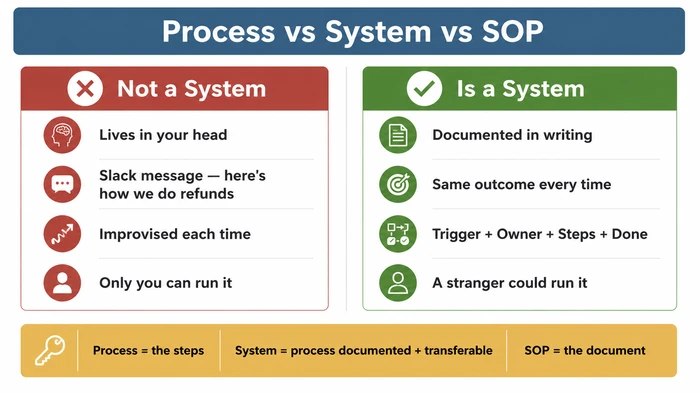
What a business system is not:
- Not a tool. Notion, Trello, Process Street, ClickUp — these are containers for systems, not systems themselves. An empty Notion workspace is a filing cabinet, not a system.
- Not a framework. A framework tells you the shape of an SOP. The SOP itself is the system. Confusing the two is how owners spend three months reading McKinsey blog posts and zero hours documenting their own work.
- Not a vague Slack message. “Here’s how we do refunds, more or less” is institutional folklore, not a system. The moment that message scrolls off the channel, the knowledge dies with it.
The terminology matters because the SERP uses these words loosely and small-business owners get lost in the swap:
- A process is the actual sequence of steps, whether documented or not.
- A system is that process once it’s documented and someone other than you can run it.
- An SOP (Standard Operating Procedure) is the written artifact capturing one system.
Process becomes system the moment it leaves your head. SOP is the document doing the moving.
The Absentee-Owner Test: Why Systems Matter More Than You Think
Could your business run for 14 consecutive days without you opening a laptop? Be honest.
That single question is the clearest measure of whether you have systems. What “yes” looks like in practice: customers get onboarded. Invoices go out. Suppliers get paid. New leads get a response inside the SLA you promised. Decisions below a defined value threshold get made by the team without escalation. Things go wrong — they always do — and the team handles them.
What “no” looks like is anything pulling you back in. A WhatsApp from your supplier you have to answer because nobody else has the relationship. A quote your assistant can’t price because the pricing logic lives in your head. A customer complaint escalating the moment it lands because no one knows what your refund threshold actually is.
Most operational advice frames systems as a way to save time. That framing keeps you as the bottleneck — you just bottleneck faster. The Absentee-Owner Test reframes the goal entirely. Every system has to answer one question: who decides this when I’m not here? Time savings are a side-effect. Transferability is the headline.
Bus factor of 1 — the silent risk most owners ignore
Bus factor is a software-engineering term crept into operations: the number of people who’d have to be unavailable for a process to break. Bus factor of 1 means only you know how to do it.
The risk isn’t theoretical. Businesses with a bus factor of 1 sell at a 30–50% discount to comparables — if they sell at all. Buyers price the dependency in. Lenders price it in. Insurance underwriters price it in. So does your spouse the next time the kids get sick during a contract delivery. Bus factor of 1 isn’t a productivity issue. It’s a structural risk compounding the longer you ignore it.
Pick The Right Process First (Decision Tree)
You can’t systemise everything at once. Owners who try lose six months. Nothing ships. The team learns “the new system” is something to politely ignore until you abandon it.
Do the opposite. Pick one process — the single workflow whose absence costs you the most this quarter. Score every candidate against five questions:
- Does this process touch customers or revenue directly? (Yes = +2)
- Does only you know how to do it? (Yes = +2)
- Does it happen at least monthly? (Yes = +1)
- Has it broken in the last 90 days? (Yes = +1)
- Could a competent stranger do it tomorrow with no doc? (No = +1)
Add the scores. The tier verdict comes out the other side.
| Score | Tier | Action |
|---|---|---|
| 5–7 | Tier 1 | Systemise this week. Block 4 hours on your calendar within 7 days. |
| 3–4 | Tier 2 | Systemise this quarter. Schedule after Tier 1 ships. |
| 0–2 | Tier 3 | Leave for now. Revisit after the first 3-5 systems are live. |
The decision tree below converts those five questions into a deterministic verdict for the most common scenarios. Match yourself against the row that fits.
| Process Profile (Your Scenario) | Action / Tier | Reasoning |
|---|---|---|
| Touches customers or revenue directly + only you know how to do it + happens at least monthly + has broken in the last 90 days | Tier 1 — Systemise this week. Start here. Block 4 hours on your calendar within 7 days. | Four "yes" answers means this is the highest-risk, highest-frequency, fresh-memory candidate in your business. The failure modes are still in your head. The cost of one more breakage is real money. Document this one first and you'll never regret it. |
| Touches customers or revenue + only you know how to do it + happens monthly+ + has NOT broken recently | Tier 1 — Systemise this week. | The absence of a recent failure is luck, not evidence of stability. Bus factor of 1 on a revenue-touching process is the textbook definition of fragility. Document before the next breakage, not after. |
| Touches customers or revenue + multiple people know how to do it + happens monthly+ + has broken recently | Tier 1 — Systemise this week. | Recent breakage means recent learning. The recovery steps are still fresh. Capture the new "common failure modes" section while the team can still describe what went wrong without guessing. |
| Internal-only process (does not touch customers or revenue) + only you know how to do it + happens monthly+ | Tier 2 — Systemise this quarter. | Bus factor of 1 still matters even on internal work — it locks you in. But if customers and revenue aren't directly exposed, the urgency is lower. Schedule it after your Tier 1 system ships. |
| Touches customers or revenue + multiple people know how to do it + happens monthly+ + has NOT broken recently | Tier 2 — Systemise this quarter. | Distributed knowledge plus stability gives you breathing room. Document it before knowledge walks out the door (resignation, sickness, growth) — but you have weeks, not days. |
| Any process + happens less than monthly (quarterly, annually, ad-hoc) | Tier 3 — Leave for now. | Low frequency means low ROI on documentation right now. The exception: if it touches a regulator, an auditor, or a tax deadline — promote to Tier 2. Otherwise, infrequent processes are the last thing you systemise, not the first. |
| Any process + a competent stranger could already do it tomorrow with the materials existing today | Tier 3 — Leave for now. | If the process already passes the "competent stranger" test, you have an informal system. Polish it later when you have spare cycles. Don't let it crowd out a real bottleneck. |
| One-off project work that won't repeat | Do NOT systemise. Just do the work. | Systems exist to capture repeated outcomes. A one-off doesn't pay back the documentation cost. Take notes for your own reference, but don't build an SOP for something running once. |
The most common Tier 1 winners across every business we’ve seen are customer onboarding (touches revenue + only the owner knows the nuances), invoicing and chasing (touches money + breaks regularly), and new-hire ramp-up (only the owner knows it + rare but high-stakes).
If you’re still not sure which process is hurting you most, the companion guide on how to find your business bottleneck walks through the diagnostic in more depth.
The 6-Step Framework for Building One Business System
Six steps, seven steps, nine steps — the SERP can’t agree. The number doesn’t matter. What matters is that every system in your business uses the same count, so the team learns the shape. Six is enough; pick more only if your industry demands it.
- Name the outcome → 2. Capture current reality → 3. Define the trigger and owner → 4. Write the steps → 5. Run it once with someone else following the doc → 6. Set a 90-day review date.
Step 1 — Name the outcome
One sentence. “This system produces ___.” If you can’t finish that sentence, the system is too vague to document. The outcome is the destination — every step that follows is judged by whether it moves you closer.
A weak outcome: “Onboard the customer well.” Unmeasurable. A strong outcome: “A new customer has logged in, completed first-use, received their welcome pack, and has the next-steps email scheduled — within 5 working days of payment.” That sentence tells you when the system is done. The weak version doesn’t.
Step 2 — Capture the current reality
Most owners skip this step. Most attempts die on it. Record yourself doing the work the way you actually do it now — voice note, Loom screen capture, watch-and-narrate. Don’t write the SOP from a blank page.
Aspirational SOPs from blank pages describe businesses that don’t exist. They describe the business you wish you ran, not the one you actually run. The team senses the gap immediately and stops trusting the document. Capture first; refine later.
Step 3 — Define the trigger and the owner
When does this run? Who runs it now? Who should run it after the system exists?
Trigger answers “what fires this off” — a Stripe payment, a Monday morning, a customer email, a ticket reaching 48 hours unresolved. Owner answers “whose desk does this live on” — the current operator (often you) and the future operator (a VA, an account manager, a junior team member). Naming both makes the handoff explicit instead of aspirational.
Step 4 — Write the steps
Numbered. One action per line. Name the who on every line. Use plain verbs — send, check, update, confirm, schedule. Skip jargon. The test: could a competent stranger follow this document tomorrow without asking you a single clarifying question?
If the answer is no, the doc isn’t done. Keep going.
Step 5 — Run it once with someone else following the doc
Watch them silently. That’s the rule. Don’t jump in. Don’t “help.” Where they hesitate is where your SOP is broken. Where they ask a question is where you assumed knowledge wasn’t there. Note every gap on the spot.
This is the single highest-leverage step in the framework. Most documents looking fine on paper fall apart the moment a real human tries to follow them. The 30 minutes you spend watching saves the 10 hours of confusion the document would otherwise cost over a year of use.
Step 6 — Set a 90-day review date
Every system rots. Tools change. Pricing changes. Team members change. The customer’s expectations change. Schedule a 90-day review the moment the SOP ships — put it in the calendar, name a reviewer, write the review trigger into the document itself. Without a review date, the SOP becomes folklore again within six months.
How many steps should YOUR framework have?
Pick any reasonable count between five and nine. Six is the sweet spot for most owner-operator businesses — enough granularity to be useful, not so much the document becomes its own bottleneck. Industries requiring regulatory traceability (medical, food, finance) typically need a longer count with explicit verification and sign-off stages. Pure service businesses can usually compress to five.
Once you’ve chosen, commit. The single biggest gain comes from every SOP in your business using the same shape — the team learns the format, not eight different formats.
Worked Example: Documenting Customer Onboarding End-to-End
Frameworks are easy to read and hard to apply. The cure is one full worked example.
Customer onboarding fits because it touches revenue, only the owner usually knows the nuances, it happens at least monthly in most businesses, and it breaks visibly when it goes wrong — usually with a customer complaint landing directly in your inbox.
Here’s the same six-step framework applied to a real onboarding system, end to end.
Step 1 applied — Outcome. “This system produces a new customer who has logged in, completed first-use of the core service, received their welcome pack, and has the next-steps email scheduled — within 5 working days of payment.”
That sentence is the destination. Every step is judged by whether it moves the customer closer to that state.
Step 2 applied — Capture. You sit down on a Tuesday afternoon, hit record on Loom, share your screen, and walk through the last three customer onboardings out loud. Pull up the actual emails. Read the actual Stripe receipts. Show how you set up their account. Narrate what you do and why — including the small judgement calls (“I always check whether they’re VAT-registered before I send the welcome pack because the wording differs”). The transcript will be messy. That’s fine. Messy is the data.
A snippet of what the transcript might look like: "…so when the Stripe email lands, I usually wait until I’ve finished my coffee and then go into the dashboard, check the payment cleared, and then I’ll go into our CRM and create the customer record — and at this point I’m checking whether they’re a sole trader or limited company because that affects the welcome email I send…"
Step 3 applied — Trigger and Owner. Trigger: Stripe payment confirmation email lands. Current owner: you. Future owner: customer success VA (to be hired in Q2) — or, in the interim, your virtual assistant on a defined exception path.
Step 4 applied — Steps. Numbered, one action per line, with the who on each line. The first draft of the SOP table looks like this:
| # | Who | Action | Tool / Location | Time |
|---|---|---|---|---|
| 1 | System | Stripe payment confirmation triggers Zap | Stripe → Zapier | Auto |
| 2 | VA | Confirm payment cleared and not flagged for fraud review | Stripe dashboard | 5 min |
| 3 | VA | Create customer record (sole trader vs limited flag set) | CRM | 5 min |
| 4 | VA | Send welcome email — variant matched to entity type | Email tool | 3 min |
| 5 | VA | Generate login credentials and schedule send for next morning 09:00 customer time zone | Auth system | 5 min |
| 6 | VA | Schedule day-3 check-in email asking "have you logged in yet?" | Email tool | 3 min |
| 7 | VA | Add customer to day-7 first-use review list | CRM tag | 2 min |
| 8 | VA | Day 5: check first-login event in product analytics | Analytics | 3 min |
| 9 | VA | If no login by day 5: trigger personal recovery email from Owner | Email tool | 5 min |
| 10 | VA | Send welcome pack (PDF) once first-use confirmed | Email tool | 3 min |
| 11 | VA | Schedule day-14 next-steps email | Email tool | 3 min |
| 12 | VA | Mark customer record as "Onboarded" and remove from review list | CRM | 2 min |
Total time-on-task is roughly 40 minutes spread across seven calendar days — entirely doable by a competent VA following a document, with zero owner involvement except the day-5 personal recovery email if the customer hasn’t logged in.
Step 5 applied — Test run. Hand the document to your VA. Tell them you’ll be in the room but not speaking. Watch them work the next live customer onboarding through the SOP. The places they’ll probably hesitate, every time:
- The welcome email tone — is “Hi James” right, or is it “Dear Mr Patel”? (Add an explicit tone rule to the doc.)
- The credential timing — what time zone is “next morning 09:00”? (Add: customer’s time zone, taken from CRM.)
- The “did they actually use it?” check — what counts as first-use? (Add: a specific event name from the analytics tool.)
Update the document on the spot, while the VA’s still in the room. The next onboarding will go smoother.
Step 6 applied — Review. Schedule a 90-day review for July. At review, look for: drop-off points (which step gets skipped most often?), customer questions that should have been FAQs (add to the welcome pack), and changes in the underlying tools (did Stripe rename the webhook?). Update. Re-test once. Reset the review for another 90 days.
What this would look like in your business
- If you’re a service business (consultant, agency, trades): the equivalent system is “client kickoff.” Trigger is the signed contract or first invoice paid. Outcome is the client knows what they ordered, knows what happens next, and has the kickoff call in the calendar within 5 working days.
- If you’re an agency with project-based delivery: the equivalent is the project-kickoff SOP plus a separate handoff SOP between sales and delivery. Two systems, run back-to-back, neither one allowed to skip the other’s “done” criteria.
- If you’re a product-and-service business (e-commerce + setup, software + implementation): the system splits in two — fulfilment of the product (logistics) and onboarding of the human (success). Document them separately. Test them separately.
The shape stays the same. Only the steps change.
The Cash-Flow Bridge: How Systems Stop Money Leaking
Roughly 90% of small businesses fail, and cash-flow mismanagement is the most-cited cause. That figure’s repeated so often it’s gone numb — but the mechanism behind it is concrete. Each undocumented process is a cash-flow leak waiting to happen. The leak isn’t the headline event (“we ran out of cash”). The leak is the chain of small operational gaps draining the cash before anyone noticed.
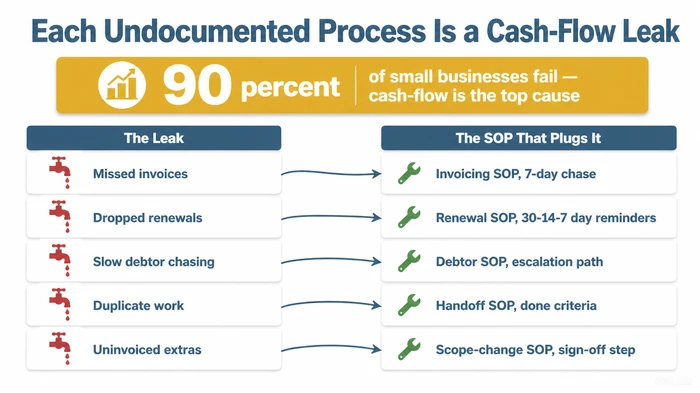
The mapping is direct. Each operational gap has a specific SOP closing it.
| The Cash-Flow Leak | The SOP That Plugs It |
|---|---|
| Missed invoices (sent late or not at all) | Invoicing SOP with a 7-day post-delivery chase rule |
| Dropped renewals (subscriptions or retainers expiring un-noticed) | Renewal SOP with 30/14/7-day reminder triggers |
| Slow customer chasing (debtors aging past 60 days) | Debtor SOP with an explicit escalation path and final-notice script |
| Duplicate work (sales redoes what delivery already did, or vice versa) | Handoff SOP with a “done” definition both teams sign on |
| Uninvoiced scope creep (“we did the extra bit for free”) | Scope-change SOP with a sign-off step before any extra work begins |
Each row is a system you don’t have right now. Each row is also a percentage of margin you’re already paying for in lost revenue and recovered time. The team chasing the debtor in week 12 instead of week 6 is the team nobody told what week 6 looks like.
The compounding effect is what makes systems pay back. The first system saves roughly 5 hours per week — meaningful, not transformational. The tenth system unlocks the Absentee-Owner Test — the business survives a 14-day holiday. The twentieth system makes the business sellable — because a buyer can finally see what they’re acquiring without you in the room.
For the invoicing-and-admin angle specifically, the companion guide on admin and tax for small businesses walks the receivables side in more detail.
The “Do It For Me” Asset: SOP Template + AI Prompt
The two most common reasons SOPs don’t get written: “I don’t know what one looks like” and “I don’t have three hours to write one.” Both are solved below. Copy the template, paste the AI prompt into ChatGPT or Claude, and you have a first-draft SOP inside an hour.
The SOP Starter Template
Copy this directly into a Google Doc, Notion page, or Markdown file. Fill in the blanks for one process. That’s your first system.
# SOP: [System Name]

**One-line outcome:** This system produces: ___________________________________
*(Example: "A new customer is fully onboarded and has completed their first successful use of the service within 7 days of signing the contract.")*

---

## 1. Trigger
*When does this system run? What event kicks it off?*

- Trigger event: ___________________________________
- Frequency: [ ] Daily  [ ] Weekly  [ ] Monthly  [ ] Per-customer  [ ] Per-project  [ ] Other: ______
- Typical volume: _____ runs per [day / week / month]

## 2. Owner
*Who is responsible for this system running? Who do you escalate to if it breaks?*

- Current operator (the person who does the work): ___________________________________
- System owner (the person responsible for the document staying current): ___________________________________
- Backup operator (bus factor > 1): ___________________________________

## 3. Inputs Required Before Starting
*What needs to exist before step 1? Information, access, files, approvals.*

- [ ] Input 1: ___________________________________
- [ ] Input 2: ___________________________________
- [ ] Input 3: ___________________________________
- [ ] Access / permissions needed: ___________________________________

## 4. Steps
*Numbered. One action per line. Name the WHO on every line. Use plain verbs (send, check, update, confirm).*

| # | Who | Action | Tool / Location | Time |
|---|-----|--------|-----------------|------|
| 1 | ___ | ___    | ___             | ___  |
| 2 | ___ | ___    | ___             | ___  |
| 3 | ___ | ___    | ___             | ___  |
| 4 | ___ | ___    | ___             | ___  |
| 5 | ___ | ___    | ___             | ___  |

## 5. "Done" Definition
*How do you know this system has completed successfully? Be specific — a checkbox, a confirmation email, a dashboard reading.*

This system is complete when: ___________________________________

Verification step: ___________________________________

## 6. Common Failure Modes & Recovery
*What goes wrong, and what to do when it does. Fill this in from memory of the last 3 times this broke.*

| Failure mode | Symptom | Recovery action | Who to escalate to |
|--------------|---------|-----------------|--------------------|
| ___          | ___     | ___             | ___                |
| ___          | ___     | ___             | ___                |
| ___          | ___     | ___             | ___                |

## 7. Document Maintenance

- Last updated: __________ (date)
- Last reviewed: __________ (date)
- Next review due: __________ (date — set 90 days out by default)
- Reviewed by: __________
The AI Prompt Template
Record a 10-minute voice note describing how you currently do the process. Get the transcript (Otter, Whisper, ChatGPT itself). Paste the transcript into the {RAW_DESCRIPTION} slot of the prompt below, fill in the other variables, and run it. Output: a populated first-draft SOP in the format above.
[CONTEXT]
You are an operations writer helping a small-business owner-operator turn their head-knowledge into a written Standard Operating Procedure (SOP). The owner has just described, in their own words, how they currently do a recurring process. Your job is to turn that raw description into a clean, structured first-draft SOP that another competent person could follow.

[INPUTS]
- System name: {SYSTEM_NAME}
  Example: "Customer onboarding for new clients"

- Desired outcome (one sentence): {DESIRED_OUTCOME}
  Example: "A new customer has completed their first successful service use within 7 days of signing."

- Current operator (who does this today): {CURRENT_OPERATOR}
  Example: "Me, the owner."

- Future operator (who should be able to do it after this SOP exists): {FUTURE_OPERATOR}
  Example: "A new VA, or my account manager once she's hired."

- Raw description of how the work is done today (paste a voice-note transcript, a screen-recording transcript, or a stream-of-consciousness brain-dump — messy is fine):
  """
  {RAW_DESCRIPTION}
  """

[INSTRUCTIONS]
1. Read the raw description carefully. Identify the trigger event that starts this process.
2. List the inputs required before step 1 can happen (information, access, files, approvals).
3. Extract the actions in the order they actually happen. Number them. Each step should:
   - Name the WHO (current operator, customer, system, third party)
   - Use a plain verb (send, check, update, confirm, schedule)
   - Name the tool or location where it happens (email, CRM, spreadsheet, phone)
   - Be doable by someone who has never done it before, given the document
4. Identify the "done" definition — the specific signal that tells the operator the system has completed successfully.
5. From the raw description, infer 2-3 likely failure modes (where the operator hesitated, mentioned exceptions, or said "usually" / "sometimes"). Add a recovery action for each.
6. Flag any step where the description was vague or assumed knowledge — mark it [CLARIFY: ___] so the owner can fill in the missing detail.

[OUTPUT FORMAT]
Output the SOP in exactly this Markdown structure (do not add or remove sections):

# SOP: {SYSTEM_NAME}

**One-line outcome:** {DESIRED_OUTCOME}

## 1. Trigger
[trigger event]
Frequency: [daily / weekly / monthly / per-customer / per-project]

## 2. Owner
- Current operator: {CURRENT_OPERATOR}
- Future operator: {FUTURE_OPERATOR}
- Backup operator: [CLARIFY: who is the bus-factor backup?]

## 3. Inputs Required
- [bulleted list of prerequisites]

## 4. Steps
| # | Who | Action | Tool / Location | Time |
|---|-----|--------|-----------------|------|
[populated table]

## 5. "Done" Definition
[specific completion signal]

## 6. Common Failure Modes & Recovery
| Failure mode | Symptom | Recovery action |
|--------------|---------|-----------------|
[populated table — 2-3 rows]

## 7. Clarifications Needed
[bulleted list of every [CLARIFY: ___] flag from the steps above]

[END OUTPUT FORMAT]

After producing the SOP, end with one sentence telling the owner which step is most likely to break in practice and why — based on what they said in the raw description.
End-to-end time, the first time you do this: a 10-minute voice note, 2 minutes to paste into the prompt, 30 seconds for the AI to generate the draft, then 20–30 minutes of human refinement. Under an hour, total, for a first-draft SOP.
Anti-Patterns: The Four Mistakes That Kill 90% of Systemisation Attempts
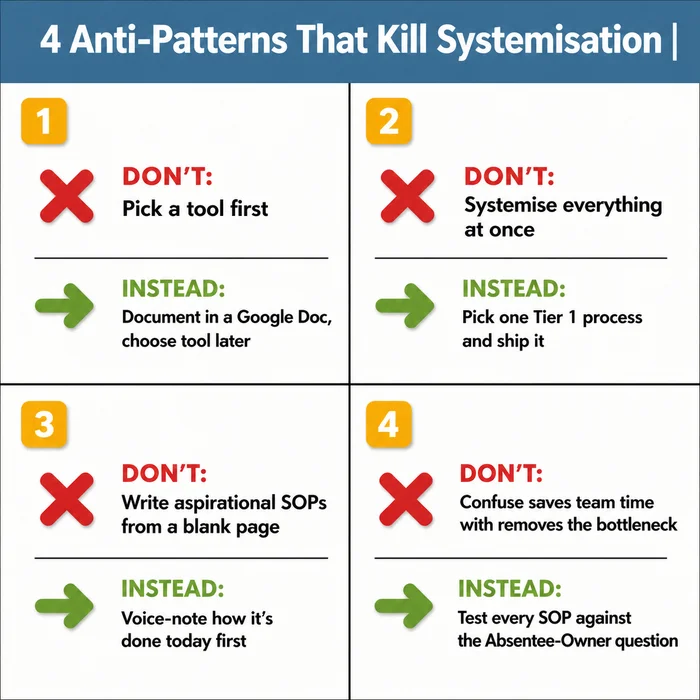
The Common Mistake: You decide it’s time to “get organised”, so you spend a weekend evaluating Notion, ClickUp, Trello, Process Street, Monday.com, Asana, Coda, and a dozen others. You sign up for a paid plan. You import templates. You build a beautiful workspace with colour-coded tags and clever databases. Three months later, the workspace is empty. No one’s using it. You haven’t actually documented a single end-to-end system. You’ve built a filing cabinet and put nothing in it.
Why It’s Dangerous: The tool selection becomes the project. It absorbs the time, attention, and momentum you should have spent on the actual work — capturing how one process is currently done and writing it down. You confuse the activity of configuring software with the work of building a system. Worse: when the tool inevitably doesn’t fit, you blame the tool and start the cycle again with a different one. Six months disappear. Nothing ships. Your team learns “the new system” is something to politely ignore until you abandon it.
The Expert Alternative: Document one system in plain text — a Google Doc, a Markdown file, a sheet of paper if you have to. Use the SOP starter template above. Pick the single process hurting most when it breaks. Write the SOP. Run it once with someone else following the document while you watch. Refine the document based on what they got wrong. Then, and only then, look at tools — and you’ll know what to look for, because you’ll have a real artifact needing a home.
Red Flags to Watch For: You’re watching tool comparison videos before you’ve written a single SOP draft. You’ve signed up for a free trial of a process tool but can’t name the first three systems you’ll document in it. You’re building a Notion workspace structure before you have any content to put in it. A team member has asked “what is this for?” about the new tool and you don’t have a one-sentence answer. You catch yourself saying “once we’ve got the right tool set up, then we can start documenting.” That sentence is the trap.
The tool-first trap is the most common but it isn’t the only one. Three more kill the rest of the attempts.
Anti-pattern #2 — Trying to systemise everything at once. The six-month-wasted trap. Every process feels urgent when you look at the list. None of them ship because attention’s split twelve ways. Use the decision tree above. Score every candidate. Pick the highest. Ship one before starting the next.
Anti-pattern #3 — Writing aspirational SOPs from a blank page. The document describes the business you wish you ran, not the one you actually run. The team senses the gap immediately and stops trusting the SOP. Capture how the work is currently done first — voice note, screen recording, watch-and-narrate. Refine after. Skipping the capture step is why most attempts produce documents nobody uses.
Anti-pattern #4 — Confusing “saves the team time” with “removes the bottleneck.” A system saving 30 minutes per employee per week but still routing every decision through you hasn’t solved the real problem. Test every SOP with the absentee-owner question: if I disappear for two weeks, can this still run? If the answer is no, the document is incomplete.
Bonus anti-pattern — Outsourcing the first SOP. The first SOP has to come from your head. After that, a VA or AI assistant can convert your voice notes into draft documents. The first one is non-delegable. It’s how you learn what a system actually contains, where the judgement calls live, and what the failure modes really look like.
Saving the team time is a side-effect, not the goal. The goal is removing you as the single point of failure. Test every SOP against the absentee-owner question, not the time-saved question.
For the deeper diagnosis on why owners stay the bottleneck even after writing SOPs, the companion guide on how to stop being the bottleneck in your own business picks up where this section ends.
Variations & Exceptions
- If you’re in manufacturing or a regulated industry (medical devices, pharma, food production): you need ISO/GMP-grade documentation that’s out of scope here. The 6-step framework is a useful starting point but not a compliance system. Layer in your industry’s documentation standards on top — the framework above gives you the shape, the regulator gives you the required content.
- If you run a software or SaaS startup: “Systems” in your world often means engineering systems (CI/CD, runbooks, on-call rotations). Same word, different practice. The principles still apply — one process at a time, capture current reality first, test with someone else — but the artifacts look different. Treat this guide as the operational layer; treat your engineering documentation as the technical layer.
- If you’re VC-funded growth-stage: This guide isn’t aimed at you. You have or will hire an ops manager. Forward this article to their team leads — the absentee-owner test still applies at every layer.
- If you’re a one-person business with no plans to hire: Reframe “runs without you” as “runs without you having to remember everything.” The same systems still earn back their build time in mental load saved. They also dramatically increase the resale value of the business if you ever decide to sell.
- If your team is fully remote or distributed: Documentation is a multiplier, not a different framework. Everything in this guide applies harder. Voice-note capture (Step 2) is even more useful when you can’t physically watch someone do the work — your team’s already used to async, written communication.
FAQ
Q: What does it actually mean to “build a system” in business? Build a system means take one repeatable process out of your head, document it in writing, and prove someone else can run it. Three components, all required: documented, repeatable, transferable. A system living only in your head isn’t a system — it’s a job description nobody else has.
Q: How do small businesses build systems if they can’t afford a consultant? You don’t need one. Use the 6-step framework above. Pick one process. Voice-note yourself doing the work. Drop the transcript into the AI prompt. Refine the output for 20 minutes. Test it with your team. Total cost: under an hour and zero pounds. Consultants are useful at scale; for the first ten SOPs, the work is yours.
Q: How long does it take to build a business system? Expect the first SOP to take 5–10 hours spread over 2 weeks — most of the time goes into the capture step (Step 2) and the live test run (Step 5), not the writing. From system #2 onward, time-per-system drops by roughly 50% as your template matures and you stop reinventing the format. Full systemisation of a small business runs 6–12 months at a sustainable pace of one new SOP per fortnight.
Q: What’s the difference between a process and a system? A process is the actual sequence of steps, whether documented or not. A system is the same process once it’s documented and someone other than you can run it. The SOP is the document capturing the system. Process is the activity. System is the activity made transferable. SOP is the artifact doing the transferring.
Q: How do business systems prevent business failure? Each undocumented process is a cash-flow leak waiting to happen. Missed invoices, dropped renewals, slow debtor chasing, duplicate work, and un-invoiced scope changes all drain cash before the headline event (“we ran out”) ever shows up. The 90% small-business failure rate is largely a cash-flow rate. Systems patch the leaks one at a time.
Q: What’s the first system every small business should build? Whichever scores highest on the decision tree in the “Pick The Right Process First” section. The most common Tier 1 winner is customer onboarding — it touches revenue, only the owner usually knows the nuances, and it breaks visibly when it goes wrong. Score yours. Pick the highest. Ship it.
Conclusion
Building business systems isn’t about tools, frameworks, or productivity hacks. It’s about documenting one process end-to-end so someone other than you can run it. Then doing it again. Then again.
Your one-week call-to-action: pick one process. Run it through the decision tree above. Voice-note yourself doing it tomorrow. Drop the transcript into the AI prompt. Refine the output. Test it with someone else by Friday. That’s one system. The next one is half as hard.
Twenty systems from now, you can take a 14-day holiday. Forty systems from now, the business is sellable. Both outcomes start with the SOP you build this week.
For the wider operational picture, see the parent guide on operational efficiency for small businesses — this article is one of the supporting pieces in that cluster.
Founder, Too Many Hats
Free tool
What it's costing you
See how many hours your manual tasks are really costing you.
Free tool
Problem Solver
Describe your biggest timewaster and get a personalised plan.
Related Guides
Data Silos in Small Business: Why Your Tools Don't Talk
Stop reconciling reports every Sunday. What data silos look like in a 5-50 person business, the silo tax they cost you, and the 30-90 day fix.
How to Stop Being the Bottleneck in Your Own Business
Stop being the bottleneck in your business with a 4-layer playbook: diagnose the type, apply Theory of Constraints, transfer ownership, run the vacation test.
How to Find the Bottleneck in Your Business (Diagnostic)
Find the bottleneck in your business in one afternoon with a 4-step diagnostic, Little's Law worksheet, and decision tree. No software required.