Admin Tasks Wasting Time in Small Business: The 40% Tax
Admin tasks wasting time in your small business? UK operators lose 24 days a year. Rank the 8 worst, then Eliminate, Automate, Delegate.
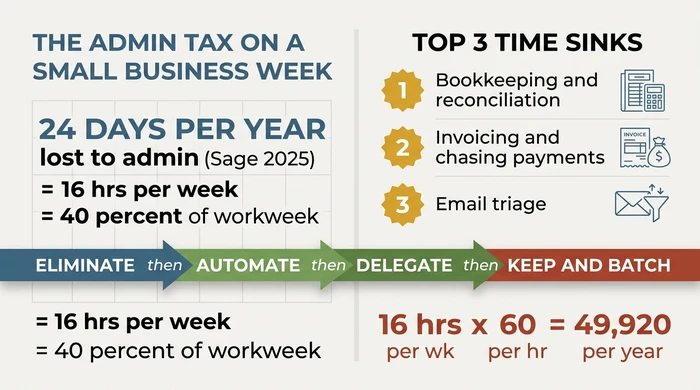
Admin tasks wasting time in small businesses cluster around eight repeat offenders: bookkeeping and reconciliation, invoicing and payment chasing, email triage, scheduling, payroll, data entry, compliance filings, and customer service logging. UK micro-businesses lose roughly 24 days a year, about 40% of the workweek, to these tasks (Sage, 2025).
Critical Insights:
- UK small businesses lose an average of 24 days a year to financial admin alone, equivalent to 16 hours every week (Sage 2025; Admin & More 2026).
- The top three time-sinks are consistently bookkeeping and reconciliation, invoicing and payment chasing, and email triage, together eating more than half of admin hours.
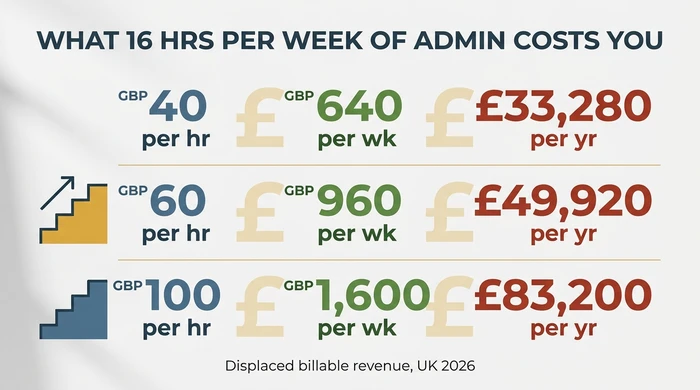
- At a 60 GBP/hour billable rate, 16 admin hours per week costs 49,920 GBP a year in displaced revenue.
- For a 1-5 person business, automation and elimination beat delegation as first-line fixes. 30-50% of admin can typically be removed before a VA is economically justified.
- Apply the rule Eliminate, Automate, Delegate, then Keep-and-batch, in that order, never reversed.
It’s Friday evening again. The admin tasks wasting time in your small business - bank reconciliation, two late invoices, an inbox that refills itself - have eaten another 30 hours of a 55-hour week.
That gap is a slow leak. Unbilled hours, delayed payments, missed quotes, capacity you can’t sell because admin has already swallowed the day. Left alone, it quietly caps how big the business can get, because the hire who would fix it is the hire you can’t yet afford.
This guide names the eight tasks costing small operators the most hours, benchmarks the real scale with 2025 data, and hands you a three-step decision - Eliminate, Automate, Delegate - to shrink the admin tax before paying anyone else to do it for you. It sits inside our broader guide to operational efficiency for small business, which frames the wider playbook this article drills into.
The Admin Tax, Quantified: What Small Businesses Actually Lose
Admin eats somewhere between a fifth and half of your working week. That’s not a guess. Four independent sources, spanning nearly a decade, land on the same pattern for the typical UK small business - and the figure has grown, not shrunk.
| Source | Figure | Scope |
|---|---|---|
| Sage (2017) | 120 hours / year | Financial admin, UK small business average |
| Sage (2025) | 24 days / year | Financial admin only, UK small business; equivalent to ~192 hrs/yr |
| Admin & More (2026) | 16 hours / week | All admin, UK micro-business operators |
| IBTimes UK | 33 hours / month | General admin, UK small businesses |
| IBIAB (2025) | 40% of workweek | Non-billable admin, UK self-employed and small business |
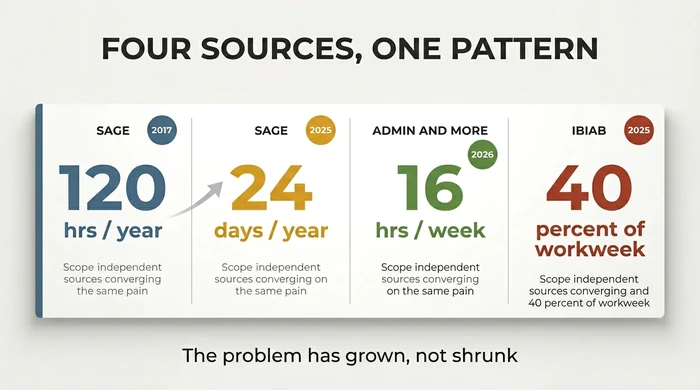
Two things matter in that table. First, the Sage 2017 figure of 120 hours a year is routinely cited as if it were current. It isn’t. The 2025 update puts the number at 24 days a year - closer to 192 hours, and that’s only the financial admin slice. Pair the two figures whenever you see the 120-hour number quoted; the trajectory is up, not flat.
Second, the phrase admin tax is a useful frame. It’s the share of your week going to non-billable administration - the quiet tax you pay on your own time before a single invoice clears. Quantifying it is the first step to shrinking it.
Which Admin Tasks Actually Waste the Most Time
Eight tasks do most of the damage. For a typical 1-5 person UK business, they rank roughly: bookkeeping and reconciliation, invoicing and payment chasing, email triage, scheduling and appointments, payroll, data entry between systems, compliance and filings, and customer service logging. The top three alone account for over half the total admin hours in most micro-businesses.
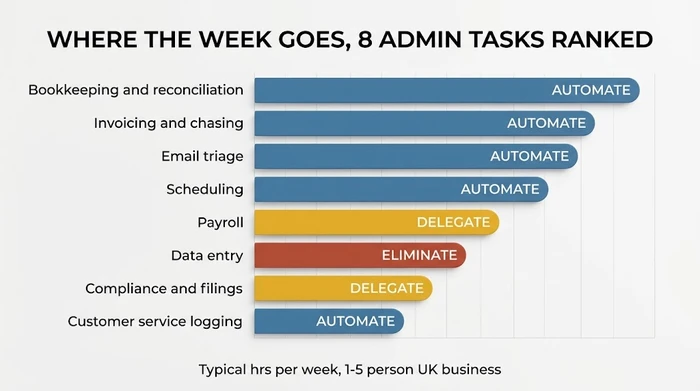
Before breaking them down task by task, it helps to know which one eats YOUR week specifically, not the average. Our companion guide on how to find the bottleneck in your business walks through that diagnosis. The rankings below are typical, not prescriptive.
Bookkeeping and reconciliation
Bookkeeping is almost always the top time-sink for a VAT-registered micro-business, consuming 3-6 hours per week on average. The bloat comes from three places: matching bank feed transactions to invoices and receipts, chasing missing paperwork, and fixing categorisation errors from earlier weeks. Reconciliation in particular scales badly - every new supplier and payment method adds friction. First-line verdict: Automate. Modern accounting platforms auto-categorise 70-90% of transactions using machine learning, and receipt-capture apps kill the paperwork-chasing loop entirely.
Invoicing and payment chasing
Invoicing itself is quick. Chasing payment is what drains the week. UK small businesses lose an average of 56 days a year waiting on late invoices (FSB, 2024), and the chase typically costs 2-4 hours per week. First-line verdict: Automate. Every major accounting platform now runs scheduled reminders, automatic statements, and one-click payment links. Set these up once and you replace an unending queue of polite follow-ups.
Email triage
The inbox is the single most invasive admin task because it pretends to be work. A typical operator spends 4-8 hours a week reading, sorting, and replying to email most of which could be handled by a rule, a template, or a filter. First-line verdict: Automate, then Batch. Agentic email triage - AI reading, categorising, drafting replies, and escalating only real decisions - is now mainstream. Pair it with two batched inbox sessions a day and the rest of your week stops being interrupted.
Scheduling and appointments
“Does Tuesday work?” - and the three replies it generates - is a pure cost. For service businesses with 5+ client meetings a week, scheduling consumes 1-3 hours. First-line verdict: Automate. A scheduling link writing to your calendar and handling reminders replaces the entire email ping-pong. Setup takes an afternoon and returns its investment inside a month.
Payroll
Payroll is monthly, not weekly, so it looks small in a weekly audit - but it carries disproportionate cognitive load because mistakes have tax and legal consequences. Typical cost: 2-4 hours per month, equivalent to ~1 hour/week amortised. First-line verdict: Automate or Delegate to a fractional bookkeeper. Payroll software (FreeAgent, Xero Payroll, BrightPay) handles RTI submissions and pension contributions; a fractional bookkeeper at 50-120 GBP/month is cheaper than your time once you’re above 3 employees.
Data entry into systems
Re-keying the same information into two or three tools - booking into calendar, calendar into invoice, invoice into accounts, accounts into CRM - is pure waste. It typically costs 1-3 hours per week and is the task most likely to produce errors. First-line verdict: Eliminate via integration. The fix isn’t a better data-entry habit; it’s a Zapier, Make, or native integration removing the re-keying entirely. If two systems can’t talk to each other, one of them is probably the wrong tool.
Compliance and filings
VAT returns, Companies House confirmation statements, self-assessment, sector-specific filings. Typically 1-2 hours per week amortised, with peaks around quarter-end. First-line verdict: Delegate, with automated reminders. Compliance is judgment-heavy and penalty-laden - one of the few areas where delegation to a qualified bookkeeper or accountant is the right first move, not the last. Automate the reminders; delegate the execution.
Customer service logging
Every customer interaction needing a record - warranty claim, complaint, return, follow-up - is time spent on documentation rather than resolution. Typically 1-3 hours per week for product businesses, less for services. First-line verdict: Automate, or Eliminate if volume is low. A lightweight help-desk tool (Help Scout, Freshdesk starter tier) logs every email thread automatically. Below ~20 tickets a month, a single labelled inbox is enough; above that, a proper tool pays for itself.
The Automate, Delegate, or Eliminate Decision
Order matters. The correct sequence is Eliminate, Automate, Delegate, then Keep-and-batch - in that order, never reversed. Most SERP advice defaults to “hire a VA” as the first move. For a 1-5 person business, that’s almost always the wrong answer.
Here’s why. A VA paid to run a broken process is a VA paid to do waste. You’ve locked in the inefficiency, added a salary to it, and given yourself a management job on top. The typical micro-business can strip out 30-50% of admin time through elimination and automation alone, before delegation becomes the right economic choice.
Run the four verdicts in order against any task:
- Eliminate. Most admin accumulates by habit. Before asking how to do it faster, ask whether it needs to exist. The monthly summary nobody reads; the status report you stopped needing two quarters ago; the categorisation nobody looks at. Stop doing them. This costs nothing and frees time immediately.
- Automate. If the task must exist and is rule-based (same inputs, same decisions, same outputs), it’s a candidate. Bookkeeping reconciliation, invoice reminders, scheduling, data entry between tools - all automation targets before delegation targets.
- Delegate. Only after elimination and automation have been run. Delegation makes sense when the task needs human judgment but not YOUR judgment - a bookkeeper for payroll, an accountant for VAT, a VA for documented repetitive outreach. The process should already be streamlined before you hand it over.
- Keep and batch. Tasks requiring your specific judgment, expertise, or relationship stay with you - but in protected, batched blocks, not bleeding across the week. This is what you’re paid for. Protect it.
Decision Matrix: Automate, Delegate, or Eliminate?
Use the table below on any admin task showing up in your Audit. Work top to bottom; don’t skip steps.
| Step | Question | If YES | If NO | Reasoning |
|---|---|---|---|---|
| 1 | Does this task need to exist at all? Would anything break if you stopped doing it this quarter? | Go to Step 2 | Eliminate - stop doing it | Most admin accumulates by habit, not necessity. Cut dead weight before spending a penny on tools or people. |
| 2 | Is the task rule-based and repetitive (same inputs, same outputs, same decisions)? | Automate - use a rule, integration, or AI agent | Go to Step 3 | Rule-based work is the cheapest to remove. A one-off setup beats paying for the same decision forever. |
| 3 | Does it need human judgment, but not specifically YOUR judgment? | Delegate - VA, fractional bookkeeper, part-time hire | Go to Step 4 | Delegation is the right answer only after elimination and automation are exhausted. Otherwise you pay someone else to do waste. |
| 4 | Does it require your specific judgment, expertise, or relationship? | Keep & batch - protect it; do it in one focused block weekly | Revisit Step 1 - you haven't been honest about whether it needs to exist | Judgment work is what you're paid for. Protect it from interruption by batching, not by letting it bleed across the week. |
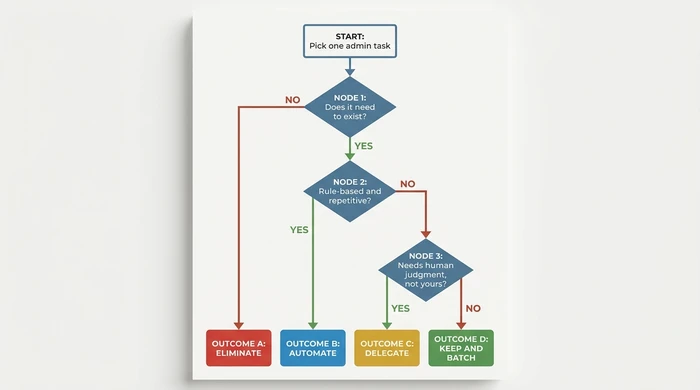
Applied to the eight ranked tasks: bookkeeping, invoicing, email triage, scheduling, and customer service logging route to Automate. Data entry routes to Eliminate (via integration). Payroll and compliance route to Delegate. Nothing on the list routes to Keep-and-batch by default; that verdict is reserved for billable-adjacent work like strategy, client relationships, and pricing decisions.
The Admin Hours Audit (Do It Yourself Now)
Log your actual hours. Use the interactive audit below to set your billable rate and see the annual cost per task. If JavaScript is disabled, the static table underneath does the same calculation manually.
Worked example: 16 hours a week x 52 weeks x 60 GBP/hr = 49,920 GBP a year of displaced billable time. Plug in your own rate; the number is almost always larger than operators expect.
For a deeper calculation layering in overheads and opportunity cost, run your figures through the full cost-of-admin calculator.
What This Actually Costs You (In Money, Not Just Hours)
Hours are abstract. Pounds are not. The same 16 admin hours a week converts very differently depending on what those hours would have earned:
| Effective hourly rate | Weekly cost | Annual cost |
|---|---|---|
| £40 / hr | £640 | £33,280 |
| £60 / hr | £960 | £49,920 |
| £100 / hr | £1,600 | £83,200 |
And that’s only the direct cost. The second-order costs stack on top:
- Late invoices create cashflow drag. A £5,000 invoice paid 30 days late is a £5,000 short-term loan you made to your client, interest-free.
- Missed or delayed quotes are revenue that never lands. Quote within 24 hours and you win the work; quote in a week and it’s already gone to someone else.
- Context-switching tax. Every swap between admin and billable work costs 15-25 minutes of re-focus. Fragmented days mean the billable hours you do bill are less productive than they should be.
Run your own numbers against the cost-of-admin calculator and you’ll usually find the annual cost is 20-40% higher than a pure hours-times-rate sum suggests.
Traps to Avoid: The Anti-Advice
The default advice across the web is to hire a virtual assistant. For a 1-5 person business, this is almost always the wrong first move. You hand a messy, undocumented, inefficient workflow to someone new, pay them by the hour, and call it a solution.
Why it’s dangerous: You’re now paying someone else to do waste. The inefficiency is still there - it just has a salary attached. The typical micro-business can automate or eliminate 30-50% of its admin time before delegation becomes the right answer. Skip that step and you lock in the cost forever, plus management overhead.
Red flags to watch for:
- You’re about to hire a VA but can’t write down the process they will run.
- You’ve time-blocked admin to one day a week for more than two months and the block keeps growing.
- You’ve added a third or fourth SaaS tool this year and are now doing admin to manage your admin tools.
- You’ve never asked, of any recurring task, what happens if you just stop.
Time-blocking admin to, say, every Friday feels productive. It isn’t a solution - it’s triage, not treatment. It hides the total cost instead of reducing it, and the block reliably grows until it swallows two days.
Use time-blocking only as a temporary holding pattern while you build the automate-and-eliminate plan. If you’re still time-blocking three months from now with the same tasks, the plan never happened.
Each tool adds its own admin: logins, onboarding, subscriptions to reconcile, data to migrate, integrations to maintain. A third scheduling tool doesn’t halve your scheduling time; it doubles your tooling admin.
One tool replacing three tasks beats three tools each replacing one. Consolidate before you adopt. If a prospective tool can’t replace or retire an existing one, it’s probably the wrong tool.
Variations and Exceptions
The eight tasks and their typical ranking hold for a service-based 1-5 person UK business. Five common variations matter:
- Regulated trades (legal, healthcare, financial advice): Compliance admin can’t be automated away. Budget it as a fixed cost and delegate to a qualified specialist early.
- VAT-registered: Bookkeeping admin roughly doubles versus non-registered. Automation ROI is fastest here - prioritise the top of the stack.
- Product businesses (retail, e-commerce): The top sinks shift to inventory reconciliation and returns processing, not scheduling. Reorder the list accordingly.
- Seasonal trades (weddings, accountants in Q1, tradespeople in summer): Measure admin hours at peak, not average. A figure looking manageable annually can break the business in a six-week peak.
- Revenue under 50,000 GBP: Stay on free-tier tools and manual workflows. A paid SaaS stack may not yet pay back - elimination and batching do most of the work at your scale.
FAQ
Q: How many hours a week do small business owners spend on admin?
UK small business owners spend 16 hours a week on average on admin (Admin & More, 2026), which works out to around 40% of a typical workweek (IBIAB, 2025). Financial admin alone accounts for 24 days a year according to Sage 2025 research. Figures are higher for VAT-registered businesses and regulated trades.
Q: What is the single biggest admin time-waster for small businesses?
Bookkeeping and reconciliation is the biggest single time-waster for most VAT-registered UK micro-businesses, consuming 3-6 hours per week. Email triage runs a close second at 4-8 hours a week because it interrupts billable work continuously rather than sitting as a discrete block.
Q: Should I hire a VA to handle admin?
No - not as your first move. For a 1-5 person business, automate and eliminate before delegating. A VA paid to run a broken, undocumented process locks in the inefficiency with a salary attached. Typically 30-50% of admin time can be removed through automation and elimination first; delegate only what’s genuinely left.
Q: What admin can AI actually automate in 2026?
Yes, AI now handles four admin categories reliably in 2026: bookkeeping auto-categorisation (70-90% accuracy on bank feeds), agentic email triage (reading, sorting, drafting replies, escalating real decisions), invoice reminders and payment chasing (scheduled, personalised), and scheduling (natural-language booking agents). Compliance filings, judgment calls on client relationships, and anything requiring your specific expertise still need you.
Q: How do I calculate what admin is really costing me?
Multiply your weekly admin hours by 52, then by your effective billable hourly rate. That gives the displaced-revenue cost. Add 20-40% for second-order costs (late-payment drag, missed quotes, context-switching). Use the cost-of-admin calculator for a layered breakdown including overheads.
Conclusion: Shrink the Tax Before You Scale
The admin tax is quantifiable (around 24 days a year for the average UK small business), concentrated in eight repeatable tasks, and mostly removable before you need to hire. Operators who grow cleanly shrink the tax first; the ones who hire first usually end up paying it twice.
Three steps this week:
- Run the Admin Hours Audit above. Use honest numbers.
- Identify the highest-hour row tagged Automate. That’s your first target.
- Open the cost-of-admin calculator and see the full annual figure - then revisit the operational efficiency guide for small business for the wider playbook.
Shrink the tax. Then scale.
Founder, Too Many Hats
Free tool
What it's costing you
See how many hours your manual tasks are really costing you.
Free tool
Problem Solver
Describe your biggest timewaster and get a personalised plan.
Related Guides
AI Sales Follow Up: Stop Ghosting Your Warm Leads
AI sales follow up for founder-sellers: score leads, fire triggers, draft the first touch, and call the right lead today — without burning your domain.
AI Customer Service for Small Business: 3 Modes, 30-Day Path
AI customer service for a small business in three modes — deflection, routing, AI assist — plus the handover seam that protects quality. 30-day path.
How to Reduce Errors in Business Processes (Forensic Guide)
Reduce errors in repetitive business processes with a three-lever sequence: redesign, automate, protect. Scorecard, worked example, 5 rights pattern.