Business Automation for SMEs in 2026: A No-Hype Guide
Drowning in manual tasks? Learn what business automation actually means, how to pick what to automate first, and realistic costs for your business.
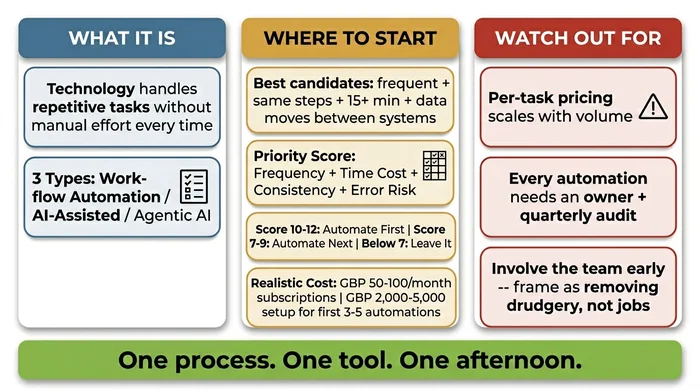
The Verdict: Business automation for SMEs is letting software handle the repetitive stuff — invoice chasing, lead capture, data copying between your tools — so your small team stops burning hours on busywork. Unlike the enterprise systems you’ve probably heard about, it usually runs on friendly tools like Zapier, Make, or n8n. No coding required.
Critical Insights:
- The Golden Rule: Never automate a broken process. If your team does it differently every time, automation will only scale your errors at full speed — fix the process first.
- Start with tasks performed at least weekly that involve moving data between two systems — invoice chasing, lead capture, and client onboarding sequences deliver the fastest ROI.
- Begin with one process, one tool, one afternoon — prove value on a single task before scaling, or you risk building an automation graveyard of abandoned workflows.
- Expect to spend £50–£150/month on software subscriptions plus a one-time £2,000–£5,000 for professional setup of your first three to five workflows — not the near-zero figures some vendors imply.
- Assign a named owner to every automation and schedule a quarterly review; the single biggest failure mode is building something nobody maintains when tools update.
It’s Friday evening and everyone else has gone home. You’re still at your desk, copying this week’s new client details from a form into your CRM, then into your invoicing tool, then writing a welcome email from scratch – again. Business automation eliminates that kind of repetitive data-shuffling so your team can focus on work that actually requires a human brain.
The business automation terminology you’ll hear
The term gets thrown around loosely in vendor marketing. Four variations matter for SMEs, and knowing which is which protects you from being sold the wrong thing.
- BPA (business process automation) is the broad category – any technology automating a complete process from start to finish. “Business automation” and “BPA” are used interchangeably.
- RPA (robotic process automation) is software mimicking human actions on a screen. Primarily enterprise tooling for legacy systems. Most SMEs will never need it.
- Workflow automation is the sub-type most relevant to your business: connecting existing tools so an action in one triggers actions in others automatically.
- Agentic AI handles multi-step tasks independently, making decisions along the way. The 2026 direction worth knowing about, but not the starting point for most SMEs.
A concrete example: a professional services firm was spending 45 minutes every Monday manually pulling project status data from three tools and building a report. A simple workflow automation now runs that process every Friday at 5 pm without anyone involved. The 45 minutes became zero.
The three types that matter for SMEs
Most automation guides present a full taxonomy more useful for enterprise IT than a business owner solving a practical problem. Three types cover what’s relevant for a business of 5-50 people in 2026.
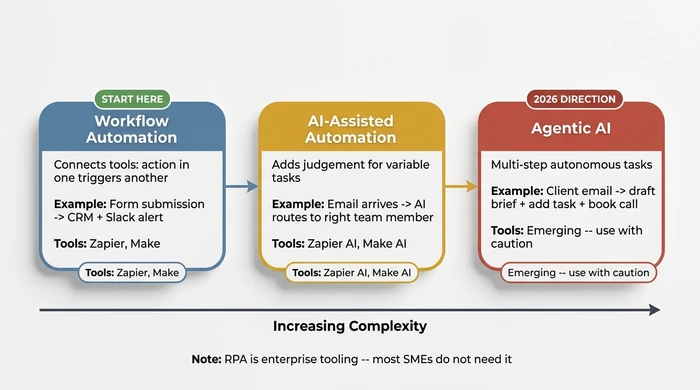
Workflow automation connects your existing tools so an action in one triggers actions in others. A new enquiry arrives via Typeform; Zapier creates a contact in your CRM, sends a confirmation email, and posts a Slack message to your sales team. No coding. This is where every SME should start.
AI-assisted automation adds a layer of judgement. An email arrives in your support inbox; an AI layer categorises it and routes it to the right team member. This handles variability pure workflow automation cannot.
Agentic AI handles multi-step tasks independently. A client emails with a project brief; the AI agent reads it, drafts a summary, creates a task, and schedules a call. Available in 2026, but requires more careful setup and oversight. Approach it once you have working workflow automations in place.
When to use each type
| Use case | Type | Typical tools | Complexity |
|---|---|---|---|
| New lead from web form to CRM | Workflow automation | Zapier, Make | Low |
| Invoice chasing emails | Workflow automation | Zapier, Xero auto-reminders | Low |
| Routing customer support emails | AI-assisted automation | Zapier AI, Make AI modules | Medium |
| Client onboarding sequence | Workflow automation | Make, n8n, HubSpot | Low-medium |
| Weekly reporting from multiple tools | Workflow automation | n8n, Make | Medium |
| Email triage and task creation | AI-assisted automation | Zapier AI | Medium |
| Multi-step client intake and scheduling | Agentic AI | Emerging tools | High |
What to automate first
The most common mistake is picking the automation that sounds impressive rather than the one saving the most time. The golden rule: never automate a broken process. If your team does it differently every time, or nobody can explain the steps end to end without checking notes, fix the process before you build anything on top of it.
Once you’ve confirmed a process works reliably, score it across four criteria – frequency, time cost, consistency, and error risk – to decide whether it’s a strong automation candidate. Use the interactive scorer below to evaluate one of your own processes in 30 seconds:
For the full scoring criteria, decision guide table, and worked examples, see our priority framework for SME owners.
Choosing the right platform
Three categories cover what you need to know:
No-code workflow tools: Zapier and Make. These connect your existing applications and handle conditions without coding. Zapier has the widest app compatibility and the gentlest learning curve. Make offers more logic options and lower per-task pricing at higher volumes. Both have free tiers. Start here.
Low-code / developer-adjacent: n8n. More flexible, self-hostable (avoiding per-task pricing entirely), and worth investigating once you have five or more automations. Requires a slightly higher technical comfort level.
Built-in automation features. Before buying any new platform, check what your existing tools already offer. Gmail filters, Xero payment reminders, HubSpot workflow sequences – many tasks require no additional platform at all. Microsoft Power Automate is worth knowing if your business runs on Microsoft 365.
Our detailed platform comparison walks through Zapier, Make, n8n, and Power Automate side by side – including 2-year cost projections most vendors won’t show you.
What it actually costs
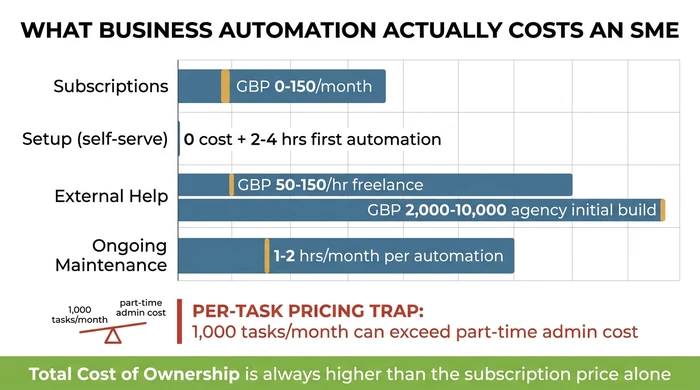
Total cost of ownership is the full cost including subscriptions, setup time, external help, and ongoing maintenance. Vendor marketing tends to show only the subscription line.
| Cost component | Realistic range | Notes |
|---|---|---|
| Subscription tools | £0-£150/month | Free tiers available on Zapier and Make; SME plans typically £50-£150/month depending on task volume |
| Setup time (self-serve) | 2-4 hours for a first simple automation | A competent non-technical person can configure a basic Zapier or Make workflow in an afternoon; a 5-automation project takes 2-6 weeks elapsed |
| External help (freelance) | £50-£150/hour | A freelance automation consultant for a specific build; reasonable once you know what you need |
| External help (agency) | £2,000-£10,000 initial build | Appropriate at scale; premature before you understand your own requirements |
| Ongoing maintenance | 1-2 hours/month per active automation | Monitoring, fixing breakages, updating when tools change |
The real benefits – and the honest limitations
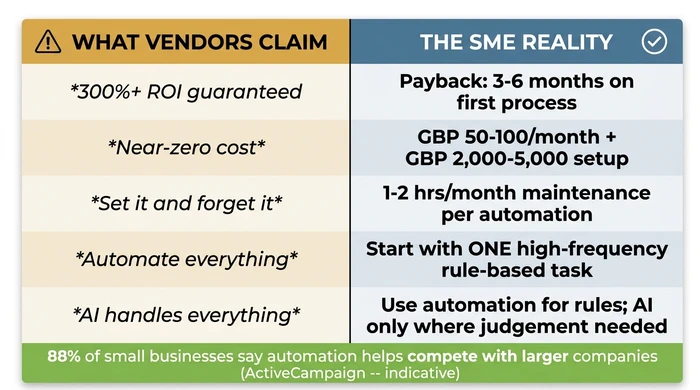
Business automation delivers real benefits. The honest version is more modest than vendor marketing suggests – and more durable than the hype implies.
Time reclaimed. A workflow saving five hours per week at £30 per hour recovers over £7,800 per year – even if the automation only partially replaces a manual process.
Error reduction. Removing manual data entry eliminates copy-paste errors. The automation performs the task the same way every time.
Consistency. Every client gets the same onboarding sequence. Every overdue invoice gets the same chasing email at the same interval.
Competitive parity. 88% of small businesses report automation allows them to compete with larger companies.
The limitations are equally real:
Per-task pricing trap. Zapier and Make charge per action. As business volume grows, automation cost grows too – sometimes eliminating the savings.
Vendor dependency. Moving between platforms means rebuilding from scratch. No portability standard exists.
Maintenance overhead. Automations break when tools update connections, change pricing, or alter interfaces. Budget 1-2 hours per month per active automation.
Keeping it running
The single biggest failure mode in SME automation is not choosing the wrong tool or automating the wrong process. It’s building something that works, then abandoning it.
Six months of silent failure is common. A tool updates its API, the automation stops, and nobody notices until a client complains. This is the automation graveyard – and most businesses with more than a handful of automations already have one.
The fix is straightforward: named ownership, one-paragraph documentation, and a quarterly 30-minute audit per automation. These three rules catch failures before they reach customers.
Our priority framework article covers the three maintenance rules in detail – named ownership, documentation, and quarterly audits.
Variations and exceptions
If you’re a solo operator: Staff adoption isn’t a concern. Focus entirely on the priority scorecard and start with your highest-scoring task. Your maintenance risk is also lower – you’ll notice immediately when something breaks, because you’re the only person using it.
If your industry has strict data compliance requirements (finance, healthcare, legal): Before routing sensitive data – client records, financial documents, personal information – through a third-party automation platform, verify their data processing agreements and confirm compliance with GDPR or your sector’s specific regulation. Not all automation tools are suitable for all data types. Check before you build.
If you already have basic automations and want to go further: Use the quarterly audit process as your starting point. Identify which existing automations are still working, which are abandoned, and which could be expanded. Build on what works before adding new platforms or new complexity.
If your budget is very constrained (bootstrapped, under 10 employees): Start with the automation features already built into tools you already pay for. Gmail filters, Xero auto-reminders, HubSpot sequences, and similar built-in features have zero additional cost and zero setup complexity. Add a dedicated automation tool only when you’ve exhausted what your existing stack can do.
If your process steps vary significantly by client or situation: Straightforward workflow automation (Zapier, Make) may not be the right fit. Variable processes either need standardising first, or they genuinely require AI-assisted automation – which adds complexity. Approach with more caution and always include a human review step until you’re confident the automation handles the variation correctly.
Where to go from here
Your next step depends on where you are right now:
Need to decide what to automate? The priority framework for SME owners gives you the full scoring criteria, decision guide table, and maintenance rules.
Ready to choose a platform? The detailed platform comparison covers Zapier, Make, n8n, and Power Automate with honest pricing and 2-year cost projections.
Want to add AI to your workflows? The AI for small business roadmap covers six practical use cases and a five-step implementation plan.
The Time-Cost Calculator shows you exactly how many hours and pounds your manual processes are costing you each year. Add your tasks, see the numbers, and identify which one to automate first.
The Problem Solver analyses your specific situation and tells you exactly which processes to automate, in what order, and which tools to use. No sales pitch – just a clear, actionable plan.
One process. One tool. One afternoon. That is where every working automation begins.
In This Guide
- Automated Reporting for Small Business: Save 17 Hours/Month Spending 17 hours per month assembling reports by hand? Learn how to automate reporting in your existing tools in one afternoon—no consultant required.
- Business Automation Tools for Small Business (2026 Guide) Business automation tools compared: Zapier vs Make vs Power Automate vs n8n for small business. Honest pricing, migration risk, decision framework.
- What to Automate First: A Priority Framework for SME Owners What to automate first in your small business: use the priority scorecard to rank processes by frequency, time cost, consistency, and error risk.
- Automate Employee Onboarding for Small Business: Steps Automate employee onboarding for small business: pre-boarding workflows, IT provisioning, training, and budget-tiered tools you can deploy this month.
- Scheduling Automation: Stop Being the Calendar Manager Scheduling automation for small business: build a three-tier stack — booking link, automated reminders, calendar rules — to end back-and-forth emails.
- How to Automate Data Entry and Stop Wasting 10 Hours a Week Automate data entry in your small business: four tool categories, volume-to-cost tiers, two worked walkthroughs, and the audit step nobody mentions.