What to Automate First: A Priority Framework for SME Owners
What to automate first in your small business: use the priority scorecard to rank processes by frequency, time cost, consistency, and error risk.
The Verdict: Most SMEs automate the wrong thing first – the task that sounds impressive rather than the one saving the most time. This article gives you a repeatable scoring framework (frequency, time cost, consistency, error risk) to rank your manual processes objectively, a decision guide to confirm readiness, and the maintenance rules that prevent your automations from silently failing six months later.
Key takeaways:
- Score every candidate process on four criteria. Processes scoring 10-12 out of 12 are your strongest first automation.
- Never automate a broken process. If it doesn’t work reliably by hand, automation scales the errors at full speed.
- Assign a named owner to every automation before go-live, document it in one paragraph, and run a quarterly 30-minute audit.
- Involve your team early – the people doing the drudgery know exactly which tasks to automate first.
The priority scorecard – four criteria that matter
The most common mistake is picking the automation that sounds impressive rather than the one saving the most time. A related mistake is automating a task that doesn’t work well manually.
Once you’ve confirmed a process works reliably, use the scoring approach below to decide which one to automate first.
Score each process across four criteria:
- Frequency: How often do you perform this task? Daily = 3, weekly = 2, monthly = 1.
- Time cost: How long does each occurrence take? More than 1 hour = 3, 15-60 minutes = 2, less than 15 minutes = 1.
- Consistency: Are the steps the same every time? Always the same = 3, usually the same = 2, varies significantly = 1.
- Error risk: What happens when someone gets it wrong? Significant damage (financial, reputational, client impact) = 3, minor rework needed = 2, no real harm = 1.
Priority bands: Score 10-12 means automate this first. Score 7-9 means automate after your first win. Score below 7 means leave it for now.
The score tells you what to automate first. It does not tell you which tool to use – that decision comes after.
Scoring guide
Prefer scoring multiple processes at once? Use the reference table below:
| Criterion | Score 1 | Score 2 | Score 3 |
|---|---|---|---|
| Frequency – How often do you perform this task? | Monthly | Weekly | Daily |
| Time cost – How long does each occurrence take? | Less than 15 minutes | 15-60 minutes | More than 1 hour |
| Consistency – Are the steps the same every time? | Varies significantly | Usually the same | Always the same |
| Error risk – What happens when someone gets it wrong? | No real harm | Minor rework needed | Significant damage (financial, reputational, client impact) |
Blank scorecard with worked examples
| Process Name | Frequency (1-3) | Time Cost (1-3) | Consistency (1-3) | Error Risk (1-3) | Total Score | Priority |
|---|---|---|---|---|---|---|
| Chase overdue invoices by email | 3 | 2 | 3 | 3 | 11 | Automate first |
| Copy new enquiry form submissions to CRM | 3 | 2 | 3 | 2 | 10 | Automate first |
| Send weekly project status report | 2 | 2 | 3 | 1 | 8 | Automate after first win |
| [Your process here] | ||||||
| [Your process here] | ||||||
| [Your process here] | ||||||
| [Your process here] | ||||||
| [Your process here] |
Many businesses find their highest-scoring task immediately when they do this exercise. Invoice chasing appears at the top of the list for almost every service business. It’s frequent, time-consuming, consistent in its steps, and an error – chasing the wrong client, missing a debtor – has real consequences.
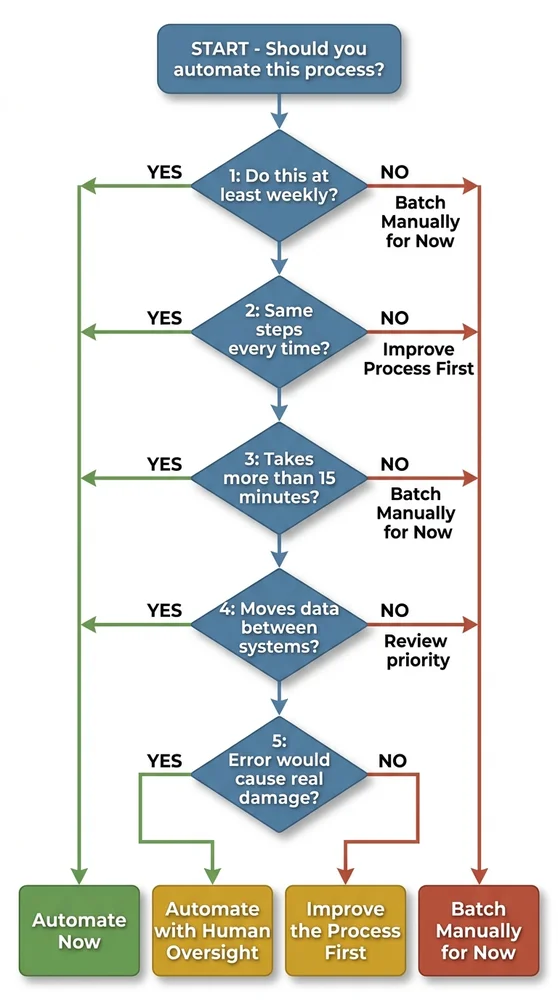
Should you automate this process? – the decision guide
If you prefer a scenario-by-scenario view, use the table below to check where a specific task sits before investing setup time.
| Scenario | Action | Reasoning |
|---|---|---|
| You perform this task less than once a week | Batch manually for now -- do not automate yet | Automation setup time and ongoing maintenance will exceed the time saved on a low-frequency task. Revisit if it becomes more frequent. |
| You perform this task at least weekly, but the steps vary significantly depending on the situation | Improve the process first, then automate | Simple workflow automation (Zapier, Make) requires consistent, rule-based steps. Variable processes either need standardising first, or they require AI-assisted automation -- which adds complexity and cost. Standardise the process before building an automation around it. |
| You perform this task at least weekly, steps are consistent, but each occurrence takes less than 15 minutes | Batch manually for now -- or check your existing tools first | Short tasks may not justify a dedicated automation. Check whether your existing tools (Gmail filters, Xero auto-reminders, CRM sequences) already handle this for free before adding a new platform. |
| Task is weekly+, steps are consistent, takes 15+ minutes, and involves moving data between two or more systems | Automate now -- this is your strongest candidate | Data movement between systems is exactly what workflow automation tools (Zapier, Make, n8n) are built for. High frequency and time cost mean the payback period on setup effort is short. |
| Task meets all criteria above AND an error would cause significant damage (financial, legal, client relationship) | Automate with human oversight -- build in a review step | High-stakes tasks should not be fully automated without a human review checkpoint. A "human in the loop" step -- where a person approves what the automation has prepared before it executes -- preserves the time saving while limiting the cost of any error. |
| The process does not work reliably when done manually | Improve the process first -- do not automate yet | Automating a broken process does not fix it -- it makes it fail faster and at scale. Map the process, fix the failure points, then automate. |
Before you automate – the process reliability check
Before scoring any task on the scorecard, ask one question: does this process work reliably when a person does it by hand?
If team members regularly correct the output, if the steps differ depending on who does it, or if nobody can explain the process end to end without checking their notes – stop. Map and fix the process first.
This is the golden rule of business automation: never automate a broken process. The automation replicates the errors automatically, at full speed, every time it runs, often without anyone noticing until a customer complains.
A process is ready to automate when:
- Any team member can follow the same steps and get the same result
- The output requires no manual correction in normal circumstances
- Someone can explain the full process without checking notes
- The trigger and end state are clearly defined
If even one of these fails, spend the time fixing the process. A well-documented, reliable manual process is worth more than a fast, broken automated one.
The maintenance problem nobody talks about
Build an automation, prove it works, move on. That’s the pattern most businesses follow. Six months later, a tool updates its connection settings. The automation silently fails. Nobody notices until a client complains about not receiving their onboarding email – or until an invoice goes three months unpaid because the chasing sequence stopped running.
This is the automation graveyard: workflows built with good intentions and abandoned when the person who built them leaves, or when the tools they connected quietly change.
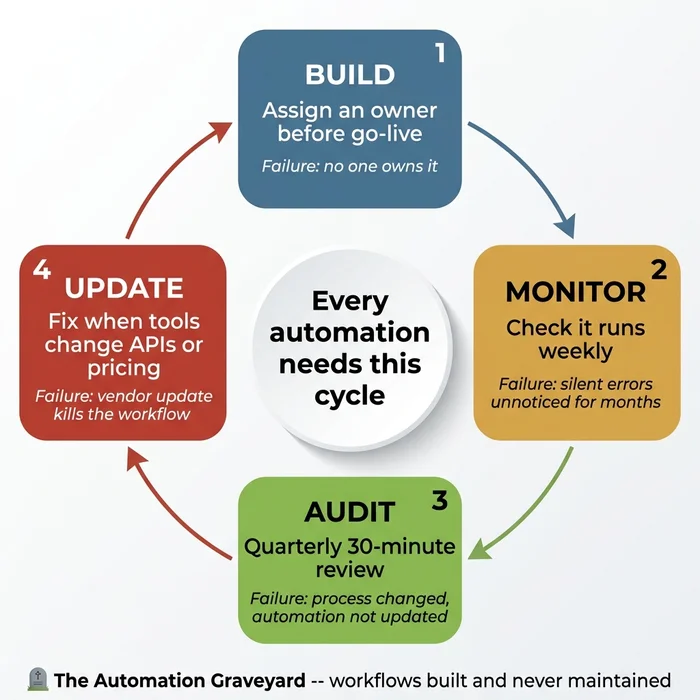
Three rules prevent this:
-
Every automation needs a named owner before it goes live – one specific person responsible for it, not “whoever built it” or “the team”. When that person leaves, ownership transfers explicitly as part of the offboarding process.
-
Document what each automation does in one paragraph, stored somewhere the team can find it. What triggers it, what it does, which tools it connects, and what a human should do if it stops working. This documentation is the only institutional memory if the builder leaves.
-
Run a quarterly audit – 30 minutes, once every three months, checking each live automation is still running, still relevant, and still connected to tools with unchanged pricing tiers or API structure. Add it to the calendar now.
What typically breaks automations: tool API changes, pricing tier changes removing previously included features, staff leaving with login credentials stored only in their heads, and the underlying process changing without anyone updating the automation to match.
Human in the loop is a safety feature, not a limitation. For high-stakes automations – contract generation, payment processing, anything with legal or financial consequences – build in a step where a person reviews and approves what the automation has prepared before it executes. The automation does the 80% of preparation work; the human does the 20% carrying real accountability.
Involving your team without creating anxiety
The people doing repetitive manual work know exactly where the drudgery lives. Involving them in identifying what to automate produces better results than a top-down decision – and it produces team members who actively support the automation rather than resenting it.
Three practical steps that work in small teams:
-
Ask before you build. “What parts of your week do you find most repetitive or frustrating?” The answers will identify your highest-priority automation candidates and build buy-in simultaneously.
-
Frame it as removing the worst parts of the job, not eliminating roles. The question to ask is: “What would you do with five extra hours a week?” – not “this will make your role 20% smaller.”
-
Start with something someone actively dislikes. A win on a genuinely tedious task builds confidence faster than a technically impressive automation nobody particularly cares about. Find the task everyone complains about and automate that first.
Some staff concern is legitimate. If an automation will significantly change a role, address it directly and early – before the automation goes live, not after.
Variations and exceptions
If you’re a solo operator: Staff adoption isn’t a concern. Focus entirely on the priority scorecard and start with your highest-scoring task. Your maintenance risk is also lower – you’ll notice immediately when something breaks, because you’re the only person using it.
If your industry has strict data compliance requirements (finance, healthcare, legal): Before routing sensitive data through a third-party automation platform, verify their data processing agreements and confirm compliance with GDPR or your sector’s specific regulation. Not all automation tools are suitable for all data types. Check before you build.
If your process steps vary significantly by client or situation: Straightforward workflow automation (Zapier, Make) may not be the right fit. Variable processes either need standardising first, or they genuinely require AI-assisted automation – which adds complexity. Approach with more caution and always include a human review step until you’re confident the automation handles the variation correctly.
Your next step
You now have a scoring framework and a decision guide. The next step depends on where you are:
Ready to choose a platform? Our detailed platform comparison walks through Zapier, Make, n8n, and Power Automate side by side – including 2-year cost projections most vendors won’t show you.
Want to add AI to your workflows? The AI for small business roadmap covers six practical use cases and a five-step implementation plan.
Want to score interactively? The interactive scorecard on our main automation guide lets you evaluate a process in 30 seconds.
The Time-Cost Calculator shows you exactly how many hours and pounds your manual processes are costing you each year. Add your tasks, see the numbers, and identify which one to automate first.
The Problem Solver analyses your specific situation and tells you exactly which processes to automate, in what order, and which tools to use. No sales pitch – just a clear, actionable plan.
Founder, Too Many Hats
Free tool
What it's costing you
See how many hours your manual tasks are really costing you.
Free tool
Problem Solver
Describe your biggest timewaster and get a personalised plan.