Business Automation Tools for Small Business (2026 Guide)
Business automation tools compared: Zapier vs Make vs Power Automate vs n8n for small business. Honest pricing, migration risk, decision framework.
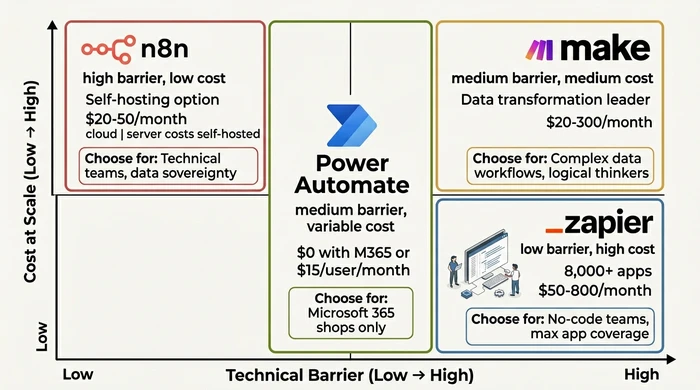
The Verdict: The best business automation tool depends on your technical skill and budget: Zapier for absolute beginners needing maximum app coverage, Make for complex workflows at better per-task pricing, and n8n for technical teams requiring data sovereignty. Power Automate only makes sense if you’re already deep in Microsoft 365 — otherwise licensing complexity outweighs the savings.
Critical Insights:
- Zapier is the lowest-friction starting point but tends to be the most expensive at maturity — its task-based pricing scales aggressively as your task volume grows. Check the Zapier pricing page for current tiers.
- Make offers a strong power-to-price ratio for complex workflows because it charges per operation rather than per task, but expects comfort with logical thinking and a node-based visual builder. See the Make pricing page.
- Power Automate is effectively included if you already pay for the right Microsoft 365 plan, but standalone licensing gets complex fast — avoid unless you’re already committed to the Microsoft stack. Check the Power Automate pricing page.
- n8n self-hosted runs on predictable infrastructure costs and gives you full data sovereignty, but assumes your team has DevOps skills. See the n8n pricing page for cloud tiers.
- Never pick on entry price alone: there is no export/import between platforms, so every workflow has to be rebuilt by hand on the new platform — choose for your 2-3 year horizon.
You’re drowning in repetitive tasks that shouldn’t require human intervention—copying data between your CRM and email marketing, manually qualifying leads, chasing invoices, updating spreadsheets that should update themselves.
Your business is growing, but your operations are stuck in manual mode. Every hour spent on routine tasks is an hour not spent on revenue-generating work. Competitors are responding faster, closing deals quicker, and operating more efficiently because they’ve automated the drudgery.
You know you need business automation tools small business can afford, but choosing the wrong platform means wasted months, lost budget, and vendor lock-in that’s expensive to escape.
After 25 years of building businesses, I’ve learned this the hard way. In my first company, we chose Zapier because it was the easiest to set up. Two years later, we were spending $800/month and hitting task limits daily. Migration to Make took six weeks and cost $15,000 in consultant fees. That mistake taught me: platform choice is a 2-3 year commitment, not a monthly subscription you can swap easily.
This guide compares the four leading automation platforms—Zapier, Make, Power Automate, and n8n—through an SME lens. It’s part of our complete guide to business automation for small business owners. You’ll get honest strengths and weaknesses (no promotional bias), realistic cost projections at scale, and a decision framework to match your technical comfort, budget, and ecosystem. No enterprise jargon, just actionable guidance for small businesses.
Zapier: The Ecosystem King
Best for: No-code teams needing maximum app coverage with zero technical expertise
Strengths: Why 3 Million Businesses Choose Zapier
- 8,000+ app integrations—largest ecosystem in the market, covering virtually every SaaS tool an SME uses
- Lowest technical barrier—pure visual builder, requires no coding or logic experience
- Fastest time to first automation—most users build their first workflow within 30 minutes
- Extensive template library—thousands of pre-built workflows for common business scenarios
- Reliability and uptime—SOC 2 Type II certified, mature platform with 13+ years of refinement
Weaknesses: The Hidden Costs
- Pricing scales aggressively—charged per task, and complex workflows consume tasks rapidly (see our automated reporting guide for a real example of how task counts add up)
- Limited data transformation—struggles with complex formatting, conditional logic, or multi-step data manipulation
- Workflow complexity limits—very complex automations become difficult to debug and maintain
- No self-hosting option—data must flow through Zapier’s servers, which concerns some regulated industries
SME Fit: When Zapier Is the Right Choice
Choose Zapier if:
- You need integrations with niche tools not covered by other platforms
- No one on your team has technical or programming experience
- Your workflows are simple 1:1 connections (trigger in one app, action in another)
- You value speed to implementation over optimization at scale
- Your budget can accommodate task-based pricing that climbs as your volume grows
Modelling Zapier cost (illustrative — your numbers will differ):
To project Zapier cost, count the steps in each priority workflow, multiply by your expected monthly trigger volume to get monthly tasks, then look up the matching tier on the Zapier pricing page. A “complex” workflow that updates a CRM, sends a Slack message, and writes a spreadsheet row will burn 3-5 tasks per execution, so 500 monthly leads through that workflow consumes 1,500-2,500 tasks before you’ve added any other automations. Use the automation cost calculator to model your own projection.
The Common Mistake: Choosing Zapier based on the attractive free tier or the lowest paid tier without calculating how many tasks your actual workflows will consume.
Why It’s Dangerous: A single “complex” workflow—trigger when a lead comes in, update your CRM, send a Slack notification, add a row to a spreadsheet, and qualify the lead—can consume multiple tasks per execution. Multiply by your weekly lead volume and you can outgrow the free tier in days, then climb several pricing tiers inside a year.
The Expert Alternative: Calculate your realistic task volume before committing. Map out your top 3 priority workflows, count the steps in each, multiply by your expected volume (leads, orders, inquiries per day), and project costs against the current Zapier pricing tiers. If the 12-month projection lands in the upper tiers, evaluate Make or n8n for better scaling economics.
Make: The Data Transformation Specialist
Best for: Teams comfortable with logic who need complex data manipulation
Complex data formatting stops most automation tools dead. Make powers through it.
That’s the difference. Make excels at complex data transformations with superior visual logic, making it ideal for multi-step workflows that require data formatting, mapping, or conditional branching. Zapier hits a ceiling that Make keeps climbing.
Strengths: Visual Logic Meets Power
- Superior data transformation—built-in functions for parsing, formatting, and manipulating data without code
- Transparent operation pricing—see exactly how many operations each step consumes before building
- Visual error handling—advanced error routing, retry logic, and conditional paths
- Better value for complex workflows—operation-based pricing often cheaper than Zapier’s task model for multi-step automations
- Strong community and templates—extensive scenario library and active user community
Weaknesses: The Trade-offs
- Fewer integrations than Zapier—approximately 1,000+ apps (vs. Zapier’s 8,000+)
- Steeper learning curve—requires comfort with logical thinking, conditional statements, and data structures
- Interface can feel overwhelming—more options and complexity can intimidate absolute beginners
- Documentation quality varies—some advanced features lack clear examples
SME Fit: When Make Outperforms Zapier
Choose Make if:
- Your workflows require data formatting (e.g., parsing text, date calculations, string manipulation)
- You need complex conditional logic (if/then branching based on multiple criteria)
- You’re comfortable with logical concepts even if you’re not a programmer
- You want more control over error handling and workflow behavior
- You’re cost-conscious at scale and operation-based pricing appeals to you
Modelling Make cost (illustrative — your numbers will differ):
Make charges per operation, where each step in a scenario typically counts as one operation. Estimate your monthly operations by multiplying steps-per-scenario by execution frequency, then map that against the current Make pricing tiers. Light, moderate, and heavy usage tiers differ by an order of magnitude in operation allowance — model your projected volume rather than picking on entry price.
The Common Mistake: Choosing Make for its data transformation power without realizing that complex workflows become difficult to debug when they break.
Why It’s Dangerous: Make’s visual logic enables powerful workflows—but complex scenarios with multiple branches, error handlers, and data transformations create troubleshooting nightmares. When workflows break (and they will), diagnosing the issue requires systematic patience that busy small business owners often lack. You’ll spend hours debugging instead of running your business.
The Expert Alternative: Start simple. Build your first 3-5 Make workflows as linear, single-path automations without complex branching. Master the debugging interface and error handling before attempting multi-scenario complexity. If your workflows require nested conditional logic deeper than 2-3 levels, consider whether custom development might be more maintainable.
Power Automate: The Microsoft Native
Best for: Businesses already invested in Microsoft 365 ecosystem
Already paying for Microsoft 365? You might already own this.
Power Automate delivers cost-effective automation only if you’re already invested in Microsoft 365; otherwise licensing complexity and ecosystem lock-in make it less attractive for SMEs. The platform shines within Microsoft’s walls—but struggles outside them.
Strengths: Deep Microsoft Integration
- Native Microsoft 365 integration—seamlessly connects Outlook, Teams, SharePoint, Excel, and Dynamics
- Includes RPA capabilities—desktop flows automate legacy apps that lack APIs (clicks, keystrokes, data entry)
- Already included in some Microsoft licenses—certain business plans include Power Automate at no additional cost
- Enterprise-grade security—built on Microsoft’s infrastructure with compliance certifications
- AI Copilot integration—natural language workflow creation for simple automations
Weaknesses: The Ecosystem Lock-in
- Microsoft 365 dependency—you get maximum value only if fully committed to Microsoft ecosystem
- Complex licensing structure—multiple license tiers (Premium, Process, per-user, per-bot) create confusion
- Smaller non-Microsoft ecosystem—third-party integrations exist but are fewer than Zapier/Make
- Steeper learning curve for non-Microsoft users—interface assumes familiarity with Microsoft conventions
- Overkill for simple needs—powerful but complex if you just need basic automations
SME Fit: The Microsoft 365 Triage Point
Choose Power Automate if:
- Your business already uses Microsoft 365 for email, documents, and collaboration
- You need to automate Microsoft applications (Outlook rules, SharePoint updates, Excel data entry)
- You have legacy or on-premises applications that lack APIs (RPA fills this gap)
- You already pay for Microsoft licenses that include Power Automate access
- Your industry requires enterprise-level compliance and audit trails
Modelling Power Automate cost (illustrative — your numbers will differ):
If your Microsoft 365 plan already includes Power Automate, the marginal cost is zero. If not, you pay either a per-user Premium licence (for cloud flows) or a per-bot Process licence (for unattended RPA), and many SMEs end up needing both. Confirm the current rates and your entitlements on the Power Automate pricing page before committing.
The Common Mistake: Assuming Power Automate is “included” with your Microsoft 365 license without verifying which license tier you actually have and what automation features it covers.
Why It’s Dangerous: Microsoft’s licensing structure is intentionally complex. The Premium per-user licence covers most cloud flows, but advanced RPA capabilities for legacy applications require the more expensive per-bot Process licence. Many SMEs discover mid-implementation that they need both licence types — doubling their expected cost and stalling their automation rollout.
The Expert Alternative: Before committing, verify your exact Microsoft 365 licence tier and what Power Automate features it includes:
- Business Basic/Standard: Limited Power Automate access
- Business Premium: Full Premium licence included
- Standalone Premium: per-user pricing for cloud flows (see Power Automate pricing)
- Process licence: per-bot pricing for unattended RPA (see same pricing page)
Contact Microsoft support or your reseller to confirm your entitlements before building workflows.
n8n: The Transparent Contender
Best for: Technical teams prioritizing data sovereignty and code-level control
Full control comes with a price tag: technical complexity.
n8n provides self-hosting for data sovereignty and transparent pricing, but requires technical skills (DevOps, server management) that many small businesses lack. The platform delivers power and freedom—but demands expertise you might not have.
Strengths: Transparency and Control
- Self-hosting option—run n8n on your own servers for complete data control and compliance
- Open-source transparency—code is auditable, no black-box algorithms, community-driven development
- Code-level control—write JavaScript or Python directly within workflows for maximum flexibility
- Transparent pricing—cloud version has simple tiering; self-hosted is free (minus your infrastructure costs)
- Modern workflow designer—clean interface with drag-and-drop nodes and visual debugging
- Growing community—183,000+ GitHub stars, active development, 8,500+ workflow templates
Weaknesses: The Technical Barrier
- Requires technical skills—self-hosting demands DevOps knowledge (servers, Docker, security updates, backups)
- Smaller integration ecosystem—500+ integrations (vs. Zapier’s 8,000+)
- Self-hosting hidden costs—“Free” software still requires server infrastructure, monitoring, and maintenance
- Less mature than competitors—smaller community means fewer third-party resources, consultants, and troubleshooting help
- Steeper learning curve—assumes comfort with technical concepts (webhooks, APIs, authentication)
SME Fit: The Technical Team Requirement
Choose n8n if:
- You have (or can hire) someone with DevOps skills to manage self-hosted infrastructure
- Data sovereignty is non-negotiable (regulated industries, privacy requirements)
- You want code-level control without being locked into a vendor’s proprietary platform
- You’re comfortable debugging technical issues independently
- You prefer predictable infrastructure costs over per-task/per-operation pricing
Modelling n8n cost (illustrative — your numbers will differ):
Cloud n8n is priced per workflow execution; check the n8n pricing page for current tiers. Self-hosted n8n has no software licence cost, but you pay for the underlying server, monitoring, backups, and the time your DevOps person (in-house or contracted) spends keeping it patched and upright. The “free” label only applies if you have those skills already on payroll.
The Common Mistake: Choosing n8n self-hosted because the software is “free” without accounting for infrastructure costs and your own maintenance time.
Why It’s Dangerous: Self-hosted n8n is free only if you ignore server costs, SSL certificates, backup systems, monitoring tools, and security updates. When (not if) something breaks at 2 AM, there’s no vendor support hotline — you’re troubleshooting it yourself or hiring an emergency consultant at premium rates.
The Expert Alternative: Budget for the true total cost of ownership. For self-hosted n8n, line-item:
- Server infrastructure (priced by your VPS or cloud provider)
- DevOps consultant time if you lack in-house skills
- One-time setup cost for initial configuration, security hardening, and backup systems
If this stack exceeds your budget, use n8n’s cloud version (see the n8n pricing page) or choose a managed platform.
SME Decision Framework: How to Choose the Right Platform
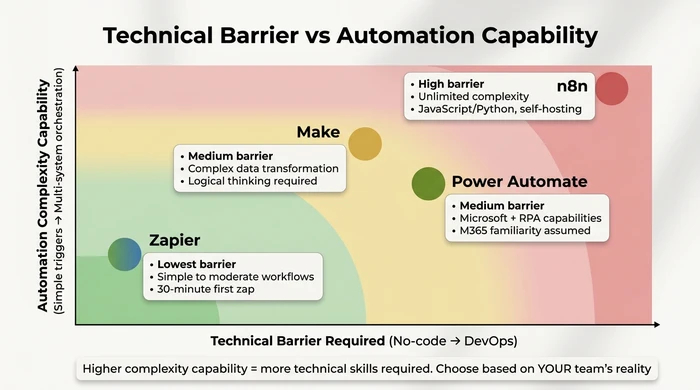
Step 1: Assess Your Technical Comfort
| Your Technical Level | Platform Recommendations | Why This Fit? |
|---|---|---|
| No-Code / Non-Technical You're not a developer. You want to just connect apps without touching code or understanding APIs. |
1. Zapier (Primary) 2. Make (if willing to learn) |
Zapier has the lowest technical barrier with pure visual builder and extensive template library. Most users build their first workflow within 30 minutes. |
| Low-Code / Logical Thinker You're not a programmer, but you're comfortable with spreadsheets, formulas, and if/then logic. |
1. Make (Primary) 2. Zapier (for simple workflows) |
Make's data transformation and visual logic reward logical thinking. You'll unlock capabilities that Zapier can't handle at better long-term pricing. |
| Has Developer Resources You have (or can hire) someone with programming experience who can handle APIs, webhooks, and code. |
1. n8n (Primary) 2. Custom development |
Self-hosting and code-level control become viable. n8n allows JavaScript/Python directly in workflows, giving you maximum flexibility without vendor lock-in. |
| Microsoft 365 Native Your business runs on Microsoft tools—Outlook, Teams, SharePoint, Excel. You know Microsoft conventions. |
1. Power Automate (Primary) 2. Zapier (for non-Microsoft tools) |
Native integration delivers maximum value if you're already in the ecosystem. Verify your license includes Power Automate access before committing. |
Step 2: Budget Reality Check (2-Year TCO Perspective)
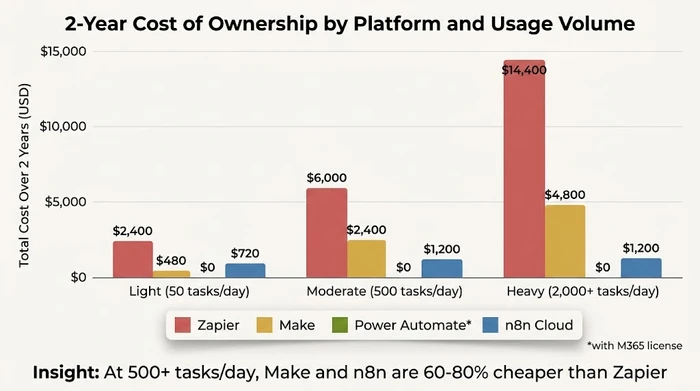
The point of the chart above is the shape of the curves, not specific dollar figures. Zapier’s per-task pricing climbs the fastest, Make’s per-operation model climbs more gently, n8n’s pricing barely moves once you’re paying for infrastructure, and Power Automate stays flat for Microsoft 365 shops.
Build your own 2-year TCO (illustrative — your numbers will differ):
For each platform, look up the current published pricing tier that matches your projected light, moderate, and heavy volume scenarios:
- Zapier — see the Zapier pricing page and multiply the matching tier by 24 months.
- Make — see the Make pricing page and do the same.
- Power Automate — see the Power Automate pricing page; if your Microsoft 365 plan already includes it, the marginal cost is zero.
- n8n cloud — see the n8n pricing page.
- n8n self-hosted — add server, monitoring, and DevOps time at your own quoted rates.
The automation cost calculator handles the arithmetic if you’d rather plug in volumes than build a spreadsheet.
Critical insight: At scale, Make and n8n tend to be more cost-effective than Zapier because they charge per operation or per execution rather than per task. Power Automate is cheapest only if you already pay for the right Microsoft 365 tier.
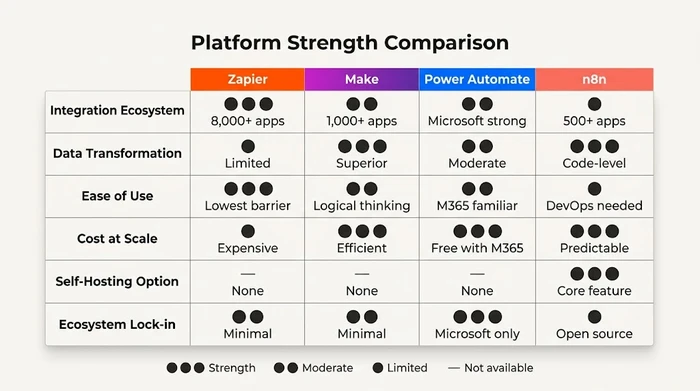
Step 3: Platform Comparison at a Glance
Use the filters below to narrow the comparison to platforms that match your situation. Change any filter to see results update instantly — all four platforms stay in the static table below as a reference:
Filter platforms by your situation
Skill and budget show platforms at your selected level or simpler/cheaper — a more technical user can still use no-code tools, and a higher budget can still pick a cheaper platform. "Primary need" filters exactly.
| Platform | Technical Barrier | Integrations | Cost at Scale | Best For |
|---|---|---|---|---|
| Zapier | Lowest - pure no-code visual builder | 8,000+ apps (largest ecosystem) | High - per-task pricing scales fastest | Teams needing maximum app coverage with zero technical skills |
| Make | Medium - requires logical thinking comfort | 1,000+ apps (fewer than Zapier) | Medium - per-operation pricing | Complex workflows requiring data transformation and formatting |
| Power Automate | Medium - assumes Microsoft familiarity | Strong for Microsoft 365, limited for third-party | Low (included with eligible M365) to higher (standalone) | Businesses already invested in Microsoft 365 ecosystem |
| n8n | High - requires DevOps skills for self-hosting | 500+ apps (smallest ecosystem) | Low-Medium - predictable infrastructure costs | Technical teams prioritizing data sovereignty and code control |
Step 4: Migration Risk and Lock-in Considerations
The Common Mistake: Choosing a platform based on entry pricing with the assumption you can “easily switch later if it doesn’t work out.”
Why It’s Dangerous: There is no export/import between automation platforms. Each platform uses different logic structures, trigger mechanisms, and data transformation methods. Every workflow must be rebuilt from scratch — configuring triggers, remapping data fields, rewriting transformation logic, and retesting. The rebuild is per-workflow, so cost scales with how many complex workflows you’ve already built.
The Expert Alternative: Choose based on your 2-3 year outlook, not just current needs. If you expect your task volume to climb sharply within 18 months, the platform that’s cheapest today may become the most expensive later. Migration cost is whatever your consultant or staff hourly rate is, multiplied by the rebuild hours per workflow — plus the opportunity cost of broken automations during transition.
The uncomfortable truth: Platform migration is expensive. Every workflow must be rebuilt from scratch—there’s no “export/import” between platforms because each uses different logic structures and trigger mechanisms.
Migration cost (illustrative — your numbers will differ): Estimate the rebuild hours per workflow on the new platform, multiply by the number of complex workflows you’ve built, then multiply by your consultant or staff rate. Add the opportunity cost of broken automations during transition.
Decision implication: Choose based on your 2-3 year outlook, not just current needs. If you expect task volume to climb sharply within 18 months, the platform that’s cheapest today can become the most expensive later. Plan for growth.
Platform Selection Recommendations: “Choose X If…” Scenarios
Choose Zapier If…
- You need integrations with niche tools not covered by other platforms (Zapier’s 8,000+ app ecosystem is unmatched)
- No one on your team has technical experience and you need to implement automation immediately
- Your workflows are simple 1:1 connections (trigger in App A, action in App B) without complex data manipulation
- You value speed to implementation over long-term cost optimization
- You’re willing to pay a premium for convenience and reliability
Warning: Zapier’s pricing at scale tends to be the highest of all four platforms. If you anticipate growing well beyond a few hundred tasks per day, budget for jumps into Zapier’s higher pricing tiers (see the Zapier pricing page).
Choose Make If…
- Your workflows require data formatting, parsing, or complex conditional logic
- You’re comfortable with logical thinking (if/then scenarios, data mapping) even if you’re not a programmer
- You want better cost efficiency at scale than Zapier offers
- You value transparent pricing (see operation costs before building)
- You’re willing to invest in learning a steeper interface for long-term payoff
Warning: Make’s smaller ecosystem means some niche tools may not be supported. Verify your specific app integrations before committing.
Choose Power Automate If…
- Your business already uses Microsoft 365 for email, documents, and collaboration
- Your automation needs focus on Microsoft applications (Outlook, Teams, SharePoint, Excel)
- You have legacy or on-premises applications that lack APIs (RPA fills this gap)
- Your current Microsoft licenses already include Power Automate access
- Your industry requires enterprise-level compliance and audit trails
Warning: Power Automate delivers minimal value outside the Microsoft ecosystem. If you use Google Workspace, mix-and-match SaaS tools, or avoid Microsoft products, this platform creates lock-in without benefit.
Choose n8n If…
- You have (or can hire) technical staff to manage self-hosted infrastructure
- Data sovereignty is a regulatory requirement (healthcare, finance, government)
- You want code-level control and auditability without vendor lock-in
- You prefer predictable infrastructure costs over per-task pricing
- You’re comfortable debugging technical issues independently or have a consultant
Warning: Self-hosting is never truly free. Budget for server costs at your VPS or cloud provider’s quoted rates, plus SSL certificates, backups, monitoring, and security updates. When something breaks at 2 AM, there’s no vendor support hotline — you’re on your own.
Choose Nothing (Or Build Custom) If…
- Your automation needs are limited to 1-2 simple workflows that native integrations can handle
- You have complex, business-critical processes that require custom software for reliability and auditability
- Your automation budget is very tight and technical resources are unavailable (DIY automation will consume more staff time than it saves)
- You’re in a highly regulated industry where vendor risk assessments exceed automation benefits
Reality check: Not every business needs an automation platform. If you have fewer than 5 manual workflows and each takes less than 30 minutes weekly, the overhead of learning and maintaining a platform may exceed the time saved.
Next Steps: From Decision to Implementation
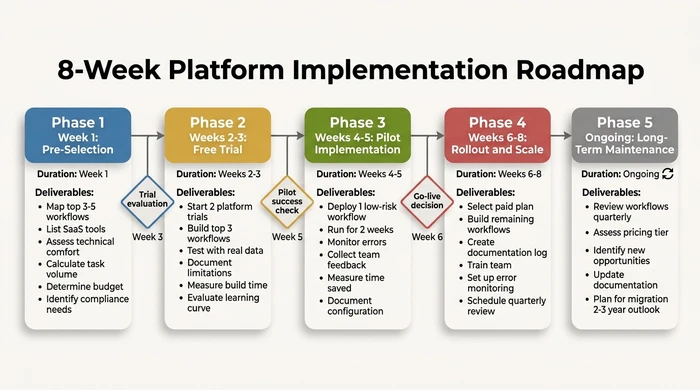
1. Start with a 14-Day Trial
All four platforms offer free trials. Use this time to build your top 3 priority workflows from end to end. Don’t just explore features—actually implement real automations with your real data. You’ll discover limitations that feature lists never reveal.
2. Pilot with One Non-Critical Workflow
Before rolling out company-wide, choose one low-risk workflow (e.g., “post new Slack message when blog publishes”) and run it for 2 weeks. This tests reliability, error handling, and your team’s comfort with the platform without risking business operations.
3. Document Your Workflows
Create a simple log of every automation you build:
- What it does (in plain English)
- Trigger and action steps
- Who owns it (which team member uses it)
- Last tested date and any known issues
This documentation is invaluable for troubleshooting, onboarding, and the inevitable day you need to rebuild on a different platform.
4. Review Quarterly
Automation needs evolve. Schedule a quarterly review to assess:
- Which workflows are delivering value (measure time saved)
- Which workflows have broken or been abandoned
- Whether you’ve outgrown your current platform’s pricing tier
- New automation opportunities that have emerged
5. Budget for Growth
If your daily task volume climbs by an order of magnitude over a couple of years, your automation costs climb with it on every per-task or per-operation platform. Plan this expense in your annual budget rather than reacting when pricing tiers bite. The entry-tier platform that seems cheap today can sit several tiers higher by next year — know that trajectory going in. Use our automation cost calculator to model your own projections (illustrative — your numbers will differ based on your actual volume and the vendors’ current pricing).
Variations & Exceptions
Microsoft 365 shops: If your business runs entirely on Microsoft tools, Power Automate becomes your primary recommendation—not a secondary option. The licensing you already pay for likely includes access, making it the most cost-effective choice by far. However, verify your specific license tier before committing, as “Basic” and “Standard” plans have limited automation features.
Highly regulated industries: Healthcare (HIPAA), finance (SOX), and government sectors often require data sovereignty that cloud-only platforms can’t provide. n8n self-hosted becomes your primary option, but budget for compliance consultants and security audits—self-hosting doesn’t automatically make you compliant.
Rapid scale expected: If you’re planning a sharp climb in daily task volume within 18 months, Zapier’s aggressive per-task pricing tiers will punish you. Choose Make or n8n from day one for better scaling economics, even if Zapier seems cheaper at entry level.
| Scenario | Standard Advice | Adjusted Recommendation |
|---|---|---|
| Microsoft 365 shop | Evaluate all platforms equally | Power Automate becomes primary recommendation; licensing may already include it |
| Highly regulated industry | Cloud platforms acceptable | n8n self-hosted becomes primary for data sovereignty; cloud platforms may violate compliance |
| Has in-house developer | No-code platforms preferred | n8n or custom code becomes viable; developer can handle self-hosting complexity |
| Rapid scale expected | Start with entry tier | Choose platform with best scaling economics (Make or n8n); avoid Zapier’s aggressive scaling |
| Niche tool integrations needed | All platforms have good coverage | Verify Zapier supports niche tools first; its 8,000+ ecosystem covers edge cases others miss |
| Tight long-term budget | Entry tiers work for everyone | n8n self-hosted or Make tend to offer the best value; Zapier exceeds tight budgets fastest |
| No technical comfort whatsoever | Zapier for ease of use | Zapier is only viable option; Make and n8n require logical/technical skills you lack |
FAQ
Q: What are the best automation tools for small businesses?
A: The “best” tool depends on your technical comfort, budget, and existing tech stack. Zapier offers the easiest entry with 8,000+ integrations but costs more at scale. Make provides superior data transformation for complex workflows at better long-term pricing. Power Automate is ideal only if you’re already in the Microsoft 365 ecosystem. n8n suits technical teams needing self-hosting for data sovereignty.
Q: How much does business automation software cost?
A: Costs depend heavily on task or operation volume, user count, and whether you self-host. All four platforms offer free or trial tiers; paid plans scale by usage. Zapier charges per task, Make per operation, n8n per workflow execution (cloud) or infrastructure cost (self-hosted), and Power Automate is licensed per user or included with some Microsoft 365 plans. Check each vendor’s current pricing page (Zapier, Make, Power Automate, n8n) before budgeting, and model 2-3 year TCO against your projected volume rather than entry pricing.
Q: What is the easiest automation platform for non-technical users?
A: Zapier has the lowest technical barrier—pure visual builder, no coding required, extensive template library, and most users build their first workflow within 30 minutes. Make requires comfort with logical thinking. Power Automate assumes Microsoft familiarity. n8n self-hosted requires DevOps skills.
Q: Can I self-host business automation tools?
A: Only n8n offers self-hosting as a core feature. Zapier, Make, and Power Automate are cloud-only (SaaS). n8n’s self-hosted option is attractive for data sovereignty and compliance but requires technical skills (server management, Docker, security updates) and infrastructure costs.
Q: What’s the difference between Zapier, Make, Power Automate, and n8n?
A: Zapier: Largest ecosystem (8,000+ apps), easiest to use, highest cost at scale. Make: Superior data transformation, better long-term pricing, steeper learning curve. Power Automate: Microsoft 365 native integration, RPA capabilities, ecosystem lock-in. n8n: Self-hosting for data control, transparent pricing, technical barrier to entry.
Conclusion
The right automation platform for your small business isn’t about which vendor has the best marketing—it’s about which tool matches your technical reality, budget constraints, and long-term growth plans.
Zapier if you need maximum integrations with zero technical skills. Make if you want cost-effective power for complex data workflows. Power Automate only if you’re already in Microsoft 365. n8n if you have technical resources and need data sovereignty.
Choose based on your 2-3 year outlook, not just today’s needs. Platform migration is expensive in time and money—build on the foundation that scales with your business. Start with a trial, pilot one workflow, and measure actual time saved before committing to company-wide rollout. If you’re still unsure where to start, we’ve helped businesses like yours make this exact decision.
The businesses that succeed with automation aren’t the ones that choose the “best” platform. They’re the ones that choose the right platform for their specific constraints and implement it systematically, one workflow at a time.
Not sure which platform fits your specific situation? Use our automation cost calculator to see what manual processes are costing your business right now—and what you could save by automating.
Want help implementing automation for your business? See how we work with small business owners to identify, select, and implement the right automation platform for their specific needs.
Founder, Too Many Hats
Free tool
What it's costing you
See how many hours your manual tasks are really costing you.
Free tool
Problem Solver
Describe your biggest timewaster and get a personalised plan.