AI for Small Business in 2026: A Practical Roadmap
How small businesses use AI in 2026: six real use cases, a five-step implementation roadmap, and honest cost/risk accounting. Start this week.
The Verdict: AI for small business is the use of software tools — most requiring no technical setup — to handle content creation, customer responses, scheduling, and admin tasks that currently eat hours from your week. In 2026, 98% of small businesses already use AI in daily operations; the question is no longer whether to start, but where.
Critical Insights:
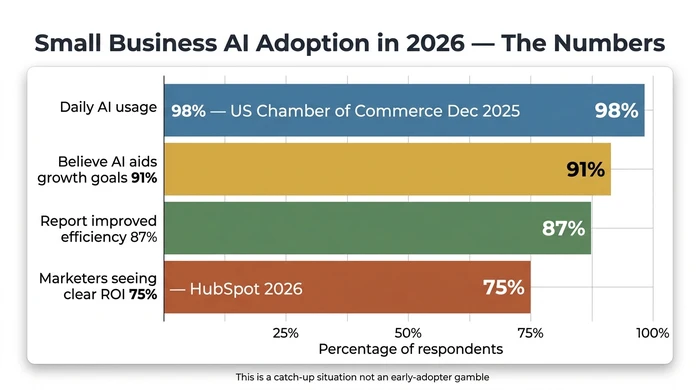
- 98% of small businesses now use AI tools in daily operations (U.S. Chamber of Commerce, Dec 2025), meaning your competitors are almost certainly already using it — making this a catch-up situation, not an early-adopter gamble.
- The highest-ROI starting points for most owners are content creation and routine task automation — they require no technical background, deliver results within days, and cost under £50/month on a paid plan.
- Free tiers of AI tools frequently hit capability walls; total cost of ownership includes subscription fees, onboarding time, QA labour, and potential integration costs — budget £50–£150/month for a functional starter stack.
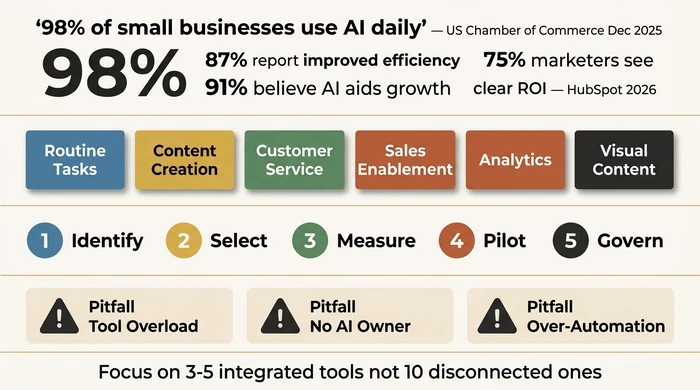
- A focused stack of 3–5 integrated tools consistently outperforms 10 disconnected ones — tool overload is the primary failure mode for small business AI adoption.
- AI output requires review before it goes to customers; expect 2–4 weeks of prompt refinement before net time savings materialise — this is normal, not a sign the tool is wrong.
AI for small business is no longer a question of whether to start — it’s a question of where. Your competitors already have an answer.
The noise around AI makes it harder than it needs to be: tool lists running to 24 options with no guidance on sequencing, statistics without anyone naming which tasks are actually worth automating for a business your size, official guides that quietly sidestep the brand voice problem, the QA overhead, and the free-tier upgrade traps.
Why 2026 Is the Tipping Point for Small Business AI
The framing question has changed. According to the U.S. Chamber of Commerce (Dec 2025), 98% of small businesses now use AI tools in daily operations — up from 40% in 2023. Your competitors are already using AI. The question is whether you’re using it deliberately or not at all.
The supporting data reinforces this. 87% of small businesses adopting AI report improved efficiency and competitiveness. 91% of small business owners believe AI will help them reach their growth goals. And 75% of marketers report a clear ROI from AI implementation (HubSpot, 2026).
None of those statistics tell you which tasks to automate first, which tools are worth your time, or how to avoid the failure modes causing most small business AI projects to stall after the first month. That’s what this covers.
Where AI Delivers Real Results — Six Use Cases by Business Function
Start with the task, not the tool. The correct starting point is the business function consuming the most time for the least judgment — then you find the tool fitting that need. The six categories below are organised by what your business needs to achieve, not by what the software is called.
- Routine task automation — invoice chasing, appointment reminders, form-to-CRM data entry. Tools like Zapier and Make. Highest ROI if your week is swallowed by admin.
- Marketing and content creation — first drafts for social, email, product descriptions. ChatGPT, Jasper, Canva AI. Highest ROI if content production is your bottleneck.
- Customer service — response drafting, FAQ chatbots, ticket triage. Tidio, Intercom AI, Zendesk AI. Use in assist mode for relationship-dependent businesses.
- Sales enablement — lead scoring, follow-up sequences, CRM enrichment. HubSpot AI, Pipedrive. Fixes inconsistent follow-up, not a growth hack.
- Analytics and forecasting — trend detection in existing data. Google Analytics 4 AI, Looker Studio. Requires clean historical data as a prerequisite.
- Visual content creation — social graphics, product images, ad creatives. Canva AI, Adobe Firefly, Midjourney. Now good enough for most social channels without a designer.
Our AI use cases guide walks through each category in depth — what each one actually replaces, the sequencing rules that determine which belongs first for your business, and the common mistakes that cause most small businesses to pick the wrong starting point.
Use the interactive scorer below to evaluate your own business against these six categories and identify where to start.
Score each use case category against the two questions below. Multiply your Hours score by your Pain score — the highest number is where to start. If an existing tool already covers that category, your switching cost is low and you should activate it this week.
AI Tools Worth Knowing
Don’t treat this as a shopping list. Use the Prioritiser above to identify which category matters to you first, then look at one or two tools in that row before evaluating anything else.
| Category | Example Tools | Typical Use Case | Free Tier Available |
|---|---|---|---|
| Routine Task Automation | Zapier, Make | Multi-step workflow triggers, reminders, data routing | Y (both, limited) |
| Content Creation | ChatGPT, Jasper, Copy.ai | First-draft email, social posts, blog outlines | Y (ChatGPT) / N (Jasper, Copy.ai) |
| Customer Service | Tidio, Intercom AI | FAQ chatbot, ticket triage, response drafting | Y (Tidio, limited) / N (Intercom) |
| Sales Enablement | HubSpot AI, Pipedrive | Lead follow-up sequences, CRM data enrichment | Y (HubSpot free tier) / N |
| Analytics | Google Analytics 4 AI, Looker Studio | Trend identification, traffic and sales patterns | Y / Y |
| Visual Content | Canva AI, Adobe Firefly | Social graphics, product images, ad creatives | Y (Canva, limited) / Y (Firefly, limited) |
A note on free tiers: most free plans are functional enough to test whether the tool solves your problem, but they hit capability walls within weeks of real use. When budgeting, plan for the paid tier — the free-to-paid decision is almost always inevitable if the tool is working. Automated reporting for small businesses covers the analytics and reporting category in detail if that’s your highest-priority use case.
How to Implement AI Without Wasting Money — The Approach
Picking the right use case is half the job. The other half is sequencing the implementation so the pilot actually delivers a measurable result rather than adding a subscription to the list of things you are paying for and not using.
A five-step sequence separates owners who see ROI from those who accumulate unused tools:
- Identify the high-leverage workflow before buying anything. Free step, prevents misaligned tool purchases.
- Select a focused stack of 3–5 tools. Check existing subscriptions first — Google Workspace, Microsoft 365, QuickBooks, and Canva all have AI features most users have never activated.
- Measure the current performance baseline before deploying AI. “AI saves time” is only provable if you know the before.
- Pilot in shadow mode for 1–2 weeks, with AI output running alongside the existing process rather than replacing it. Customer-facing work gets a named QA checkpoint.
- Govern with a one-paragraph written policy: who owns outputs, who reviews, what data is in scope, who signs off customer-facing material.
The sequence matters. Skipping Step 3 is the single most common reason small business AI adoption fails — three months later the owner has no way to prove whether the tool is saving time, and cancels (or keeps) on gut feel.
Our AI implementation roadmap walks through each step in detail — including the decision table for filtering any proposed automation, the shadow-mode pilot pattern, prompt-refinement expectations, and the common failure modes at each step.
The Honest Risks No One Talks About
Every major competitor skips this section. These are the four failure modes causing most small business AI projects to stall — written as a peer warning, not a legal disclaimer.
Most small business owners who don’t see ROI from AI made the same five errors: they bought multiple tools at once without a clear use case priority; they turned off human review before QA was established; they picked tools by feature list rather than by whether they work without a developer; they assumed AI would sound like them from day one; and they started with the most complex use case (analytics, forecasting) instead of the highest-ROI quick win (content drafts, scheduling automation).
Red flags to watch for:
- A vendor claims their tool “works out of the box” with no onboarding — real AI tools require 2–4 weeks of calibration before output is reliably on-brand
- You’re evaluating a tool’s features before identifying which task you’re trying to improve — tools follow use cases, not the reverse
- You’re being offered an “AI agent” that, on closer inspection, only responds to questions — that is a chatbot with a rebrand
- Any guide telling you to start with AI analytics and forecasting before you have clean historical data and a baseline metric
- You find yourself managing five new dashboards in addition to your existing work — tool overload is the primary failure mode, not tool quality
The Brand Voice Problem
The most common Reddit complaint about AI tools: the output doesn’t sound like you. This isn’t a fringe complaint. It’s the predictable result of how generative AI works.
The first draft AI produces will be competent but generic. Making it sound like your business requires prompt engineering — giving the AI examples of your existing copy, defining your tone, naming the phrases you never use. That calibration takes time. Budget 2–4 weeks of consistent use before your prompts reliably produce on-brand output.
AI content creation doesn’t eliminate your writing time. It reduces blank-page friction and cuts first-draft time significantly. Editing still happens. The “tweak it to match our tone” problem is real, is time-consuming, and every honest practitioner will tell you the same. If you’ve already tried ChatGPT and found the output generic — that’s normal. It means you need better prompts, not a different tool.
The hardest part of AI content is not the generation — it is teaching the tool what you actually sound like. That takes examples, iteration, and time. Anyone telling you otherwise has not tried to produce on-brand output at scale.
QA Overhead — The Hidden Time Cost
AI output isn’t finished work. Every AI-generated customer communication, invoice draft, or report needs a human review before use. This isn’t a temporary problem — it’s a permanent feature of working with AI tools.
In the first month, plan for 20–30% of the time “saved” to be spent on review and correction. Prompts are being refined; error patterns are being identified; the tool is being calibrated to your context. The net time saving is real, but it takes 2–4 weeks to materialise. Owners evaluating AI tools in week one and concluding “this isn’t saving me time” are measuring at the wrong point.
The myth to correct: AI tools save time immediately. They don’t. They save time after onboarding and QA overhead is accounted for. The honest total cost of ownership calculation includes subscription fees, onboarding time, and QA labour — not just the monthly sticker price.
Over-Automation in Relationship-Dependent Businesses
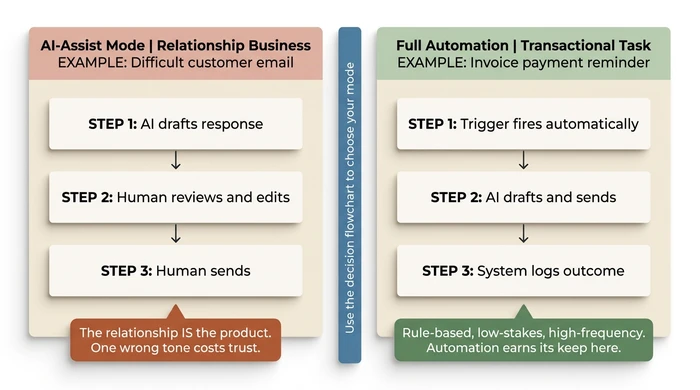
This nuance is entirely absent from official AI guides — and it’s the one causing the most damage in practice. Tradespeople, consultants, therapists, and any business where the relationship is the product face a different risk/reward calculation from transactional businesses.
Faster response doesn’t automatically mean better response. An AI-drafted customer email missing the tone of an ongoing relationship can cost more in lost trust than the hours it saved. The flowchart in the roadmap addresses this directly: tasks involving human judgment or relationship context should operate in AI-assist mode — AI drafts, human reviews and sends — not full automation.
Data Privacy and the Free Tier Reality
The practical question is simple: what data is passing through the AI tool? Customer names, email content, and financial records require more scrutiny than internal scheduling or draft summarisation.
Free tiers of most major AI tools use your inputs to train or improve their models. Paid tiers — OpenAI’s paid plans, Claude Pro, and equivalents — generally offer opt-out from training. Check the data handling policy before using any AI tool with customer data. This isn’t a theoretical concern; it’s a compliance and trust issue becoming real the moment a customer asks where their data goes.
Total cost of ownership (TCO) for a functional AI starter stack — two to three paid tools — runs to approximately £50–£150/month. That figure includes subscription fees but not the onboarding time and QA overhead of the first month. The business automation guide for SMEs covers the broader cost and ROI calculation across your full automation stack.
What Is Changing in 2026 — From Chatbots to AI Agents
Something genuinely new is happening in small business AI in 2026. It’s called agentic AI — and the confusion around it is creating real buyer risk.
An AI agent is a software system able to autonomously execute multi-step tasks — searching the web, updating records, sending messages — without a human approving each action. This is categorically different from a chatbot. A chatbot responds to questions. An agent acts on them — initiating sequences, making decisions across steps, and completing workflows end-to-end without further instruction.
The buyer confusion is deliberate: most products currently marketed as “AI agents” are rebranded chatbots. They respond, they don’t act. The practical test: does the tool complete a multi-step workflow — booking, follow-up, record update — without any manual step in between? If the answer is no, it’s not a genuine AI agent regardless of what the vendor calls it.
Three concrete examples of what a real AI agent does for a small business:
- Appointment booking: Confirms availability, sends the calendar invite, and updates the CRM record — without any manual step from you or your team.
- Customer follow-up: Triggers a personalised follow-up sequence after a purchase event, pulling content from order history — without a human composing each message.
- Inventory management: Detects when stock drops below a threshold, triggers a reorder with the supplier, and logs the transaction — without manual intervention.
The tools genuinely delivering multi-step autonomy in 2026 include advanced configurations of Zapier AI, Make, and purpose-built agents in some CRM platforms. Most small business owners at the planning stage shouldn’t start with agentic AI — the simpler use cases in the earlier sections deliver better ROI with less setup complexity. The agent layer is the horizon to plan toward, not the starting point.
Your First Move This Week
Week one has one goal: identify one task and run one pilot. That’s the entire scope.
Open your existing tool subscriptions — Google Workspace, Microsoft 365, QuickBooks, Canva, your email platform — and check whether any of them have an AI feature you haven’t yet activated. Most do. Start there before buying anything new. The rationale: lower switching cost (you’re already paying for it), lower integration friction (it’s already connected to your data), and lower privacy risk (the vendor has already done the compliance work for your tier).
If that search yields nothing useful, return to the Prioritiser above. Identify your highest-pain, highest-frequency task category. Search “[task category] + AI tool + free trial” and test one tool for 14 days before committing to a subscription.
The second move, if the first pilot delivers a measurable result: use the AI implementation roadmap to sequence your next two to three use cases. Expand the stack only after the first pilot proves its value. Explore the full business automation guide for small businesses to see how AI fits into the broader automation picture for your operations.
Variations and Exceptions
AI for small business isn’t one-size-fits-all. If your situation matches one of these scenarios, adjust the default advice accordingly.
If you’re a solo operator (no employees): Start with content creation or customer response drafting — the use cases where your personal time is the bottleneck. Avoid automation platforms such as Zapier or Make until you have a repeatable workflow worth automating. The learning curve on those tools exceeds the return for a single-person business with low task volume.
If your business is relationship-dependent (consulting, therapy, trades): Apply the “Should You Automate?” decision table before any customer-facing implementation. AI-assist mode — drafting for human review — is the appropriate deployment mode, not full automation. The risk/reward calculation is different from a transactional business.
If you already use some AI tools but haven’t seen ROI: You may have a tool overload problem, not a tool quality problem. Audit your current stack. If you’re running more than five AI tools, consolidate to three before adding anything new. Fragmentation is a more common cause of poor AI ROI than poor tool choice.
If your team is resistant to AI tools: Start with personal productivity use cases — your own draft writing, your own scheduling — before any team-wide rollout. Demonstrated results convert sceptics faster than mandates. One visible win is worth more than a policy document.
If you have a developer or technical resource available: Automation platforms such as Zapier, Make, and n8n become viable for higher-complexity use cases — API integrations, multi-system workflows, custom triggers. These unlock capabilities beyond the scope of this article and are worth pursuing once the simpler use cases are delivering reliable results.
FAQ
Q: What is the best AI tool for a small business?
There is no single best tool. The right choice depends on which business function you’re trying to improve. Content creation, customer service, and task automation each have different leading tools. Use the Use Case Prioritiser in this article to identify your starting point before evaluating specific tools — the tool follows the use case, not the other way around.
Q: How much does AI cost for a small business?
Expect £50–£150/month for a functional starter stack of two to three paid tools. Many tools offer free tiers, but these frequently hit capability limits within weeks of real use. Total cost of ownership includes the tool subscription plus the onboarding time and QA overhead required to make AI outputs usable in your business.
Q: Is AI safe to use with customer data?
Yes, with conditions. Free tiers often use input data for model training. Paid tiers of major platforms — ChatGPT Plus, Claude Pro, and equivalents — generally offer opt-out from training. Check the data handling policy of any tool before using it with customer names, email content, or financial records. The risk is real but manageable with basic due diligence.
Q: How long does it take to see results from AI?
Most owners see measurable time savings within 2–4 weeks of consistent use, once prompts have been refined for their specific tasks. Expect the first week to involve setup and calibration — net efficiency gains appear after that adjustment period. Evaluating the tool in week one is measuring at the wrong point.
Q: Can a non-technical person use AI tools?
Yes. The tools listed in this article are SaaS products requiring no coding or technical setup beyond a browser account. The most technically demanding use case — workflow automation via Zapier or Make — has a learning curve and should be treated as an optional next step rather than a starting point. Begin with a generative AI tool for content or response drafting; that requires nothing beyond typing.
Conclusion
The question in 2026 isn’t whether to use AI for your small business. At 98% adoption, the market has already answered that. The question is which use cases are worth your specific time and money, in what order, and with what safeguards in place.
The structured approach laid out here — use cases first, focused tool stack of 3–5 tools, pilot before committing, honest accounting of QA overhead — is what separates owners who build a working AI capability from those accumulating unused subscriptions and concluding AI doesn’t work for businesses their size. It works. The sequencing is what determines whether it works for you.
Start with one task. Run one pilot. Measure the result. Then expand.
In This Guide
- AI Use Cases for Small Business: Six Ways to Start in 2026 AI use cases for small business: routine tasks, content, customer service, sales, analytics. Honest sequencing, tool picks, where each actually pays off.
- How to Implement AI in a Small Business: Five-Step Roadmap AI implementation roadmap for small business in five steps: identify, select, measure, pilot, govern. With decision table and baseline-metric method skip.
- What Is AI for Small Business? A Plain-English Guide What is AI for small business, in plain English: narrow vs generative AI, starter use cases, real costs, honest limits, and a 30-day zero-contract plan.
- AI Chatbots for Small Business: Pricing, Vendor Picks, Setup Which AI chatbot fits your business? Compare Tidio, Gorgias, Intercom Fin pricing ($29-$99/mo), launch timeline, and the legal disclosure most guides skip.
- Stop Late Invoices: AI Payment Collection for Small Business AI payment collection for small business, explained: what it costs, UK legal limits, and a decision matrix for Xero and QuickBooks users.
- AI Customer Service for Small Business: 3 Modes, 30-Day Path AI customer service for a small business in three modes — deflection, routing, AI assist — plus the handover seam that protects quality. 30-day path.
- AI Sales Follow Up: Stop Ghosting Your Warm Leads AI sales follow up for founder-sellers: score leads, fire triggers, draft the first touch, and call the right lead today — without burning your domain.