How to Implement AI in a Small Business: Five-Step Roadmap
AI implementation roadmap for small business in five steps: identify, select, measure, pilot, govern. With decision table and baseline-metric method skip.
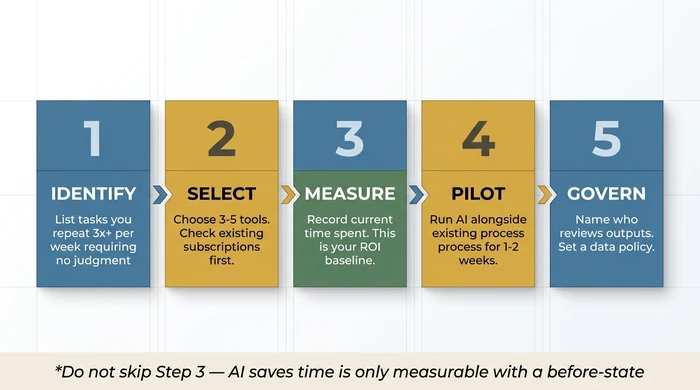
The Verdict: A five-step sequence separates small businesses that see measurable AI ROI from those accumulating unused subscriptions: Identify the task before buying the tool, Select a focused stack of 3–5 tools, Measure the baseline before deploying, Pilot in shadow mode for 1–2 weeks, Govern with a named owner and a simple data policy. The sequence matters — skipping any step costs you more than the step would have taken.
Key takeaways:
- Identify first. Pick the task before picking the tool. Free step, and the single most common cause of failed adoptions is skipping it.
- Check existing subscriptions before buying anything new. Google Workspace, Microsoft 365, QuickBooks, and Canva all have AI features most users have never activated.
- Measure a baseline — how long the task currently takes — before deploying AI. “AI saves time” is only provable if you know the before.
- Pilot in shadow mode for 1–2 weeks. Run AI output alongside existing process, not replacing it. Customer-facing work requires a named QA checkpoint.
- Govern with a one-paragraph written policy: who owns outputs, who reviews, what data is in scope.
This guide goes one level deeper than the strategic overview in our AI for small business pillar. It walks through the five-step implementation process for getting AI into your business without wasting money on tools that do not deliver — with particular attention to the two steps most owners skip: baseline measurement and supervised piloting.
If you have not yet identified which use case to start with, our AI use cases guide will help you prioritise — it covers the six categories (routine tasks, content, customer service, sales, analytics, visual) and the sequencing rules that determine which one belongs first for your business. This roadmap picks up after that decision.
Why Sequencing Matters More Than Tool Choice
Most small business owners who do not see ROI from AI did not fail because they picked the wrong tool. They failed because they skipped a step.
The pattern is almost always the same: hear about a tool, subscribe, try it for a week, conclude it is not saving time, cancel or forget about it. Six months later, the card keeps billing, the tool stays unused, and the owner concludes “AI does not work for businesses our size.”
What actually happened is simpler. They skipped identification (bought the tool before picking the task). They skipped measurement (had no baseline, so “saves time” was unprovable). They skipped piloting (went straight from sign-up to customer-facing output, found an error, got burned). Each skip was small. The cumulative cost was the failed adoption.
The five steps below are not optional. They are the minimum discipline the category rewards.
Step 1 — Identify High-Leverage Workflows
Before buying anything: list the tasks you or your team repeat most often requiring no judgment call. Use the Prioritiser on the pillar page. Look specifically for tasks that are: (a) high frequency — at least three times per week; (b) rule-based rather than judgment-dependent; (c) already happening in a tool with AI features you haven’t yet activated.
This step is free and prevents misaligned tool purchases. Most small businesses stalling on AI adoption skipped this step and bought tools before understanding which problem they were solving.
One correction order worth naming explicitly: any guide telling you to start with AI analytics and forecasting is steering you wrong. Analytics requires clean historical data and a baseline metric. For most businesses at the planning stage, the correct starting points are content creation or routine task automation — the highest-ROI, lowest-prerequisite use cases. Our use cases guide covers the full sequencing logic.
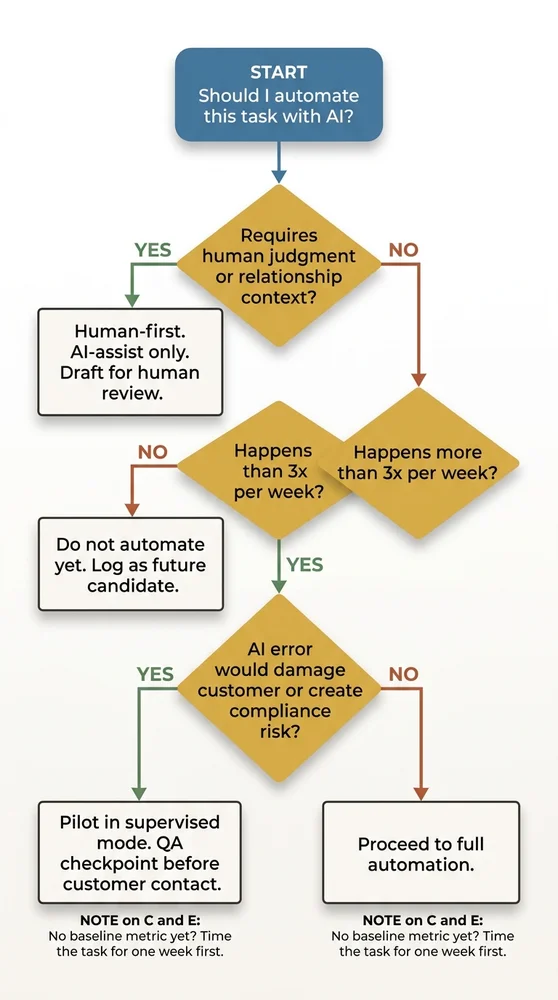
Use the decision table below to filter any task you’re considering before proceeding.
| Scenario | Action | Reasoning |
|---|---|---|
| Task requires human judgment or relationship context — e.g. a difficult customer conversation, a bespoke proposal, a sensitive follow-up | Human-first. AI-assist only. Use AI to draft; a human reviews and sends. | The relationship is the product. An AI error here costs trust, not just time. Human judgment cannot be replicated by a language model for context-dependent interactions. |
| Task does not require human judgment AND happens fewer than 3 times per week — e.g. a monthly report, an occasional data lookup | Do not automate yet. Log it as a future candidate if frequency increases. | The setup and QA cost of automating a low-frequency task almost never pays back. Automation returns value through repetition — fewer than 3 occurrences per week rarely justifies the configuration time. |
| Task does not require judgment AND happens 3+ times per week AND an AI error would damage a customer relationship or create a legal/compliance risk | Pilot with supervised mode. Run AI output alongside the existing process for 1–2 weeks. Add a named QA checkpoint before anything reaches a customer. | The task is worth automating, but the failure mode is too costly to skip the QA stage. Supervised piloting identifies error patterns before they reach customers. Do not skip this step for any customer-facing output. |
| Task does not require judgment AND happens 3+ times per week AND an AI error would NOT damage customer relationships or create compliance risk — e.g. internal scheduling, data formatting, draft summarisation | Proceed to full automation. Set a baseline metric first, then deploy. | All four conditions for automation are met. The task is frequent, rule-based, low-stakes if wrong, and not relationship-critical. Record how long it currently takes before switching on AI — this is your ROI baseline. |
| Task qualifies for automation (any of the above routes) BUT you have no baseline metric to measure improvement | Set a baseline first. Time the task for one week before deploying AI. Then proceed. | "AI saves time" is only provable if you know the before. Without a baseline, you can't justify the tool cost, identify if the tool is underperforming, or know when to upgrade. One week of tracking takes minutes and prevents months of ambiguity. |
What to do if multiple tasks qualify
If three tasks all score high in the decision table, pick the one with the lowest switching cost first. Specifically: the task already running inside a tool where you have not yet activated the AI feature. Activating an existing feature costs nothing in subscription terms, needs no new integration, and gives you a fast first win to build confidence from.
Step 2 — Select a Focused Tool Stack
Pick 3–5 tools addressing your top-priority use cases and working within your existing systems — email, CRM, accounting. Resist the pull of “while I’m at it.” Adding ten tools simultaneously is the primary failure mode for small business AI adoption.
Start by checking the tools you already pay for. Google Workspace, Microsoft 365, QuickBooks, and Canva all have AI features most users have never activated. Activating an existing feature has zero switching cost, lower integration friction, and the vendor has already done the privacy compliance work for your tier.
The built-in-first checklist
Before subscribing to anything new, verify whether the following already exist in your current stack:
- Gmail Smart Reply and Smart Compose — first-draft email responses.
- Microsoft Copilot in 365 — available on most paid business tiers; drafts in Word, summarises in Outlook, analyses in Excel.
- QuickBooks AI — transaction categorisation, invoice reminder sequences.
- Canva Magic Write and Magic Design — included with Canva Pro.
- HubSpot AI — on both free and paid CRM tiers, handles email drafting and contact enrichment.
- Google Workspace Gemini — available on paid Workspace tiers; drafts in Docs, summarises email threads.
If any of these covers your Step 1 task, activate it and skip straight to Step 3. That is free ROI.
When to add new tools
Add a new tool only when the built-in check produces nothing useful for your top-priority task, or when a category-specific leader clearly outperforms the generic feature. ChatGPT is meaningfully better than most built-in content features if content is your highest-priority use case; Zapier and Make are meaningfully better than most built-in automations if you need to connect two or more systems that do not natively integrate.
Cap the new-tool additions at three in your first six months. Four tools is the beginning of tool overload; five tools is tool overload. The failure mode is predictable: attention fragments, no single tool gets the depth of use that would justify its cost, and the whole stack gets abandoned.
Step 3 — Measure Current Performance (Do Not Skip This)
Before switching anything on, record how long the task currently takes. This is the baseline you will use to measure ROI. “AI saves time” is only provable if you know how much time was spent before.
Set a specific 30-day target: “This task currently takes 4 hours/week. Target: 2 hours/week.” Without this step, you have no way to know whether the tool is working or whether you should upgrade, change approach, or cut your losses.
How to measure without building a tracking system
You do not need time-tracking software. A week of lightweight logging is enough:
- A note in your calendar at the start and end of the task each time it happens.
- A row in a spreadsheet with three columns: date, minutes, what got produced.
- A simple tally — five occurrences of invoice chasing, average 25 minutes each.
One week of data is the minimum; two weeks is better if the task varies significantly. What you are capturing is not a precise measurement; it is an order-of-magnitude figure you can compare to the post-AI state.
What to measure beyond time
For customer-facing tasks, also capture quality. Three rough scores work:
- Error rate — how often does the output need correction?
- Response time — how long between request and response?
- Consistency — do similar inputs produce similar outputs?
You will compare these against the AI-assisted version in Step 4. If AI cuts task time noticeably but doubles the error rate, the net is worse (illustrative — your numbers will differ). Without baseline quality data you will not know that.
Step 4 — Pilot in Shadow Mode
Run the AI-assisted version of the task alongside your existing process for 1–2 weeks without replacing it. Compare outputs. Refine prompts. Identify where AI errors occur. Do not remove the human checkpoint until the error rate is acceptable. For customer-facing content, this step isn’t optional — it’s the minimum due diligence before any AI output reaches a customer.
What “shadow mode” actually looks like
Shadow mode means the AI produces its output, but the existing process still runs. You compare. Nothing goes to customers without human review. Concretely:
- For content creation: draft the social post yourself and with AI. Compare. Pick the better one (or edit the AI draft). The week-one comparison teaches you which tasks AI handles well and which it does not.
- For customer service: AI drafts the response. You read it, adjust tone, and send. The pilot is identifying prompt patterns — not replacing your judgment yet.
- For routine task automation: the Zap fires, but initially to a test email address, not the production target. You verify the output is correct before switching the destination.
The prompt refinement cycle
Expect your prompts to change five to ten times in week one. This is normal. The first prompt produces generic output; the second adds brand voice examples; the third adds negative examples (phrases to avoid); the fourth adds formatting rules; the fifth locks in the version you will use going forward.
By end of week two, you should have a stable prompt producing consistent output that meets your quality bar with light editing. If you are still fighting the prompt at week three, the task or the tool is wrong — stop and return to Step 1.
The named QA checkpoint for customer-facing work
Any AI output touching a customer needs a named person responsible for reviewing it before it goes out. This is not a permanent requirement — once the error rate is demonstrably low, the checkpoint can relax. But in the pilot window, it is non-negotiable. One poorly calibrated AI email to a long-term client costs more in lost trust than the whole pilot saved in hours.
Step 5 — Govern: Data Quality and Ownership
Decide: who owns AI outputs in your business? Who reviews before publishing or sending? What customer data — if any — is passing through the tool, and is that compatible with your privacy obligations? Set a simple policy, even one paragraph, before you scale usage. This prevents the “who approved that AI email?” problem from emerging six months later when the answer matters.
The one-paragraph AI policy template
You do not need a legal document. A paragraph covering four questions is enough for most small businesses:
- Which tools are approved? Name them. Everything else requires sign-off before use.
- Who is the AI owner? One named person responsible for tool maintenance, prompt libraries, and reviewing when something goes wrong.
- What data can go into each tool? Specifically: customer names yes/no, customer email content yes/no, financial records yes/no, internal-only data yes/no. Check the tool’s data handling policy before answering.
- Who signs off customer-facing output? For each category (email, social, customer support response), name the reviewer.
Write this down once. Store it where the team can find it. Update it when anything material changes.
The quarterly review
Every three months, spend 30 minutes on three questions:
- Is each tool still being used? If not, cancel the subscription. Unused tools are silent budget leaks.
- Has any tool changed its pricing or data handling policy? If yes, re-check whether it is still fit for purpose.
- Has any team member left or joined? If yes, transfer or grant AI tool access explicitly. Do not leave credentials in someone’s memory.
This 30-minute review prevents the slow degradation that turns a working AI stack into an abandoned one.
Common Failure Modes at Each Step
Each step has a characteristic failure mode. Recognising them saves months.
- Step 1 failure: picking the task after buying the tool. You end up justifying the tool rather than solving the problem.
- Step 2 failure: five new tools in month one. Attention fragments, no tool gets the depth of use required, the whole stack gets abandoned.
- Step 3 failure: skipping the baseline. Three months later you cannot prove whether the tool saved time or not, and you cancel (or keep) on gut feel.
- Step 4 failure: going straight to production without shadow mode. First AI error hits a customer. Trust costs exceed any time savings.
- Step 5 failure: no named owner. When the person who built the stack leaves, the stack dies silently over the following six months.
All five of these are preventable. All five happen routinely when the sequence is skipped.
FAQ
Q: How long does the whole roadmap take?
Plan for several weeks rather than days from decision to first reliable output (illustrative — your numbers will differ). The first week is identification and baseline measurement. The next couple of weeks are tool selection and initial setup. After that comes the shadow-mode pilot, then governance and scaling. Anyone promising same-week results is skipping a step.
Q: Can I do multiple use cases in parallel?
Not on the first pilot. Once the first use case is running reliably and the pilot has cleared Step 4, the second use case can enter Step 1 in parallel. Two simultaneous Step-1-to-Step-4 pilots is manageable for most small teams; three is not. Sequential pilots with a one-week gap between them work better than fully parallel ones.
Q: What if the pilot in Step 4 shows AI is worse than my existing process?
Then AI is worse than your existing process for that task, and you stop. This is a valid pilot outcome. The pilot exists specifically to surface this before you have committed budget and workflow to the new approach. Return to Step 1 with a different task, or conclude that this particular task is not a good AI fit for your business.
Q: Do I need a technical person on the team to run this roadmap?
No. Steps 1, 3, and 5 are entirely non-technical. Step 2 requires reading tool documentation. Step 4 requires patience with prompt refinement. The most technically demanding step — workflow automation via Zapier or Make — only enters the picture if your Step 1 identified a task in that category. Content creation, customer service drafting, and visual content use cases need no technical person at all.
Q: What does “governance” actually mean for a business with three employees?
A paragraph written down, a named owner (probably you), and a quarterly 30-minute review in the calendar. That is it. Do not over-engineer this. The goal is preventing the “who approved that?” problem and keeping the tool list from quietly bloating. Both are solvable with modest discipline.
Your Next Step
The roadmap is sequential. Week one has one job: identify one task using the Prioritiser on the pillar page and record its baseline time cost. That is the entire scope of the first seven days.
If you have not yet worked out which use case to start with, our AI use cases guide covers the six categories (routine tasks, content, customer service, sales, analytics, visual) and the sequencing rules that determine which one belongs first for your business. Start there, then come back to Step 1.
Founder, Too Many Hats
Free tool
What it's costing you
See how many hours your manual tasks are really costing you.
Free tool
Problem Solver
Describe your biggest timewaster and get a personalised plan.
Related Guides
AI Sales Follow Up: Stop Ghosting Your Warm Leads
AI sales follow up for founder-sellers: score leads, fire triggers, draft the first touch, and call the right lead today — without burning your domain.
AI Customer Service for Small Business: 3 Modes, 30-Day Path
AI customer service for a small business in three modes — deflection, routing, AI assist — plus the handover seam that protects quality. 30-day path.
How to Reduce Errors in Business Processes (Forensic Guide)
Reduce errors in repetitive business processes with a three-lever sequence: redesign, automate, protect. Scorecard, worked example, 5 rights pattern.