AI Use Cases for Small Business: Six Ways to Start in 2026
AI use cases for small business: routine tasks, content, customer service, sales, analytics. Honest sequencing, tool picks, where each actually pays off.
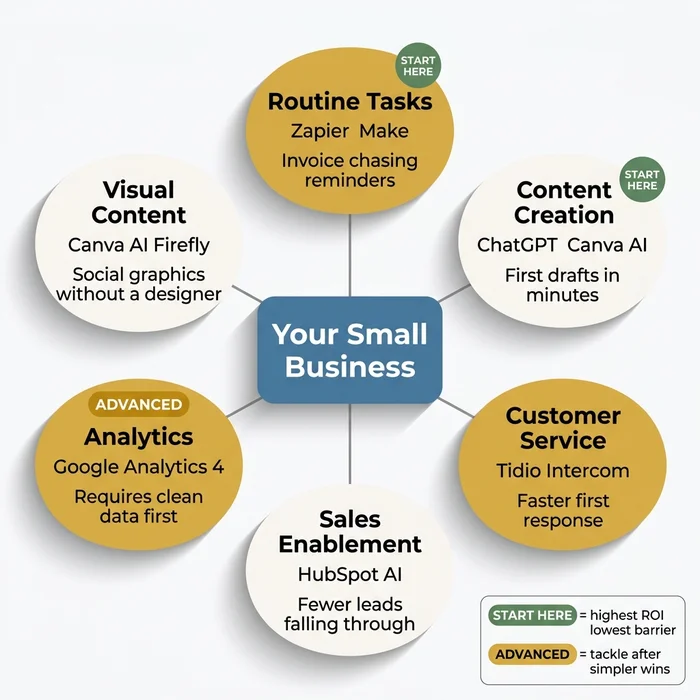
The Verdict: The six AI use cases that actually pay back for small business in 2026 sort into a clear sequence. Content creation and routine task automation are the starting points — highest ROI, lowest technical barrier. Customer service, sales enablement, and visual content are strong second moves. Analytics and forecasting comes last, not first, because it needs clean historical data as a prerequisite.
Key takeaways:
- Start with the task, not the tool. Pick the business function consuming the most time for the least judgment, then find a tool fitting that need.
- Content creation and routine task automation are the two highest-ROI starting points for most owners.
- Customer service AI should assist (draft for human review), not operate unsupervised — especially for relationship-dependent businesses.
- Analytics requires clean historical data. If you do not yet have that, build simpler wins first.
- Visual content tools (Canva AI, Firefly) are now good enough for most small business social channels without a designer.
This guide goes one level deeper than the strategic overview in our AI for small business pillar. It walks through the six use case categories that actually deliver return for small businesses in 2026, what each one replaces, which representative tools fit, and — the part most other guides skip — the sequencing rules that determine whether AI adoption works for you or turns into a graveyard of unused subscriptions.
If you have not yet scored your business against these six categories, start with the interactive AI Use Case Prioritiser on the pillar page — it will identify your highest-ROI starting point in 60 seconds. This article is what you read once the Prioritiser has given you a direction.
Why Start with the Task, Not the Tool
The most common failure mode in small business AI adoption is choosing a tool before identifying the problem. The “I’ve heard ChatGPT is useful, let’s try it” approach produces a subscription, not a result.
The correct starting point is the business function consuming the most time for the least judgment. Then you find the tool fitting that need. The six categories below are organised by what your business needs to achieve, not by what the software is called.
Two sequencing principles sit underneath the six use cases:
- Highest ROI first. Start with the category where your hours are already being spent, not where the technology is most impressive.
- Lowest technical prerequisite first. Content creation and routine task automation require no clean data pipelines, no CRM integration hygiene, and no designer. Analytics, at the other extreme, requires all three.
With that frame, here are the six categories.
Routine Task Automation
Routine task automation covers workflow triggers, data routing, and recurring reminders — the invisible infrastructure of a small business. Invoice chasing, appointment reminders, form-to-CRM data entry, follow-up nudges. These tasks happen constantly, require no judgment call, and eat hours better spent on actual work.
Tools such as Zapier and Make connect your existing apps and fire automated sequences when a condition is met — a new form submission, a payment received, a date passing. If you repeat a task more than three times a week and it requires no judgment, it is a candidate for automation. Treat Zapier and Make as a next-level step rather than day one — they have a learning curve. Start with built-in automations in tools you already use.
What routine task automation actually replaces
The tasks worth routing to AI in this category share four traits:
- High frequency — at least three times per week.
- Rule-based — the same inputs always produce the same output.
- Low judgment — no context-dependent decision required mid-task.
- Currently manual — nobody has automated it because it has always been “quick to do by hand.”
The last trait is the trap. Tasks that are quick to do once become expensive to do fifty times. Chasing a single invoice takes three minutes; chasing invoices every week across forty clients takes two hours.
Where to start in this category
Before paying for a new platform, open the tools you already have. Google Workspace, Microsoft 365, and most modern CRMs have built-in automations — email filters, scheduled reports, follow-up sequences — that most users have never activated. That is the cheapest first win in the category.
If you have exhausted the built-in features and still have recurring manual work, Zapier and Make become worth the learning curve. A concrete scoping hint: start with one trigger and one action. “When a new form is submitted, create a row in my CRM.” That is one Zap. Once it works reliably, add the second action — an email notification, a Slack ping, a Google Sheet row. Layer slowly.
Marketing and Content Creation
Generative AI for first drafts is the highest-ROI use case for most small business owners because it attacks the blank-page problem directly. Social posts, email newsletters, product descriptions, blog outlines — AI gives you a starting point in seconds rather than minutes.
Tools include ChatGPT, Jasper, Copy.ai, and the AI features built into Canva. The important honest note: AI gives you a first draft. You still edit it to sound like you. That is still faster than writing from a blank page — but it is not a zero-effort shortcut. Brand voice alignment takes time to build; the first output will be competent but generic.
What good AI content actually looks like
The category delivers two kinds of output:
- First drafts. Social posts, newsletter copy, blog outlines, product descriptions. You edit down and personalise.
- Variants. Five subject lines instead of one. Three CTA rephrasings. Six LinkedIn post angles on the same news. This is where AI is unambiguously faster than a human — it generates twenty variants in the time you would write three.
The brand voice reality
The first draft AI produces will be competent but generic. Making it sound like your business requires prompt engineering — giving the AI examples of your existing copy, defining your tone, naming the phrases you never use. Budget a few weeks of consistent use before your prompts reliably produce on-brand output (illustrative — your numbers will differ; ramp time depends on how distinct your voice is and how many examples you feed the model).
This is not a failure mode. It is the onboarding cost of the category. Owners who evaluate AI content tools in week one and conclude “this does not sound like me” are measuring at the wrong point.
Customer Service
AI-assisted response drafting, FAQ chatbots, and ticket triage tools such as Tidio, Intercom AI, and Zendesk AI can meaningfully reduce the time spent handling common enquiries — faster first response, consistent handling of repeat questions.
The caveat: over-automation in customer service carries real risk for relationship-dependent businesses. AI should assist here — drafting responses for human review — rather than operate unsupervised on customer-facing communications.
The assist-vs-automate distinction
For transactional customer service — FAQ answers, order status, return requests — full automation earns its keep. A chatbot answering “where is my order?” at 11pm on a Sunday costs nothing and saves a real first-response hour on Monday morning.
For relationship-dependent customer service — consulting, trades, therapy, bespoke services — the default mode is AI-assist. AI drafts the response. A human reviews, adjusts tone, and sends. The time saving is real; the relationship is preserved. This distinction is the single most important one in the entire category. Get it wrong and AI costs you more in lost trust than it saves in hours.
Starting points that actually work
- FAQ chatbot on your website for the five most-asked questions. Tidio’s free tier handles this in an afternoon.
- Response drafting inside your email client (Gmail Smart Reply, Outlook copilot). Zero switching cost, immediate time saving on routine replies.
- Ticket triage if you run a help desk with more than 20 tickets per week. Intercom AI and Zendesk AI sort, tag, and route — you still answer, but faster.
Sales Enablement
Lead scoring, follow-up sequence drafting, and CRM data enrichment address the most common small business sales failure: leads falling through the cracks because follow-up is inconsistent. Tools such as HubSpot AI and Pipedrive’s AI features make follow-up systematic — triggered by behaviour, not reliant on someone remembering to send an email.
The outcome framing is practical: fewer lost leads, not magical sales growth. AI does not create demand. It stops you losing the demand you already have.
What the category actually does
- Triggered follow-up sequences. New lead signs up → three-email nurture series fires automatically, with the second email personalised based on what they clicked in the first.
- CRM enrichment. New contact added → their company size, industry, and LinkedIn profile auto-populate.
- Lead scoring. Behavioural signals (email opens, page visits, form re-submissions) roll up into a score telling you which lead to call first.
Where small businesses typically misfire
The temptation is to treat sales enablement AI as a growth hack. It is not. It is a consistency fix. A service business losing three leads per month because follow-up is inconsistent gets those three leads back — which is significant. It does not suddenly double the lead count.
If you have not yet sorted out routine task automation and content creation, sequence those first. Sales AI is more valuable once your content production and automation hygiene are already working, because AI follow-ups need content to send and automations to fire them.
Analytics and Forecasting
Pattern recognition in existing data — sales trends, customer behaviour, inventory — is a high-value use case requiring a prerequisite: clean historical data. Most small businesses should reach this after establishing simpler wins. Starting with analytics before you have reliable data pipelines is attempting to run before you can walk. Sequencing matters significantly here.
The prerequisite nobody names
AI analytics does not fix messy data. It surfaces patterns in the data you give it. If your customer records are half in a spreadsheet and half in an email inbox, if your sales data lives in four different places, if nobody has ever properly exported the last two years of transactions — AI analytics will either refuse to run or produce output that looks authoritative while being wrong.
This is why the category sits last in the sequence. The prerequisite work is not the AI tool; it is the data hygiene underneath.
When analytics becomes worth it
Three signals indicate you are ready:
- Single source of truth. You can name, without looking, where your customer records, sales records, and inventory records live — and each one has one authoritative location.
- Consistent categorisation. Your products, services, and customer segments are labelled the same way in every record. No “Smith, John” in one place and “John Smith” in another.
- Minimum two years of data. Pattern recognition needs enough history for the patterns to be real. Six months of data produces noise, not signal.
Once those three are in place, Google Analytics 4 AI and Looker Studio unlock trend analysis that would otherwise cost you a consultant. Until those three are in place, leave analytics alone.
Visual Content Creation
Image generation, design templates, and AI-assisted creative tools — Canva AI, Adobe Firefly, Midjourney — make social media graphics, product images, and simple ad creatives achievable without a designer. Output quality for branded content improved dramatically in 2025-2026 and is now genuinely usable for most small business social channels.
What this category is good for
- Social graphics with text overlay on a stock-style background. Canva AI is faster than opening Photoshop.
- Product image variants — the same product on different backgrounds, at different angles, in different contexts.
- Ad creative testing. Generate six variants of an ad image, run a small budget test, keep the winner. Previously that was a designer’s week; now it is an afternoon.
What it is still not good for
- Brand identity work. Logos, brand systems, typography — a designer still delivers better value because consistency matters at scale.
- Packaging and print. AI tools handle screen-native formats well; print still needs a human for colour management and bleed settings.
- Photography of your actual team or location. AI cannot produce a photograph of something that does not exist.
The practical test: if the image is going to be seen on a phone screen in a social feed for two seconds, AI output is fine. If it is going to be reviewed in detail or printed, budget for a human.
How the Six Categories Sequence Together
The six categories are not a menu of equal options. They stack in a rough priority order for most small businesses:
- First pilot: content creation OR routine task automation (whichever consumes more of your week).
- Second pilot: the other of the above, plus visual content if your social presence matters.
- Third pilot: customer service (in assist mode) if you have recurring enquiry volume.
- Fourth pilot: sales enablement once your content and automation are reliable enough for the follow-ups to have substance.
- Last: analytics — only after the data hygiene prerequisites are in place.
This sequence is not rigid. A solo consultant with no inbound enquiries will never need customer service AI. A product business with a strong social team may move visual content up to first. But the two constants hold for almost every small business: content or task automation first, analytics last.
Once you have picked your starting use case, our AI implementation roadmap walks through the five-step process for turning that pick into a working pilot — including the baseline measurement step most owners skip and regret.
Common Pitfalls When Choosing a Starting Use Case
Four patterns cause most small businesses to pick the wrong starting point:
Picking by hype. “AI agents are the future, we should build one.” Maybe in two years. Today, a genuine AI agent requires integration work most small businesses do not have the headroom to do. Start with a category where your existing stack already has AI features you have not yet activated.
Picking by where competitors are. “Our competitor just launched a chatbot, we need one too.” Possibly — but only if your enquiry volume justifies it. A chatbot on a site getting fifty visitors a month solves a problem you do not have.
Picking by what the founder enjoys. The category most interesting to you is not necessarily the one wasting the most of your week. The Prioritiser on the pillar page exists specifically to counter this bias — it scores categories by hours consumed and pain level, not by curiosity.
Picking analytics first. Covered above. It is the single most common wrong answer.
FAQ
Q: Which AI use case should a small business start with?
Content creation or routine task automation. Both deliver results quickly, require no technical setup, and start at the entry-level paid tier of mainstream AI tools. The Prioritiser on the pillar page will tell you which of those two is your stronger starting point given your current hours and pain level.
Q: How many AI use cases should I pursue at once?
One at a time, until the first one is working reliably. A focused stack of 3–5 integrated tools consistently outperforms 10 disconnected ones. Tool overload is the primary failure mode for small business AI adoption — adding a second category before the first is delivering is exactly how that failure starts.
Q: Can I skip content creation and go straight to analytics or agents?
Technically yes, practically no. Analytics needs clean historical data and a baseline metric most small businesses do not yet have. Agents need multi-step workflows that only exist after you have built the simpler automations. Skipping the ordering almost always means paying for tools that cannot deliver on their promise yet.
Q: Do I need different tools for each use case, or one tool for everything?
One tool per category, not one tool for everything. ChatGPT is excellent at content and terrible at image generation; Canva AI is excellent at visual content and useless at workflow triggers. The “all-in-one AI platform” pitch is almost always marketing — under the hood it is a collection of category-specific features, usually weaker than the category-specific leaders.
Your Next Step
If you have not yet used the AI Use Case Prioritiser, return to the pillar page and score your business against the six categories. The output is a single starting point with a priority score.
Once you have that starting point, the AI implementation roadmap walks you through the five-step process for turning it into a working pilot over a few weeks of focused effort (illustrative — your numbers will differ; the actual elapsed time depends on the use case and how much existing tooling you already have in place). Together, the Prioritiser tells you what to start with; the roadmap tells you how.
Founder, Too Many Hats
Free tool
What it's costing you
See how many hours your manual tasks are really costing you.
Free tool
Problem Solver
Describe your biggest timewaster and get a personalised plan.
Related Guides
AI Sales Follow Up: Stop Ghosting Your Warm Leads
AI sales follow up for founder-sellers: score leads, fire triggers, draft the first touch, and call the right lead today — without burning your domain.
AI Customer Service for Small Business: 3 Modes, 30-Day Path
AI customer service for a small business in three modes — deflection, routing, AI assist — plus the handover seam that protects quality. 30-day path.
How to Reduce Errors in Business Processes (Forensic Guide)
Reduce errors in repetitive business processes with a three-lever sequence: redesign, automate, protect. Scorecard, worked example, 5 rights pattern.