AI Chatbots for Small Business: Pricing, Vendor Picks, Setup
Which AI chatbot fits your business? Compare Tidio, Gorgias, Intercom Fin pricing ($29-$99/mo), launch timeline, and the legal disclosure most guides skip.
The Verdict: AI chatbots for small business are conversational software tools that handle lead qualification, after-hours FAQ deflection, and appointment booking for companies with 1-20 employees — and they genuinely work when matched to a narrow use case. Expect to spend $29-$99/month for a starter plan; free tiers cap out around 50-100 conversations.
Critical Insights:
- AI chatbots work best for three specific jobs: lead qualification plus booking, FAQ deflection, and e-commerce pre-sale Q&A — they fail when asked to close $5,000+ high-ticket deals unassisted.
- Realistic SMB pricing sits between $29-$99/month starter and $100-$200/month growth; the commonly cited $50-$200/month band matches what most buyers actually pay.
- Free tiers cap at roughly 50-100 conversations per month with vendor branding — fine for a 72-hour test, insufficient once you hit even 5 leads per day.
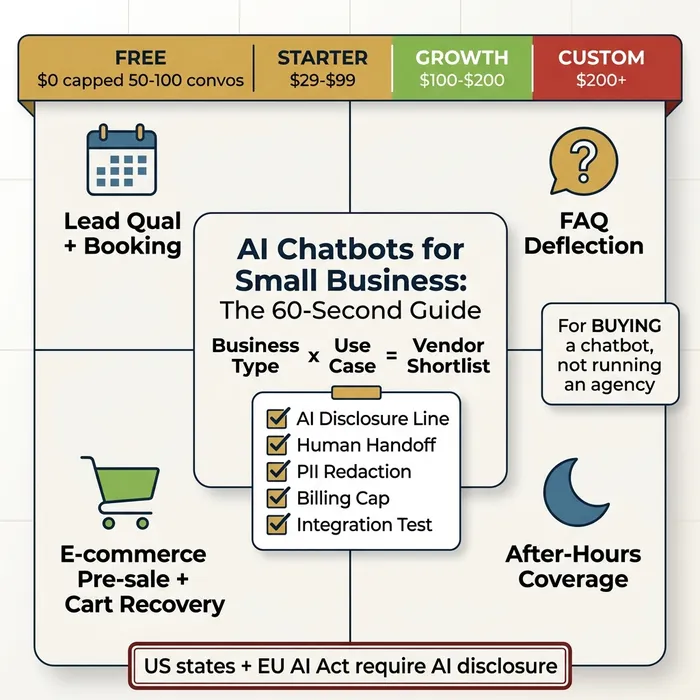
- Several US states and the EU AI Act require a mandatory AI disclosure line (“You’re chatting with an AI”) before any customer interaction — skipping this is both a legal and trust risk.
- The right vendor depends on business type: Tidio or Lindy for service businesses, Tidio or Gorgias for e-commerce, HubSpot Chatbot or Intercom Fin for B2B lead qualification, ManyChat or Wati for WhatsApp-first markets.
You missed another after-hours enquiry last Tuesday. AI chatbots for small business promise to catch the next one — but only if you pick the right tool for the right job.
Every unanswered lead is a customer buying from someone else. Every hour answering repeat questions is an hour not spent growing the business. And the vendor landscape — Tidio, Lindy, ManyChat, HubSpot, Drift, Gorgias, Intercom — is deliberately confusing.
Here’s exactly when chatbots help, when they hurt, what they really cost, and which one fits your business. Chatbots are one tactic inside a bigger picture — for the wider view, see our complete guide to AI for small business. No vendor rankings pretending there’s one universal “best” tool.
What an AI Chatbot Actually Does for a Small Business (and What It Doesn’t)
An AI chatbot is software using machine learning to generate conversational replies to customer text (and sometimes voice) input. That’s distinct from an older scripted rule-based bot — which only follows if/then decision trees — and from an enterprise “virtual agent”, the same underlying technology repackaged for contact centres with a $500-$2,000/month minimum.
For a small business owner buying one off-the-shelf, AI chatbots reliably do three jobs:
- Lead qualification and booking. The bot asks four or five qualifying questions (budget, timeline, location, service type) and either books the appointment directly in your calendar or hands the qualified lead to a human.
- FAQ deflection. Opening hours, shipping times, “do you service my area”, “what’s included in the basic package” — the bot answers from your knowledge base so these stop eating your inbox.
- E-commerce pre-sale and cart recovery. Answering sizing or compatibility questions before purchase, and sending a follow-up DM when a customer abandons a cart.
They are bad — sometimes catastrophically — at:
- Closing high-ticket deals. A $5,000+ buyer won’t sign with a bot. Let the bot qualify; a human closes.
- Complex support tickets. Anything requiring a refund decision, a policy exception, or multi-step troubleshooting usually needs a person.
- Regulated-industry advice. Medical, legal, or financial guidance creates liability even when the bot is right.
- Replacing a salesperson. A chatbot is an intake and triage layer, not a revenue-closing function.
If you’re reading because you want to start a chatbot agency and sell deployments to other companies, that’s a different article — newer readers unsure what AI can do across the business should start with our AI for small business primer.
Do AI Chatbots Actually Work? The Honest Answer
Yes — for narrow, well-defined jobs. No — for the “replace my team” framing vendors lean on in their ads.
Define “work” before you evaluate anything. For a small business, a working chatbot produces four measurable outcomes:
- Recovered leads per month. Enquiries captured outside business hours which would otherwise have gone to a competitor.
- FAQ deflection rate. Percentage of conversations fully resolved without a human touching them. A realistic baseline is 20-40% after four to six weeks of tuning.
- Time saved. Hours of inbox and DM triage freed up per week.
- Handoff success rate. Percentage of bot-to-human escalations reaching a human within your target window (usually under one business hour).
A realistic ramp is four to six weeks of tuning — cleaning your knowledge base, rewriting fallback messages, tightening handoff rules — before you see steady performance. Day-one magic doesn’t happen. Expect one to three recovered leads per week and a 20-40% deflection rate once the bot is settled. Anything above that is a bonus; anything lower means your knowledge base is thin or your intent routing is misconfigured.
Chatbots fail loudly — publicly, on-screen, screenshottable — when asked to handle multi-step support, emotional complaints, regulated advice, or nuanced custom pricing. A bot confidently quoting the wrong price in a customer chat is worse than no bot at all.
What AI Chatbots Really Cost (Transparent Pricing)
Most SMB chatbot articles bury or omit pricing. Here it is, up front, with no sales-call gate.
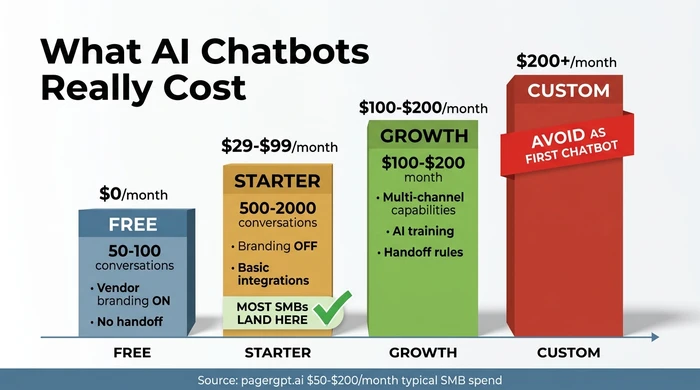
Free tier — $0/month. Every major vendor offers one. You get 50-100 conversations per month, vendor branding on the widget, limited channels (usually web only), and no human handoff. Useful for a 72-hour technical sanity check. Not useful once real traffic arrives.
Starter — $29-$99/month. The tier most small businesses actually land on. Covers 500-2,000 conversations, basic integrations (Shopify, Calendar, email), branding removed, and usually a single-language model. Tidio Starter, Chatbase Hobby, and ManyChat Pro all live here.
Growth — $100-$200/month. Multi-channel (web + WhatsApp + Messenger), AI training on your own content, proper handoff rules, and team-inbox features. The widely quoted $50-$200/month SMB band from pagergpt.ai is the combined Starter-plus-Growth range; most buyers sit in the middle.
Custom/Enterprise — $200+/month. Drift Enterprise, Forethought, Intercom Fin Max, Google Dialogflow CX. Avoid as your first chatbot. Setup assumes a dedicated admin, annual contracts, and 20+ hours of configuration work.
Hidden costs blow up budgets:
- Conversation overages. Going over your cap can cost $0.10-$0.50 per extra conversation. A single viral Instagram post can add $200 in a weekend if no billing cap is set.
- Premium integrations. Shopify Plus, Salesforce, and HubSpot Enterprise connectors often require the Growth tier minimum.
- Setup time. Budget 10-30 hours for the first deployment, even on a “no-code” platform. Writing the knowledge base is 80% of that work.
For Google’s own framing of the chatbot versus virtual-agent distinction and where SMB tools sit relative to enterprise tooling, see the Google Cloud conversational AI use-case page.
Which AI Chatbot Fits Your Business (Decision Matrix)
No universal “best” AI chatbot exists. There’s a best fit for your business type and primary use case. The filterable matrix below maps the two axes and returns a vendor shortlist with a starting budget and the integration which matters most.
Use the filters to narrow to one or two vendors in under two minutes:
| Business type | Primary use case | Recommended vendor | Starting budget | Key integration |
|---|---|---|---|---|
| Service business | Lead qualification + booking | Tidio (Lyro AI) | $29-$49/month (100-200 conversations) | Google Calendar / Calendly + website widget |
| Service business | After-hours FAQ deflection | Chatbase (free tier) or Tidio free | $0 (capped at 20-50 conversations/month) | Website URL crawl into knowledge base |
| Service business (WhatsApp-first market) | Lead qualification + booking | ManyChat or Wati | $15-$99/month + WhatsApp conversation fees | WhatsApp Business API + Google Calendar |
| E-commerce | Pre-sale Q&A + cart recovery | Tidio + Shopify app | $29-$59/month | Shopify (native) + Klaviyo for recovery |
| E-commerce (high order volume) | Order-status + FAQ deflection | Gorgias Automate | $50-$150/month | Shopify orders + email helpdesk |
| E-commerce (testing) | Pre-sale Q&A | Chatbase free tier | $0 (branded, 20 conversations/month) | Website / product catalogue crawl |
| B2B / high-ticket services | Lead qualification + human handoff | Intercom Fin (starter) or HubSpot Chatbot | $39-$150/month | HubSpot/Salesforce CRM + Slack handoff |
| B2B (solo consultant / small agency) | FAQ deflection + capture | Chatbase Hobby or Tidio Starter | $19-$40/month | Website crawl + email forward on capture |
| B2B (regulated or enterprise-adjacent) | Lead qualification with compliance | Drift starter or Lindy | $150-$250/month | Calendar + CRM + audit-log export |
No rows match all filters. Try loosening one — most commonly the use case or business type.
Still deciding whether a chatbot is the right AI investment at all — versus automations, content generation, or analytics? Work through the broader AI use cases for small business first.
Quick-Pick Decision Tree (5 Questions to Your Shortlist)
The matrix above covers the full landscape. The five-question flow below gets you to a shortlist faster when you already know your basics.
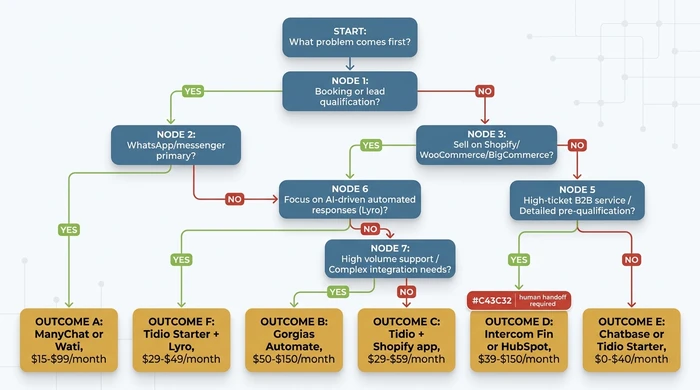
| Q# | Question | If YES / Answer A | If NO / Answer B |
|---|---|---|---|
| 1 | Is your primary goal booking appointments or qualifying inbound leads? | Go to Q2 | Go to Q3 |
| 2 | Do most customers reach you via WhatsApp or messenger (not website)? | Shortlist: ManyChat, Wati | Shortlist: Tidio Lyro, Intercom Fin (B2B) |
| 3 | Do you sell physical products on Shopify, WooCommerce, or BigCommerce? | Go to Q4 | Go to Q5 |
| 4 | Over 500 orders/month AND need order-status automation? | Shortlist: Gorgias Automate | Shortlist: Tidio + Shopify app |
| 5 | Average deal size over $5,000 or regulated industry? | Shortlist: Intercom Fin or HubSpot Chatbot + MANDATORY human handoff | Shortlist: Chatbase or Tidio free tier for FAQ deflection |
Integration Recipes for Common SMB Stacks
Vendor lists name integrations. Almost none document the actual workflow. Below are the five combinations covering most small businesses, with the specific flow each one unlocks.
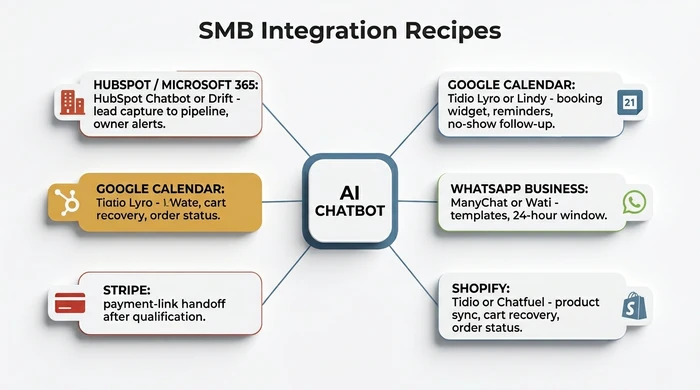
Shopify + Tidio or Chatfuel. Product catalogue syncs automatically, so the bot can answer “is the blue one in stock in size M?” without a human. Cart-recovery DMs fire 30-60 minutes after abandonment. Order-status lookup uses the Shopify API directly. Typical setup: 2-4 hours. Budget: $29-$59/month.
Google Calendar + Lindy or Tidio Lyro. Booking widget on your site checks real availability, books the slot, sends a confirmation and a reminder 24 hours out, and runs a no-show follow-up at T+30 minutes if the customer misses. Works with Calendly as an intermediate layer. Budget: $29-$79/month.
WhatsApp Business API + ManyChat, Wati, or 360dialog. Non-negotiable rule: WhatsApp template messages for anything sent outside the 24-hour customer-initiated conversation window, and free-form replies only inside it. The vendor handles the template approval pipeline with Meta. Budget: $15-$99/month plus per-conversation WhatsApp fees.
HubSpot CRM or Microsoft 365 + HubSpot Chatbot or Drift. Lead capture drops straight into the CRM pipeline with source attribution. Owner notification via Slack or Teams fires within seconds. Qualified leads get an automatic lifecycle-stage upgrade. Budget: $39-$150/month on top of the CRM subscription.
Stripe payment-link handoff. Once the bot has qualified a buyer on a small-ticket product or service, it generates a Stripe payment link in-conversation. Works with every vendor above via Zapier or a native connector. No extra subscription beyond Stripe’s standard transaction fee.
Ready to plan the rollout order across multiple tools — which chatbot, which automation, which analytics layer, in what sequence? The AI implementation roadmap for small business covers sequencing in depth.
Legal Quick-Read — Are AI Chatbots Illegal?
No. AI chatbots are legal in every major jurisdiction. They are, however, increasingly regulated — and the regulation is cheap to comply with and expensive to ignore.
US state disclosure laws. California’s SB 1001 (the “Bolstering Online Transparency” or BOT Act) requires disclosure when a bot is used to incentivise a sale or influence a vote. Utah’s AI Policy Act, Colorado’s emerging AI framework, and several other states have similar or stricter rules. The legal-industry summary from Wiley Rein’s AI advisory practice tracks the moving state-by-state landscape.
EU AI Act. Article 50 requires any consumer interacting with an AI system be informed clearly — a one-line disclosure at the start of the conversation is enough.
The safe default. Open every chat with a single honest line: “Hi, I’m an AI assistant. I can answer common questions or book a call with a human.” This covers every current disclosure requirement worldwide, and real-world A/B tests show it generally improves engagement rather than hurting it.
Regulated industries — healthcare, legal, finance, insurance — carry extra disclosure and data-handling rules and sit outside the scope of an off-the-shelf SMB deployment. Book 30 minutes with a lawyer before go-live; it’s cheaper than a complaint.
PII guardrails. Don’t train your bot on unredacted support tickets, customer data, or pricing you haven’t decided to publish. Anything the bot knows, a clever prompt can eventually surface.
The Anti-Advice: 5 Mistakes That Kill SMB Chatbot Projects
The Common Mistake: Searching “best AI chatbot”, landing on lists dominated by Drift Enterprise, Forethought, or Google Dialogflow CX, and signing an annual contract because the brand looks serious.
Why It’s Dangerous: Enterprise vendors assume a dedicated admin, 20+ hours of setup, and $500-$2,000/month minimums. You’ll burn three weeks configuring intents you don’t need, hit an annual contract you can’t exit, and still not have a working widget on your Shopify store.
The Expert Alternative: Start at the SMB tier: Tidio, Chatbase, ManyChat, or Gorgias depending on your business type. Target $29-$150/month on monthly billing with a free trial. Earn the right to upgrade by proving the use case works — don’t assume it.
Red Flags: Sales call required to see pricing; annual-only contracts; implementation fees above $500; dashboard demands you configure “intents,” “entities,” or “fulfilment webhooks” before shipping a reply.
The Common Mistake: Naming the bot “Sarah” with a human-looking avatar and no indication the user is talking to AI, because it “feels friendlier”.
Why It’s Dangerous: Several US states (California SB 1001, Utah AI Policy Act, and others) require disclosure when a consumer interacts with AI. The EU AI Act Article 50 mandates the same for EU users. Beyond the legal risk, customers who discover the deception later lose trust permanently — and screenshot it on social media.
The Expert Alternative: Open every conversation with a single honest line: “Hi, I’m an AI assistant. I can answer common questions or book a call with a human.” Keep a human name if you want — just pair it with the AI label. This generally increases engagement in A/B tests.
Red Flags: Your vendor has no built-in disclosure setting; the bot’s persona page uses a realistic human photo; your compliance policy is “we’ll tell them if they ask”; your industry is healthcare, legal, finance, or insurance and you haven’t spoken to counsel.
The Common Mistake: Signing up for a free plan, running five test conversations, declaring “this works great”, and building your website rollout around it.
Why It’s Dangerous: Free tiers cap at 20-100 conversations per month, strip features (no human handoff, no integrations, branded widget), and price overages aggressively. The moment a real marketing campaign sends traffic, the bot silently stops replying or your bill triples overnight.
The Expert Alternative: Use the free tier for a 72-hour technical sanity check only. Then build your budget model on the paid plan you’ll actually use in month three — including realistic conversation volume (website visitors x 3-8%) and overage rates. Set a billing cap or usage alert the day you upgrade.
Red Flags: Free plan hides the overage price; no monthly billing cap option; “conversation” isn’t defined in the pricing page; vendor insists on annual billing to unlock day-one integrations.
Mistake 4: Training on PII or unpublished pricing. Unredacted tickets, card numbers, medical details, and internal-only price sheets all leak eventually. Redact before you train, not after.
Mistake 5: Automating high-ticket closes. A $5,000+ buyer won’t sign with a bot. Configure the bot to qualify and hand off, not to close. Conversion on fully automated high-ticket flows is effectively zero.
Pre-Launch Checklist (10 Items Before You Go Live)
Run through every item below before the widget goes on your live site. Skipping any one of them has caused an SMB deployment to fail in the wild.
- AI disclosure line drafted and placed as the bot’s first message.
- Human handoff path tested end-to-end (email, Slack, phone, or in-app).
- Billing cap or usage alert set at your monthly budget ceiling.
- Knowledge base reviewed for PII — no card numbers, medical details, customer identifiers.
- Integration test passed — a test booking creates a real calendar event; a test lead hits the CRM.
- Fallback message written for “I don’t know” — short, honest, routes to a human.
- Analytics baseline captured — current weekly enquiry volume, email response time, conversion rate.
- Escalation keywords configured — “speak to human”, “complaint”, “refund”, “urgent”.
- Privacy policy updated to mention the chatbot, what it stores, and how long.
- 48-hour post-launch review scheduled on your calendar right now.
Variations & Exceptions
Regulated industries (healthcare, legal, finance): Add a PII redaction rule, a clear disclosure line, and a professional compliance review before deployment. Most vendors’ default configurations aren’t compliant — the out-of-the-box widget is built for e-commerce, not HIPAA or FCA.
Multi-language customers: Not all cheap-tier vendors handle Spanish, French, or Portuguese well. Verify language coverage on the specific plan — not the marketing page — with native-speaker test questions before you commit.
You already pay for Intercom or Zendesk: Look at their AI add-on (Fin for Intercom, Answer Bot for Zendesk) before replacing. Switching cost — ticket history, agent retraining, integration rework — usually outweighs the savings.
High-ticket services ($5,000+ deals): Configure the bot to qualify and book a human call only. A fully automated close will lose deals; a bot handing a pre-qualified prospect to a human increases close rate.
WhatsApp-first markets (LATAM, India, MENA): Skip web-widget vendors entirely. Start with ManyChat, Wati, or 360dialog on the WhatsApp Business API. Customers won’t move to your website to chat.
FAQ
Q: What is an AI chatbot for small business?
An AI chatbot for small business is conversational software using machine learning to answer customer questions, qualify leads, book appointments, and handle pre-sale or post-sale enquiries — typically for companies with 1-20 employees at a cost between $0 free tier and $200/month. It replaces repetitive inbox and DM work, not salespeople.
Q: Which AI chatbot is best for small business owners?
No single chatbot is best for every small business. Fit depends on business type and primary use case: Tidio for most service businesses and small Shopify stores, Gorgias for high-volume e-commerce, Intercom Fin or HubSpot Chatbot for B2B lead qualification, ManyChat or Wati for WhatsApp-first markets. Use the decision matrix above to shortlist.
Q: Are AI chatbots illegal?
No. AI chatbots are legal in every major jurisdiction. They are increasingly regulated — several US states (California SB 1001, Utah, Colorado) and the EU AI Act Article 50 require a disclosure line stating the user is chatting with AI. Regulated industries (health, legal, finance) carry extra rules. Deploy with a disclosure line and you’re compliant in almost all cases.
Q: Which AI chatbot is 100% free?
Yes, genuine free tiers exist — Tidio, HubSpot, Chatbase, and ManyChat all offer $0 plans. Every free plan caps at roughly 50-100 conversations per month, shows vendor branding on the widget, and strips human-handoff and integration features. Free is fine for a 72-hour proof of concept; upgrade the moment you hit the cap.
Q: What are the 3 best AI chatbots for a small business?
Tidio for e-commerce and small service businesses, Lindy for calendar-heavy service operations, and HubSpot Chatbot for B2B lead qualification. That said, the “best three” framing is misleading — fit beats rank. A WhatsApp-first business should ignore all three and use ManyChat or Wati instead.
Q: What shouldn’t you tell a chatbot?
No: never share payment card numbers, login credentials, social-security or national-ID numbers, or confidential business information with a public chatbot. The same rule applies when configuring one: don’t train the bot on unredacted customer PII, unpublished pricing, or internal communications. Anything the bot knows, a crafted prompt can eventually surface.
Conclusion & Next Steps
AI chatbots for small business work when you match them to a narrow job — lead qualification plus booking, FAQ deflection, or e-commerce pre-sale and cart recovery. Set a realistic expectation: 20-40% FAQ deflection, one to three recovered leads per week, and a four-to-six-week tuning ramp before the numbers stabilise. Pick the vendor which fits your business type, not the one at the top of a listicle.
Before you sign up, draft your AI disclosure line, set a billing cap, test the human handoff, and run the 72-hour free-tier sanity check. Upgrade to the $29-$99/month tier the moment traffic justifies it — and avoid enterprise tooling until you have at least one quarter of proven ROI.
Chatbots are one tactic inside a broader automation plan. To sequence this alongside email automation, content generation, and analytics, move on to the AI implementation roadmap — or step back to the full guide to AI for small business for the strategic view.
Founder, Too Many Hats
Free tool
What it's costing you
See how many hours your manual tasks are really costing you.
Free tool
Problem Solver
Describe your biggest timewaster and get a personalised plan.
Related Guides
AI Sales Follow Up: Stop Ghosting Your Warm Leads
AI sales follow up for founder-sellers: score leads, fire triggers, draft the first touch, and call the right lead today — without burning your domain.
AI Customer Service for Small Business: 3 Modes, 30-Day Path
AI customer service for a small business in three modes — deflection, routing, AI assist — plus the handover seam that protects quality. 30-day path.
How to Reduce Errors in Business Processes (Forensic Guide)
Reduce errors in repetitive business processes with a three-lever sequence: redesign, automate, protect. Scorecard, worked example, 5 rights pattern.