What Is AI for Small Business? A Plain-English Guide
What is AI for small business, in plain English: narrow vs generative AI, starter use cases, real costs, honest limits, and a 30-day zero-contract plan.
The Verdict: AI for small business is software that performs specific tasks — drafting text, sorting data, answering routine questions, predicting outcomes — without a person doing each step manually. For most owners it shows up in two flavours: narrow AI built into tools you already pay for, and generative AI such as ChatGPT that writes, summarises, or translates on demand.
Critical Insights:
- Most small businesses already use AI without realising it — email spam filtering, accounting auto-categorisation, and CRM lead scoring are all narrow AI features inside everyday tools.
- Entry-level generative AI costs £0-£20 per user per month; full enterprise AI implementations run $5,000-$250,000+, but that is not where a small business starts.
- The fastest ROI comes from tasks done at least weekly that involve drafting, summarising, sorting, or moving data between two systems — anything else can wait.
- AI cannot reliably replace human judgement, factual accuracy guarantees, customer empathy, or compliance sign-off in regulated work — keep a human in the loop for anything customer-facing or licensed.
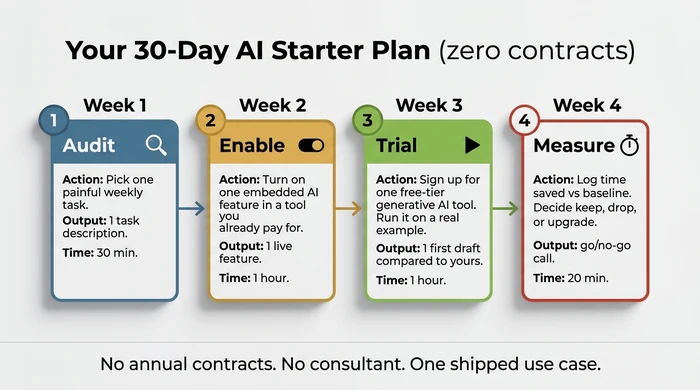
- A realistic discovery plan takes 30 days and zero contracts: audit one painful task in week 1, enable an embedded AI feature in week 2, trial a free-tier tool in week 3, measure time saved in week 4.
A peer at the Chamber says “we use AI for that now.” You nod — but if pressed, you couldn’t define what AI for small business actually means in a single sentence.
Another quarter passes. Your inbox grows. A vendor pitches an “AI-powered” subscription at £79 a month and you’ve no framework to judge whether it would do anything useful. So you either buy on faith or refuse on principle. Both decisions cost you.
This guide gives you the plain-English definition, the two kinds of AI you’ll actually meet, the tasks worth automating first, what AI can’t do, and a 30-day plan to ship one use case — no contract required. It sits inside our broader complete guide to AI for small business, which covers the longer planning, budgeting and rollout questions once you have your first win on the board.
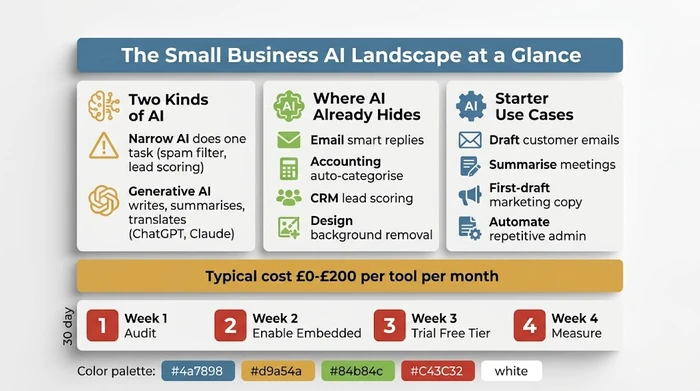
The Two Kinds of AI a Small Business Actually Meets
Two flavours cover almost everything you’ll encounter in 2026: narrow AI and generative AI. A third — embedded AI — is where most owners should start, but it’s really narrow or generative AI delivered inside a tool you already pay for.
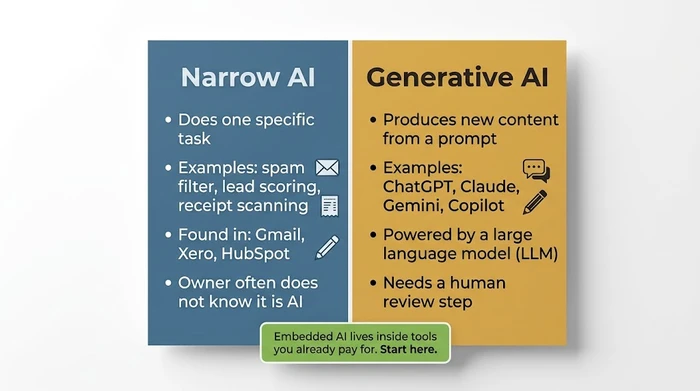
Narrow AI does one specific task well. Spam filtering. Transcription. Lead scoring. Image background removal. Receipt scanning. It already lives inside Gmail, Outlook, Xero, QuickBooks, FreeAgent, HubSpot, Pipedrive and Canva. Most owners use narrow AI every working day without ever calling it AI.
Generative AI produces new content — text, image, audio, code — from a prompt. ChatGPT, Claude, Gemini and Microsoft Copilot are the four names worth knowing. This is the flavour every podcast, vendor email and LinkedIn post is talking about. It’s genuinely useful, and it’s also a small slice of the wider AI landscape.
A prompt is just the instruction you type into a generative tool. A large language model (LLM) is the engine underneath ChatGPT, Claude, Gemini and Copilot — trained on enormous quantities of text, predicting the most likely next words to satisfy your prompt. You don’t need to know more than that to use the tool well.
ChatGPT sits inside the generative category. It’s one tool among several, powered by an LLM, useful for drafting and summarising. It is not “all of AI” and it’s rarely the highest-leverage starting point for a small business already paying for accounting software, a CRM and a design tool.
What AI is not: it isn’t a strategy, a replacement for a defined process, or a magic decision-maker. It also isn’t the same thing as basic workflow automation — though the two now overlap heavily, with tools like Zapier and Make embedding AI steps inside otherwise rule-based workflows.
The third flavour worth naming is embedded AI: features baked into tools you already use. Almost always the best place to start, because there’s no new contract, no new login, no new bill, and the data never leaves the privacy perimeter of a tool you’ve already vetted.
Where AI Already Lives in Your Business (Without You Noticing)
You already own AI. You just haven’t switched it on.
Open the three tools you spend the most time inside this week. There’s a high probability at least one already has an “AI”, “Copilot”, “Magic” or “Smart” feature live in the menu. Most owners find a switched-off feature within ten minutes.
- Email — Gmail and Outlook offer smart replies, spam filtering, scheduling suggestions, and increasingly draft-from-prompt features built into the compose window.
- Accounting — Xero, QuickBooks and FreeAgent auto-categorise transactions, flag anomalies, and scan receipts. The same software that used to need an hour of your bookkeeper’s evening now sorts most of the inbox before you log in.
- CRM — HubSpot and Pipedrive score leads, enrich contact data from public sources, and summarise long email threads into a one-line note on the contact record.
- Design — Canva and Adobe Express remove backgrounds, generate copy suggestions, expand images, and apply brand-style fills. The output isn’t always shippable, but it’s almost always a faster starting point than a blank canvas.
- Customer service — Zendesk, Intercom and Freshdesk suggest replies, route tickets, and tag conversations by sentiment so urgent complaints surface first.
- Marketing — Mailchimp and Klaviyo run subject-line tests, optimise send times, and cluster your audience into segments without you writing the rules.
The practical exercise is dull but profitable: this afternoon, open three tools you already pay for, click through the settings, and search the help docs for “AI”. You’ll almost certainly find a feature that’s live, switched off, and already inside your subscription. That’s the cheapest first AI win available to you.
The Highest-Value Starter Use Cases for a Small Business
Four tasks return value within a single working week for most owners at the discovery stage. None require a contract. None require a consultant. All four are done badly by AI roughly 10% of the time, which is why a human review step is mandatory.
Drafting customer emails. Generative AI is a strong first-draft writer. The owner edits and sends. Five to fifteen minutes saved per email. At ten emails a week, that’s roughly five hours a month back in your calendar — without any change to the email’s tone or your relationship with the customer, because you still own the final word.
Summarising meetings and calls. Otter, Fathom, Fireflies and the built-in transcription in Microsoft Teams, Google Meet and Zoom now produce searchable transcripts plus a bullet-point summary at the end of every call. Replaces 20-40 minutes of post-call note-writing per meeting and gives you something to send participants the same day.
First-draft marketing copy. Social posts, blog outlines, ad variants, landing-page sections. The quality floor is “good enough to edit” — never “good enough to publish unread”. Treat the output as a junior copywriter’s first draft: useful, faster than starting from scratch, and never shipped without a senior pass.
Repetitive admin between two systems. Invoice reminders. Lead routing. Copying form submissions into your CRM. This is usually workflow automation (Zapier, Make, n8n) with a small AI step embedded — for example, asking the model to classify an inbound enquiry before it’s routed. Boring, invisible, and often the highest hours-saved per pound spent. For deeper coverage of these patterns see our companion piece on practical AI use cases for small business.
A fifth honourable mention: a small chatbot answering the top ten questions on your contact page. Most platforms (Tidio, Intercom, HubSpot) offer a free tier and the setup is a single afternoon’s work. It won’t replace a salesperson, but it’ll catch the “what are your opening hours” emails before they reach your inbox.
How Much Does AI Actually Cost a Small Business?
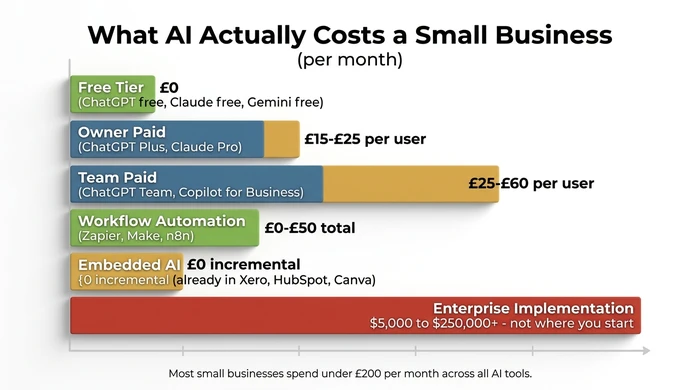
Most small businesses spend under £200 per month across all their AI tools in the first year. The five-figure and six-figure numbers vendors quote in case studies are real, but they describe custom enterprise implementations — not where a small business starts.
The practical cost ladder looks like this:
- Free tier — £0/month. ChatGPT free, Claude free, Gemini free, Microsoft Copilot in Edge. Fine for low-sensitivity drafting, learning the tool, and one-off tasks. Never paste customer PII or commercially sensitive data into a free consumer chatbot — your inputs may be used to train future models unless the provider says otherwise in writing.
- Owner-tier paid — £15-£25 per user per month. ChatGPT Plus, Claude Pro, Microsoft 365 Copilot add-on. Faster models, longer context, image generation, basic data controls. The right tier for a single owner-operator using AI most working days.
- Team-tier paid — £25-£60 per user per month. ChatGPT Team, Claude Team, Copilot for Business. Shared workspaces, admin controls, and a contractual guarantee that your data isn’t used to train the model.
- Workflow automation platforms — £0-£50 per month total (not per user). Zapier, Make and n8n charge per task or per workflow, so a five-person team pays the same as a solo founder running the same automations.
- Embedded AI in existing SaaS — £0 incremental. Often included in your current Xero, HubSpot, Canva or Microsoft 365 subscription. The cheapest AI you’ll ever buy is the AI you already paid for.
For honesty, the high end of the market does exist. Custom AI implementations for mid-market firms run $5,000-$250,000 or more depending on scope, integrations and data volume. That figure circulates in vendor decks and trips up small business owners into thinking AI is “too expensive”. It isn’t. The enterprise number describes a different product for a different buyer. You’re buying SaaS subscriptions and free trials.
“Should I Use AI for This Task?” — The Decision Matrix
Pick one task you did this week that took longer than it should have. Run it through the scorer below — five questions, about a minute, and you get a Good fit / Risky / Avoid verdict plus the tool category to try first.
If you prefer to score on paper, the static matrix below covers the same logic.
| Task type | Data sensitivity | Accuracy needed | Verdict | Tool category | First step |
|---|---|---|---|---|---|
| Drafting, summarising, translating | Public or internal | First draft OK | Good fit | Generative AI (free tier) | Paste a real example; compare the draft to what you would have written. |
| Repetitive admin (copying data between tools) | Internal | Spot checks | Good fit | Workflow automation | Map trigger → action on paper; build the simplest version in a free tier. |
| Already inside a tool you pay for | Any non-regulated | First draft OK | Good fit | Embedded AI | Search the tool's help docs for "AI"; enable the feature; trial on next run. |
| Any | Customer PII or commercially sensitive | Any | Risky | Paid tier with data controls, or embedded AI only | Never use a free consumer chatbot. Check existing tools for embedded AI first. |
| Judgement-heavy (legal, medical, financial advice) | Any | Any | Avoid | None as primary — human in the lead | Keep manual. Use AI only for background drafts a qualified person reviews. |
| Any | Regulated (health, legal, financial records) | Any | Avoid | None without compliance review | Talk to your compliance adviser before any AI tool touches this data. |
| Any | Any | Must be 100% accurate | Avoid (as standalone) | None as standalone | AI can draft; a human must verify every output before it ships. |
| Any | Any | Any | Risky (low payoff) | Embedded AI only | Task runs less than weekly or takes under 10 minutes — park it; pick a bigger target. |
Before you run any task through the scorer, confirm you can answer these six questions. If you can’t, the audit will give you noise instead of signal.
- I can describe the task in one sentence (“I write a weekly customer update email”).
- I know how often I do it (monthly / weekly / daily).
- I know roughly how long it takes each time.
- I know what kind of data the task handles (public marketing copy vs customer records).
- I know what “good enough” looks like for the output.
- I know whether the task is inside a tool I already pay for.
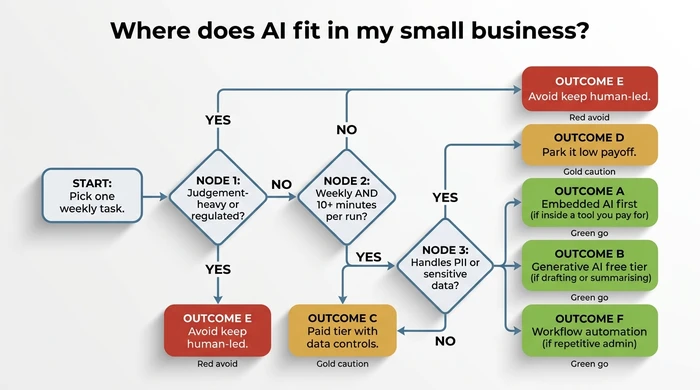
Visual Decision Tree — Where Does AI Fit Right Now?
The scorer above answers the question for one specific task. The decision tree below answers the broader question: of all the categories of work in your business, which ones is AI a fit for at all? Walk down the rows in order; the first row matching your situation is your answer.
| Scenario | Action | Reasoning |
|---|---|---|
| Task is repetitive admin (moving data between tools, sending routine emails, updating records). | Use workflow automation first (Zapier, Make, or your software's built-in automation). Add AI inside the workflow only where you need drafting or classification. | Most "AI" wins for small admin tasks are really automation wins. Automation is cheaper, faster to build, and more predictable than a generative model. |
| Task involves drafting text, summarising notes, or translating content. | Use a generative AI tool (ChatGPT, Claude, Copilot). Start on a free tier with a real example. | Generative AI excels at first-draft text. A human review step keeps quality and tone on-brand. |
| Task already lives inside a tool you pay for (email, accounting, CRM, design). | Enable the embedded AI feature in that tool before adding anything new. | You already pay for it. Data stays inside the tool's existing privacy boundary. Adoption cost is near zero. |
| Task requires judgement in a regulated or safety-critical area (legal advice, medical decisions, financial planning for clients). | Keep a qualified human in the lead. Use AI only for background drafts that the human reviews line by line. | AI models hallucinate. A confident wrong answer in a regulated context creates legal and financial exposure that dwarfs any time saved. |
| Task handles customer PII or commercially sensitive information. | Use a paid tier with documented data-retention controls, or use embedded AI inside a tool that already holds the data. Never paste into a free consumer chatbot. | Free consumer tiers may train on your inputs. Paid business tiers contractually do not. Embedded AI keeps the data inside an existing privacy perimeter. |
| Task is infrequent (monthly or less) or fast (under 10 minutes). | Leave it manual for now. Pick a weekly or daily task instead. | The learning curve and tool cost exceed the time saved. Your first AI win should pay itself back inside a month. |
| You are unsure which category the task belongs to. | Default to embedded AI in a tool you already use. If nothing embedded applies, trial a free generative AI tool with a real example. | Low cost, low risk, fastest feedback. You learn the category by trying, not by reading another article. |
The Anti-Advice — Five Things Not to Do With AI in Year One
The common mistake. New-to-AI small business owners tend to make the same five errors in their first few months: signing a 12-month SaaS contract for a tool they haven’t trialled, pasting customer records into a free consumer chatbot, buying “AI-branded” software from a vendor who can’t state in one sentence which problem it solves, letting AI produce final output in regulated workflows without a human review step, and measuring success by “how much AI we use” rather than time saved or revenue produced.
Why it is dangerous. Twelve-month contracts lock in spend before you know the tool fits — most small businesses abandon the tool inside three months and keep paying. Free consumer chatbots may train on your inputs, meaning customer PII and trade-sensitive data can leak into future model outputs. Vendors who can’t name the problem their tool solves are selling a label, not a product. AI models hallucinate — a confident wrong answer in a legal, medical or financial context creates exposure dwarfing any efficiency gain. And “AI adoption” as a metric rewards activity over outcomes, which is how small businesses end up with five AI subscriptions and zero measurable time savings.
The expert alternative. Start free or monthly, never annual. Treat data sensitivity as the first filter, not the last. Demand a one-sentence problem statement from every vendor before a demo — if they can’t give one, walk. Keep a human in the lead for any output that ships to a regulated decision, a customer or a public channel. Pick one metric per tool before you buy — “hours saved per week on X task” — and cancel if the tool doesn’t hit it inside 30 days.
Red flags to watch for:
- Vendor refuses to offer a free trial or month-to-month billing.
- Sales deck uses “AI” fifty times but never names a specific task the tool performs.
- Free consumer tool with no written data-retention policy, but your use case involves customer data.
- Tool output goes straight to a customer, regulator or public channel with no human review step.
- You can’t name, in one sentence, the task this tool will replace and the hours it will save.
- “Everyone is using it” is the strongest argument the vendor offers.
- Onboarding requires a consultant to explain what the tool does.
What AI Cannot Do for Your Small Business (The Honest Limits)
AI in 2026 is genuinely useful and genuinely limited at the same time. Both halves matter, and the second half gets dropped from most vendor pages. Here’s what AI can’t do reliably enough to bet your business on.
Cannot guarantee factual accuracy. Generative AI hallucinates — it confidently produces wrong information. Names, dates, citations, prices, statistics, legal references, medical dosages: all routinely fabricated, all sound plausible. Verify every number, name and link in any output you publish or send to a customer.
Cannot exercise judgement in regulated work. Compliance sign-off stays human. So does the call on whether to extend credit, hire a candidate, prescribe a treatment, advise on a tax position, or terminate a contract. AI can summarise the inputs; a qualified person makes the call.
Cannot understand your specific customers without context. A generative model works from your prompt. It doesn’t see your CRM, your past complaints log, or the conversation you had with that customer last August — unless you connect it explicitly and review what you’ve shared. Out of the box, the model is brilliant at general patterns and useless at your specific account history.
Cannot replace human empathy in a complaint or a sale. A generated apology email reads like a generated apology email. Customers can tell. Use AI to draft, then make it sound like you. For sales conversations and complaint resolution, the human voice still closes deals and saves accounts.
Cannot keep your data confidential in free consumer tiers. Assume anything you paste into a free chatbot could be used to train future models, unless the provider says otherwise in writing. Paid business tiers (ChatGPT Team, Claude Team, Copilot for Business) contractually do not train on your data. Free tiers are a different product.
The owners who get the most out of AI in 2026 are the ones who understand both halves: where it genuinely saves hours, and where it would quietly create a problem bigger than the time it saved.
Your 30-Day AI Starter Plan (Zero Contracts Required)
Four weeks. Thirty minutes to two hours of effort per week. No annual contract, no consultant, no purchase order. By the end of the month you’ll have one shipped use case and a measured answer to “is this worth keeping?”.
Week 1 — Audit. Pick the single most painful weekly task. Time it for one full run. Write down what data it touches, how long it takes, and what “good enough” output looks like. Output: a one-page task description. Time: 30 minutes.
Week 2 — Embedded first. Open the tool already owning that task — your email client, accounting software, CRM or design tool. Search the help docs for “AI”, “Copilot”, “Smart” or “Magic”. Enable the feature. Use it for the next run of the task. Output: one live AI feature inside an existing tool. Time: roughly one hour.
Week 3 — Trial one standalone tool. Free tier only. ChatGPT, Claude or Gemini for drafting; Otter or Fathom for meeting notes; Zapier free tier for automation. One tool, one task, one week. Paste a real example. Compare the output to what you’d have produced manually. Output: one first draft from the tool plus your honest assessment. Time: roughly one hour.
Week 4 — Measure. Compare your new time-cost to the Week 1 baseline. If you saved at least two hours a week, keep the tool and consider the paid tier. If not, cancel and pick a different task next month. Output: a documented go / no-go decision. Time: 20 minutes.
The whole arc fits inside a month and costs nothing if you stay on free tiers throughout. When you’re ready for the longer-form version that takes you from one shipped use case to a planned 90-day rollout, see our AI implementation roadmap.
Variations & Exceptions
- If you are in a regulated industry (healthcare, legal, finance, insurance): keep generative AI out of client-facing output entirely. Use it for internal drafting, research summaries and meeting notes only. All client-facing copy goes through a licensed human.
- If you run an eCommerce business: weight product description generation, image background removal, and customer-service chatbots higher than meeting summarisation. Your time sinks live in the catalogue and the support inbox.
- If you run a service business (trades, agencies, consultancies): weight quote drafting, follow-up email automation, and call transcription higher than product copy. Your time sinks live in the proposal pipeline and the post-meeting wrap-up.
- If you are a solo founder: prioritise “do it for me” generative tools that compress an hour into ten minutes. You don’t need workflow automation between five people because there are not five people.
- If you have a 10-50 person team: prioritise workflow automation removing one repetitive step from five people’s day. The maths works very differently when a saved minute compounds across a team.
- If you are US-based: swap the UK pricing examples for USD equivalents (roughly 1:1 for SaaS subscriptions). Tool availability is essentially identical for the tools named in this article.
FAQ
Q: Which AI is best for small businesses? No single tool wins. Embedded AI inside the software you already pay for is the best first AI for almost every owner — zero new contracts, zero new logins, data stays inside an existing privacy boundary. For standalone generative AI, ChatGPT, Claude and Gemini are the three credible options at the owner tier; pick one, trial it for a week, and stop comparison-shopping until you’ve shipped a real use case.
Q: Which type of AI is ChatGPT? ChatGPT is generative AI, powered by a large language model (LLM). It produces new text from a prompt. It’s one tool inside the generative category, not “all of AI” — narrow AI features inside your existing email, accounting and CRM software almost certainly outnumber the AI features you get from a ChatGPT subscription.
Q: Which AI is 100% free? Yes — ChatGPT, Claude and Gemini all offer permanent free tiers, and Microsoft Copilot is free inside the Edge browser. Free tiers are fine for low-sensitivity drafting, learning the tool, and one-off tasks. Never paste customer PII or commercially sensitive data into a free consumer chatbot, because your inputs may be used to train future models unless the provider states otherwise in writing.
Q: What is the most common type of AI in use today? Narrow AI is by far the most common. The AI you actually use every day is the spam filter in Gmail, the auto-categorisation in Xero, the lead scoring in HubSpot and the recommendation engine on Amazon. Most small businesses already use narrow AI dozens of times per working day without ever calling it AI.
Q: How can AI be used for small business? Start with four high-value tasks at discovery stage: drafting customer emails, summarising meetings and calls, generating first-draft marketing copy, and automating repetitive admin between two systems (typically with Zapier or Make). Each one returns measurable time savings inside a single working week. Avoid building custom GPTs or training a chatbot on your knowledge base until you’ve shipped two or three smaller wins.
Q: What are the 5 things AI cannot do? No, AI cannot reliably guarantee factual accuracy (it hallucinates), exercise judgement in regulated decisions (compliance stays human), understand your specific customers without explicit context (it can’t see your CRM history out of the box), replace human empathy in a complaint or a sale, or keep confidential data safe in free consumer tiers (free inputs may train future models).
Conclusion — One Task, This Week
AI for small business isn’t one thing. It’s narrow AI inside the tools you already pay for, plus generative AI you can trial for free this afternoon. Most owners get a measurable win in weeks, not quarters, by starting with one painful task, picking the smallest tool that could solve it, and measuring the result honestly.
Pick one task today. Run it through the decision matrix above. Ship one experiment by Friday. When you’re ready to plan beyond the first 30 days, the complete guide to AI for small business covers budgeting, team rollout and the longer-horizon questions waiting for you in month two.
Founder, Too Many Hats
Free tool
What it's costing you
See how many hours your manual tasks are really costing you.
Free tool
Problem Solver
Describe your biggest timewaster and get a personalised plan.
Related Guides
AI Sales Follow Up: Stop Ghosting Your Warm Leads
AI sales follow up for founder-sellers: score leads, fire triggers, draft the first touch, and call the right lead today — without burning your domain.
AI Customer Service for Small Business: 3 Modes, 30-Day Path
AI customer service for a small business in three modes — deflection, routing, AI assist — plus the handover seam that protects quality. 30-day path.
How to Reduce Errors in Business Processes (Forensic Guide)
Reduce errors in repetitive business processes with a three-lever sequence: redesign, automate, protect. Scorecard, worked example, 5 rights pattern.