How to Automate Data Entry and Stop Wasting 10 Hours a Week
Automate data entry in your small business: four tool categories, volume-to-cost tiers, two worked walkthroughs, and the audit step nobody mentions.
The Verdict: To automate data entry in a small business, pick one of four tool categories — OCR document parsers, no-code workflow tools, LLM-based extraction, or RPA — based on how your data arrives and your monthly volume. Most small firms (5-50 staff, dozens to low hundreds of records per month) land on a document parser plus a no-code workflow tool, set up in an afternoon for £50-£150/month.
Critical Insights:
- Manual data entry eats roughly 40% of accountant hours, and a team handling 200 invoices/month typically burns 20-30 hours on pure keying — measure your current hours before buying any tool.
- Human data-entry error rate sits near 1 mistake per 20 fields (~5% of invoices), so an automation without an audit step can silently cost more than it saves.
- Expect to spend £50-£150/month on software plus a one-off £0-£500 setup; enterprise RPA (UiPath-class) starts around £350/user/month and is overkill below 5,000 runs/month.
- Zapier’s per-task pricing often becomes the most expensive option above ~2,000 tasks/month — Make’s per-operation pricing or a native integration is usually cheaper at that scale.
- Start with tasks performed at least weekly moving data between exactly two systems — these give the fastest payback, typically within 4-8 weeks.
Friday afternoon, and you’re still retyping invoice numbers into Xero. If you want to automate data entry in your small business, you need a map — and nobody has given you one.
Multiply that third hour by 52 weeks. At a modest £25 an hour you’ve just described a £13,000-a-year invisible salary paid to manual data entry — before counting the reconciliation errors, the stock-sync mismatches with Shopify, and the weekend you lost on Zapier before abandoning it. The problem isn’t willpower. It’s the missing map.
This guide is the map. Four categories of tools, the volume thresholds separating them, two worked walkthroughs, and an explicit warning list of what not to buy first. It sits inside our complete guide to business automation for small businesses, so if you want the wider view of where data entry fits alongside reporting, scheduling, and onboarding, start there and come back.
Is It Actually Possible to Automate Small-Business Data Entry?
Yes — but not 100%. Software can eliminate the typing; a human still needs to review outliers, approve exceptions, and spot when an automation drifts. In this guide, data entry automation means three discrete jobs wired together: extract (read data out of a source document or app), transfer (move it across systems), and write (land it in the destination) — with a timestamped log of what happened at each step.
It does not mean a thinking assistant magically fixing bad source data, reconciling duplicates, or interpreting every vendor’s invoice quirks without configuration. Automation replaces keystrokes, not judgement.
The realistic reduction range for a well-defined workflow is 60-85% of the manual hours. The last 15-40% is review, exceptions, and edge cases costing more to automate than they save. If a vendor quotes you 100% automation, they’re selling the brochure, not the product.
The numbers behind the claim are worth committing to memory before you shop. Manual data entry consumes roughly 40% of accountant hours across small businesses, and the human error rate on hand-keyed fields sits near 1 mistake per 20 fields — around 5% of invoices contain at least one keying error. Before you buy any tool, read our framework on what to automate first so the category you pick actually matches your highest-cost process.
The Four Categories of Data-Entry Automation (and When Each Wins)
Four categories. Not eleven tools. Every “best 11 tools” listicle you’ve seen blurs these together, and buying the wrong category is how small businesses end up with a £150-a-month tool solving a £20 problem.
OCR and Document Parsers — Paper and Email-PDF Workflows
A document parser is OCR (optical character recognition) plus a field-mapping layer — rules or AI — pulling the invoice number, date, total, and line items out of a scanned or emailed document and handing them off in structured form.
- Best for: 20-500 documents per month arriving as paper, scans, or PDF email attachments with broadly consistent layouts.
- Pricing model: per-document, typically £0.05-£0.50 each, with flat plans in the £30-£80/month range.
- Example tools: Parseur, Docparser, AutoEntry, Rossum.
- Watch-out: field-mapping setup takes real effort on day one, and accuracy drops sharply on low-quality scans or handwritten notes.
No-Code Workflow Tools — Moving Data Between SaaS Apps
A no-code workflow tool is a trigger-and-action platform connecting apps you already use — Shopify to QuickBooks, Typeform to HubSpot, Gmail to a Google Sheet — without writing code.
- Best for: 100-5,000 runs per month moving already-structured data between SaaS apps.
- Pricing model: per-task (Zapier charges for each action in each run) or per-operation (Make charges per step, usually cheaper at volume).
- Example tools: Zapier, Make, n8n, Power Automate.
- Watch-out: per-task pricing compounds fast once workflows have three or more steps, and silent OAuth expiries can break workflows with no alert unless you explicitly build one.
LLM-Based Extraction — Messy, Varied, or Free-Text Data
LLM-based extraction uses a GPT-, Claude-, or Gemini-class model via API to read a document and return structured JSON. It’s the right answer whenever OCR keeps failing because the layout changes on every document.
- Best for: varied layouts, handwriting, free-text fields, emails with embedded order data — anything a template-based parser cannot pin down.
- Pricing model: per-API-call, working out to pennies per document at current token prices.
- Example tools: OpenAI, Anthropic, Google APIs wired via a short script or via the AI steps now built into Make, Zapier, and n8n.
- Watch-out: hallucinated values. An LLM will happily invent an invoice number looking plausible. Always pair extraction with an audit step — covered later in the anti-advice section.
RPA — When There Is No API at All
RPA (robotic process automation) is software mimicking a human clicking through a user interface to move data between apps with no API.
- Best for: legacy desktop software with no integration path — and honestly, not much else for a small business.
- Pricing: £200-£400 per user per month minimum at enterprise tier, before implementation fees.
- Example tools: UiPath, Automation Anywhere (enterprise-scale).
- Watch-out: overkill below roughly 5,000 monthly runs. Treat this category as the answer when you’ve outgrown the small-business tier, not as a starting point.
For a side-by-side of specific products within these categories, our guide to business automation tools for small businesses walks the vendor list with pricing.
Which Tier Fits Your Volume and Budget?
Ask “which pricing model” before “which tool”. There are four models, and they all look cheap in isolation.
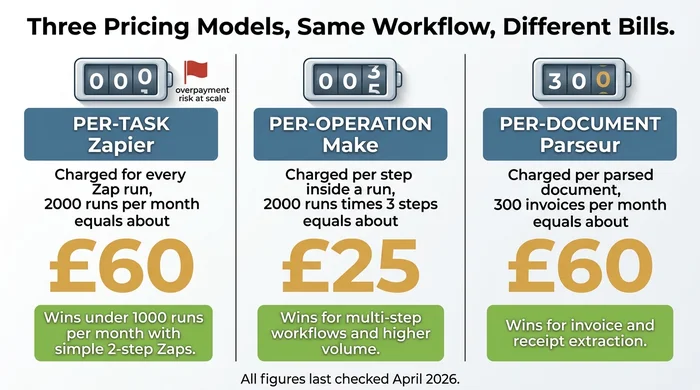
- Per-task — Zapier. You pay for every single action in every run.
- Per-operation — Make. You pay per step inside a run, but steps are cheaper than tasks.
- Per-document — Parseur, Docparser, AutoEntry. You pay per parsed document regardless of how many fields you extract.
- Per-API-call — OpenAI, Anthropic, Gemini. You pay by input and output tokens.
The right model depends on volume, and volume changes the answer more than vendor branding does.
Match your monthly volume to the tier most likely to fit:
| Monthly volume | Likely best fit | Typical monthly cost |
|---|---|---|
| Under 50 records | Native integration + free tiers | Often £0 |
| 50-500 records | Document parser OR Zapier Starter OR Make Core | £20-£50 |
| 500-5,000 records | Make Pro or dedicated document parser plan + audit layer | £50-£200 |
| 5,000+ records | Mixed stack or you've outgrown the small-business tier | £200+ |
Where Zapier’s per-task pricing breaks. A three-step Zap running 2,000 times a month burns 6,000 tasks. On Zapier’s current plans, that’s around £60-£75/month. The identical workflow in Make, priced per operation with its cheaper allowance, comes in closer to £25/month. Neither is “better” — but over a year, that’s a £500 delta you’re paying for a friendlier-looking interface.
Where a document parser beats a no-code tool. Anything above roughly 50 documents a month with line items. Trying to rebuild line-item extraction inside a generic workflow tool is how small businesses burn entire weekends.
Where an LLM API beats both. Varied layouts — supplier A’s invoices look nothing like supplier B’s — or when you want structured JSON dropped straight into a spreadsheet without building templates first.
Expert note: Every pricing figure in this guide was last checked in April 2026. Vendor pricing moves quarterly, so verify the number against the vendor’s own page before you commit to an annual plan. A 2023 listicle’s “£19/month” is rarely still £19/month.
Your Decision Path — Non-Technical vs Technical-Comfort
Two readers with the same bleeding neck shouldn’t start in the same place. A bookkeeper with no developer background needs a different path from a technically confident operations manager. The matrix below lets you self-select in under 60 seconds.
| Your situation | Recommended category | Example tools | Rough monthly cost | Audit-trail note |
|---|---|---|---|---|
| Paper or scanned PDFs, 20-500 docs/month, non-technical | OCR / document parser | Parseur, Docparser, AutoEntry | £20-£150 (per-document) | Built-in review queue; confirm retention rules for regulated work. |
| Email attachments (invoices, orders) with consistent layouts, 50-500/month | Document parser + no-code workflow | Parseur + Zapier/Make, AutoEntry + Xero native | £30-£120 | Log each parse to a sheet; spot-check weekly. |
| Moving data between two SaaS apps you already use (Shopify, QuickBooks, HubSpot), 100-5,000 runs/month, comfortable-with-formulas | No-code workflow tool | Zapier, Make, n8n, Power Automate | £20-£99 (Make cheaper at volume) | Native run history + email-on-failure error trap required. |
| Messy, varied, or free-text documents; OCR keeps failing; any volume | LLM-based extraction | OpenAI / Anthropic / Gemini API via script or workflow tool | £5-£60 (per-API-call, pennies per doc) | MANDATORY human audit step — hallucinated figures are a real failure mode. |
| Legacy desktop software with no API, niche use case | RPA (usually wrong answer) | UiPath, Automation Anywhere, Power Automate Desktop | £££ (enterprise-tier) | Consider replacing the underlying software instead. |
| You haven't measured current manual hours yet | Stop — measure first | Stopwatch, spreadsheet | £0 | No ROI claim is valid without a baseline. |
If the matrix leaves you between two rows, walk the decision tree below. It asks one question at a time.
| How does the data arrive? | Volume / comfort check | Recommended action | Reasoning |
|---|---|---|---|
| Paper or scanned PDF | Fewer than 20 docs/month | Keep manual or use a free OCR tier (Google Drive OCR, Adobe scan) | Tooling cost exceeds labour cost at this volume. |
| Paper or scanned PDF | 20-500 docs/month, consistent layouts | OCR / document parser (Parseur, Docparser, AutoEntry) | Per-document pricing scales cleanly; templates handle consistent layouts. |
| Paper, scan, or photo | Messy, varied, or free-text | LLM-based extraction with an audit step | LLMs handle variability OCR cannot — but always pair with a human review for money fields. |
| Email attachment (invoice, order, report) | Structured, repeating format | Document parser piped into a no-code workflow | Parser extracts fields; workflow pushes them into the accounting or CRM system. |
| Another SaaS app (Shopify, QuickBooks, HubSpot, Gmail) | Native integration exists | Use the native integration — do not buy a tool | Native integrations are usually free, supported by the vendor, and avoid a per-task bill. |
| Another SaaS app, no native integration | Under ~2,000 runs/month | Zapier or Make (prefer Make if workflow has multiple steps) | Zapier is easier; Make's per-operation pricing is cheaper for multi-step automations. |
| Another SaaS app, no native integration | Over ~2,000 runs/month or comfortable with self-hosting | n8n (self-hosted) or Make's higher tier | Zapier per-task pricing becomes unpredictable above this volume. |
| Legacy desktop software, no API | Any volume | Consider replacing the software before buying RPA | Small-business RPA licences cost more than most SMB software replacements. |
| A human types it fresh each time | Any volume | Redesign the process — add a form, a scanner, or an email alias — BEFORE choosing a tool | Automation cannot fix a process starting with unstructured human input. |
| Any of the above | You haven't measured current hours yet | Stop. Time one week of data entry first. | Without a baseline, no ROI calculation works and no category recommendation is trustworthy. |
Before you choose anything, put a number on the problem. The calculator below turns hours, rate, and headcount into your personal annual cost of manual entry — the single figure deciding whether any tool in this guide is worth the monthly bill.
Decision prompt: if that number is over £2,000/year and the fix costs less than £1,500/year, automate.
Two Worked Walkthroughs
Abstract categories help you choose. Concrete walkthroughs are what you actually need to build. Here are the two automations covering the highest-frequency small-business pain points — invoices and stock.
50-100 Supplier Invoices/Month via Email to Accounting Sync
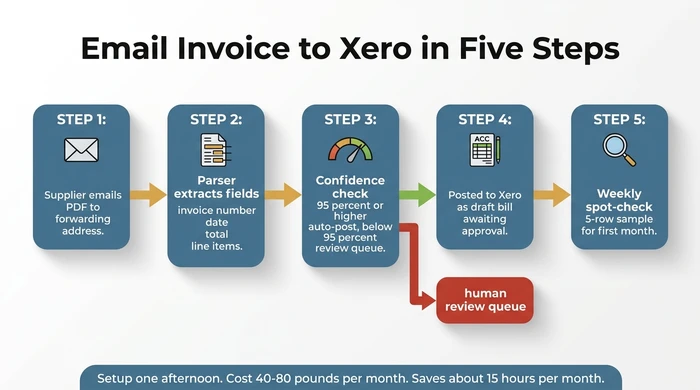
Stack: a document parser (Parseur or AutoEntry) + a Xero or QuickBooks native integration + a Slack or email review queue for low-confidence parses.
Expected setup time: one afternoon. Expected cost: £40-£80/month. Expected reduction: 18 hours/month down to roughly 3 hours of review.
- Create a forwarding email address. The parser gives you an address like
invoices-<yourcompany>@inbound.parseur.com. Set your accounting inbox to auto-forward supplier PDFs there. - Map the fields on a sample invoice. Upload five or ten representative PDFs. Click to highlight invoice number, date, supplier, total, VAT, and line items. The parser learns the template.
- Wire the output to your accounting software. Most parsers offer a native Xero or QuickBooks connector — use it before reaching for Zapier. The parser posts the extracted fields as a draft bill, not an approved one.
- Test with a batch of 20 real invoices. Check every field on every record. This is the step most people skip; it’s also the step catching a field-mapping mistake before it corrupts a quarter of accounts payable.
- Go live, with a weekly spot-check. For the first month, audit five rows a week. After that, monthly. Keep the forwarding address visible so if anything breaks you see parse failures arriving in your inbox.
Shopify Stock Sync with QuickBooks or Xero
Stack: Make (chosen over Zapier for its per-operation pricing) + Shopify native webhooks + an explicit error-trap branch for missing or unmatched SKUs.
Expected setup time: half a day. Expected cost: £30-£60/month at small-shop volume. Expected reduction: prevents three to five stock mismatches per week currently costing a refund and an apology each.
- Connect both apps in Make. Use Shopify’s webhook trigger for
product/updateorinventory_level/updaterather than polling every 15 minutes. Webhooks are free; polling burns operations. - Map SKUs between Shopify and your accounting app. This is the step breaking most stock syncs. If SKUs don’t match exactly, agree one source of truth now — usually Shopify.
- Set the trigger cadence. Real-time for bestsellers; hourly digests for slow-moving lines. Not every SKU needs instant sync.
- Add an error-trap branch. If a SKU arrives with no match in accounting, route it to a Slack channel or a dedicated email address — do not silently drop it. This single step prevents most of the “why is my stock count wrong” emergencies.
- Test with 10 SKUs. Update stock manually in Shopify and watch it land in accounting. Check totals, not just line counts.
- Go live with a spot-check cadence. Weekly reconciliation of five SKUs for the first month, then monthly. Keep the error-trap channel pinned.
The Pre-Purchase Checklist
Before you enter a credit card anywhere, run this ten-item checklist. Any “no” is a reason to pause.
- Have I measured current manual hours? (Use the formula above — no baseline, no ROI.)
- Do I know my monthly volume of documents or records?
- Is there a native integration between my existing apps before I pay for a workflow tool?
- Does the vendor publish live pricing, or is it “contact sales”? (The latter usually means “expensive.”)
- Can the tool produce a full audit log of what it read and wrote?
- Is my primary data source paper, email, SaaS, or keyboard? (This decides category.)
- Am I locked to a specific accounting package, and does the tool support it natively?
- Have I planned a human review step for money fields?
- What is my rollback path if the tool writes a wrong value into production data?
- What is the projected annual cost of the tool versus my calculated annual manual cost?
The Anti-Advice — Five Ways to Ruin Your First Automation
These are the mistakes turning an afternoon’s fix into a six-month cleanup. Three of them are common enough to warrant their own warning boxes.
The remaining two anti-patterns:
- Do not buy enterprise RPA for small-business volumes. UiPath and Automation Anywhere are built for companies running thousands of bots across thousands of seats. Buying a £350-a-month solution to a £50-a-month problem is a category error, not a pricing disagreement.
- Do not start with “the tool”. Start with the calculator. Without the annual-cost number, every vendor’s ROI claim is unfalsifiable.
The Audit-Trail and Error-Recovery Layer
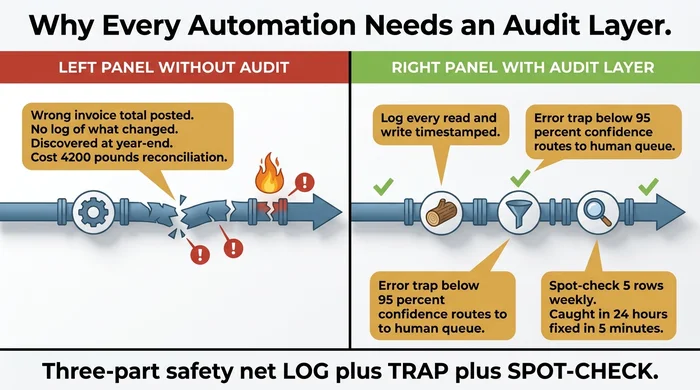
Every automation touching money, stock, or customer data needs a three-part safety net. This is the single section no top-5 competitor covers, and it’s the difference between an automation paying back in weeks and one costing you £4,000 at year-end.
- The log. Every read and every write, timestamped, with the source document and the destination record referenced. Most modern tools produce this natively — turn it on and keep 12 months.
- The error trap. A branch firing when a field is missing, malformed, or below a confidence threshold, routing the offending record to a human review queue (a Slack channel, a dedicated inbox, a “needs review” folder in the app). No silent drops.
- The spot-check cadence. Weekly five-row sample for the first month of a new workflow. Monthly thereafter. This catches drift — the vendor changing a template, a supplier changing their invoice layout, a SKU no one told you about.
Define your rollback path in writing before go-live. “If this automation writes a wrong invoice total, here is the exact sequence to undo it” is a one-paragraph document saving you a weekend at some point in the next 12 months.
Variations and Exceptions
Paper-heavy businesses (trades, clinics, cash retail): Skip no-code workflow tools as the starting point. OCR plus LLM extraction is the right lane — the bottleneck is reading paper, not moving JSON.
Ecommerce operators with multi-channel stock (Shopify + marketplaces + accounting): The problem is integration, not extraction. Make (per-operation) almost always beats Zapier at ecommerce volumes; budget for an explicit error trap on every SKU mismatch.
Regulated industries (client bookkeeping, healthcare intake, legal): Audit-trail and retention rules constrain tool choice more than price does. Favour vendors publishing a SOC 2 report and exposing a full change log. Talk to your compliance lead before go-live, not after.
Multi-currency or multi-country operations: Confirm the accounting integration preserves exchange rate and tax treatment before migrating live data. A tool handling GBP cleanly can still fumble EUR-to-GBP conversion at month-end.
You have already tried Zapier and quit: Make and n8n are the two obvious peer alternatives. n8n is self-hostable — useful when data cannot leave your infrastructure — and Make’s multi-step workflows tend to be what Zapier users wanted in the first place.
FAQ
Q: What is the 80/20 rule for automation? Focus on the 20% of tasks generating 80% of your manual-entry hours. For most small businesses, that’s invoice processing and stock or CRM sync. Ignore the long tail of one-off entries — they’ll cost more to automate than to keep doing by hand.
Q: Can ChatGPT do data entry? Yes, within limits. ChatGPT and the underlying GPT, Claude, and Gemini APIs can extract structured fields from free-text documents, and they handle variability template-based OCR cannot. But the chat window on its own is not automation — you need a workflow wrapper to trigger extraction automatically, and an audit step to catch hallucinated values before they reach production data.
Q: Is AI eliminating data-entry jobs? No — AI is shrinking the manual-keying share of the job, not erasing the role. Data-entry work is shifting toward exception handling, audit, and workflow design — higher-value work paying better, but with fewer heads needed at the pure-keying end. Plan for your team to move up the value chain, not out.
Q: How long does it take to set up an automation? Most single-workflow setups take one afternoon — roughly three to four hours of active configuration and testing. Expect two to four weeks of calendar time between the first and second automation, because the first one teaches you the tool and the habits making the second one fast.
Q: Can I automate data entry without any subscription cost? Sometimes, yes. Native integrations between major SaaS apps — Stripe to Xero, Shopify to QuickBooks, HubSpot to Gmail — are often completely free and vendor-supported. Google Drive OCR and Adobe’s free scan tier handle light document volumes. Anything beyond that typically needs a paid tool, but always check native options before buying.
Q: What is the difference between OCR and LLM extraction? OCR reads characters on an image and returns text; a document parser adds templates to turn that text into fields. LLM extraction skips the template and asks a language model to read the document and return the fields you name. OCR plus templates wins on consistent layouts and high volume. LLM extraction wins on variability.
Conclusion — Start With the Number, Not the Tool
The fastest way to waste a weekend on automation is to open Zapier’s pricing page before you’ve opened a stopwatch. Measure the hours, pick the category, wire in the audit step, and go live on one workflow at a time.
Run the calculator above tonight. If the answer is over £2,000/year, your first automation will pay for itself inside eight weeks — and most small businesses are sitting on an annual cost closer to £10,000.
When you’re ready to widen out from data entry to the rest of your operational stack, our broader guide to business automation for small businesses is the next map to read. If invoices and stock are already under control, automated reporting for small businesses is usually the highest-ROI workflow to tackle next.
Founder, Too Many Hats
Free tool
What it's costing you
See how many hours your manual tasks are really costing you.
Free tool
Problem Solver
Describe your biggest timewaster and get a personalised plan.
Related Guides
AI Sales Follow Up: Stop Ghosting Your Warm Leads
AI sales follow up for founder-sellers: score leads, fire triggers, draft the first touch, and call the right lead today — without burning your domain.
AI Customer Service for Small Business: 3 Modes, 30-Day Path
AI customer service for a small business in three modes — deflection, routing, AI assist — plus the handover seam that protects quality. 30-day path.
How to Reduce Errors in Business Processes (Forensic Guide)
Reduce errors in repetitive business processes with a three-lever sequence: redesign, automate, protect. Scorecard, worked example, 5 rights pattern.