How to Reduce Errors in Business Processes (Forensic Guide)
Reduce errors in repetitive business processes with a three-lever sequence: redesign, automate, protect. Scorecard, worked example, 5 rights pattern.
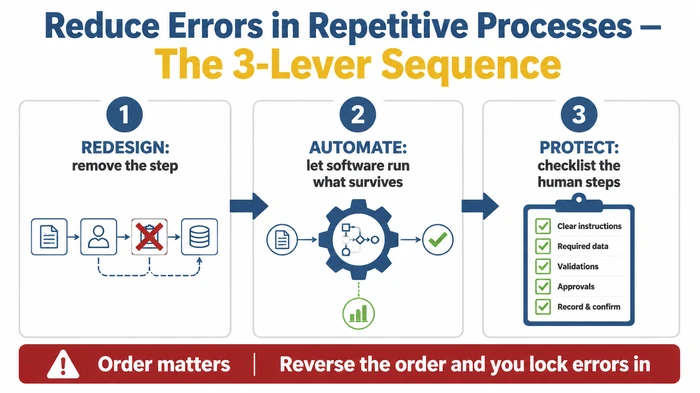
Reduce errors in repetitive business processes by attacking three lever categories in sequence: redesign the process to remove avoidable steps, automate the steps that survive, and protect the human steps with point-of-action checklists. Tackle them in that order — automating a broken process locks the errors in.
Critical Insights:
- The “5 rights” mnemonic from healthcare (right patient, drug, dose, route, time) transfers cleanly to any repetitive business transaction — swap the five nouns for the critical fields on your quote, invoice, or order.
- Ireland’s Health and Safety Authority names six concrete error-reduction levers, only one of which is “training” — the other five are design choices the process owner controls.
- Business processes split into four types (customer-, systems-, document-, and decisions-intensive); each type has a different dominant error mode and a different dominant fix.
- Vendors routinely cite headline error reductions from automation, but those numbers are vendor claims, not house facts — and they assume the underlying process was worth automating in the first place.
- The cheapest control is usually a point-of-action checklist; the most expensive is an approval signature added without a defined check, which becomes a rubber-stamp adding latency without reducing the error rate.
A mispriced quote went out Monday — £400 under cost, signed off, sent. To reduce errors in repetitive business processes like this one, you have to attack the system, not the person running it.
By Wednesday the customer had accepted and the margin was gone before the work started. The salesperson is sharp, the spreadsheet is the same one the firm has used for two years, and this is the third quote like it in six months.
The instinct is to find someone to blame. The pattern says that response is wrong. When the same kind of error keeps surfacing on the same kind of process, performed by different people on different days, the process is the problem — not the people running it. That premise sits inside our complete guide to operational efficiency for small businesses, which covers the wider playbook this article slots into.
Three lever categories fix repetitive errors: redesign, automation, and human-factors checklists. The order matters more than the choice. Get it wrong and you end up paying for software running your broken process beautifully.
What actually causes repetitive errors?
Three patterns cause almost every repetitive error. Name the pattern and the lever picks itself.
Repetitive errors trace back to one of three root causes: a re-keying gap between two systems, an ambiguous step with no defined right answer at the point of action, or variable input quality where the upstream data is dirty before your process even starts.
A re-keying gap is the frequent pattern in back-office processes. Sales enters the order in the CRM. Operations re-types it into the fulfilment system. Finance re-types it again into the accounting package. Each hop is a chance for a transposition, a missing field, or a stale value to sneak in. The error isn’t really in any one step — it sits in the existence of the copying step at all.
An ambiguous step is one where two people would reasonably do two different things. “Apply the standard discount.” Whose definition of standard? “Confirm the delivery date with the customer.” Confirm by email or by phone, before booking the courier or after? Ambiguity rewards memory and punishes new staff. It also produces the kind of error looking like inattention but really specification debt.
Variable input quality is the upstream problem. The form arrives half-filled. The supplier’s spec sheet uses a different SKU format from yours. The customer’s purchase order references a product code from two years ago. Your process can be flawless, and the error rate will still climb because it’s processing rubbish.
A repetitive-process error is a defect occurring when a routine transaction is performed multiple times and produces an inconsistent result — most often because the process re-keys data between systems, leaves the right answer undefined at the point of action, or processes upstream inputs varying in quality from day to day.
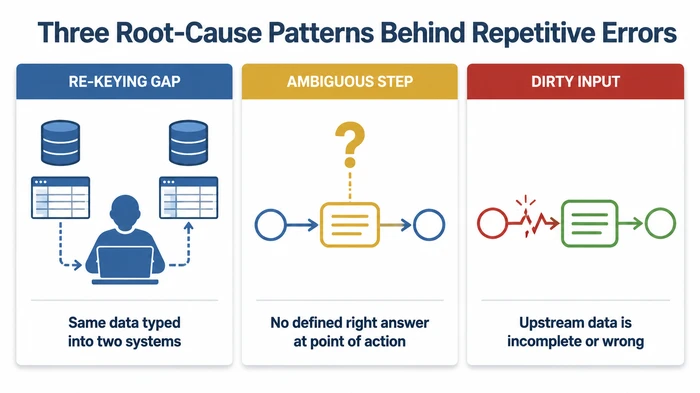
Diagnosing which of the three patterns drives your specific error matters more than picking a tool. The same surface symptom — “wrong price on the invoice” — can come from any of the three, and the right fix differs for each. Re-keying calls for integration. Ambiguity calls for a checklist. Variable input calls for upstream redesign. Skip the diagnosis and you spend money on the wrong lever.
What are the three ways to reduce errors?
Three levers. One sequence. Get it wrong and you pay for software running a broken process beautifully.
The three ways to reduce errors in a repetitive process are redesign, automation, and protection — and they form a sequence, not a menu. Redesign means removing or merging steps so the error has nowhere to occur. Automation means letting software run the surviving steps end-to-end, without a person retyping anything. Protection means putting a point-of-action checklist on the human steps remaining.
The order is the part the search results miss. Most top-ranked guides on this topic pitch one of the three levers in isolation — usually automation, because that’s what the publisher sells. Few say redesign first. That sequencing rule is the largest difference between an automation project paying back and one locking the errors in faster.
Redesign comes first because every step you remove is a step which cannot fail. If a sales order has to be re-keyed from the CRM into the fulfilment system, the re-keying step is the error source. Integrating the two systems removes the step entirely; you don’t need to make the typing more accurate, you need to stop typing. Redesign is also where the cheapest wins live. Deleting a redundant approval, merging two forms into one, killing a status-update meeting — none of those need a software budget.
Automation comes second because it amplifies whatever you point it at. Software runs steps faster and more consistently than a person, which is wonderful when the steps are right and disastrous when they’re wrong. Automating a broken process produces silent failures: the system runs smoothly, the dashboards stay green, and the underlying error rate is unchanged or worse, because the human eyeballs which used to catch problems are no longer in the loop.
Protection comes third because it’s the lever for the human steps surviving the first two passes. Some steps cannot be removed (a clinician’s call, a credit decision, a creative judgement). Those are the steps where a point-of-action checklist earns its keep — not as a bureaucratic overlay, but as a way of codifying the right answer at the moment the answer is needed.
In 2026, Ireland’s Health and Safety Authority’s Reducing Errors and Non-Compliances guidance lists six concrete error-reduction levers — human-centred design, checklists, independent cross-checks of critical tasks, removal of distractions, sufficient time, and warnings or alarms — only one of which is “more training” hsa.ie. The other five are design choices the process owner controls. That ratio — five design levers to one training lever — is strong evidence that “train staff harder” is the wrong default response to a recurring error.
What are the four types of business processes, and which errors hit each?
Read the type, recognise the error mode, pick the lever. A widely used business-process taxonomy names four types: customer-intensive, systems-intensive, document-intensive, and decisions-intensive. Each type has a characteristic error mode pointing to a different lever.
Customer-intensive processes — sales calls, support tickets, onboarding — fail at the promise-making moment. The dominant error mode is the misquoted promise: a delivery date the salesperson doesn’t have authority to commit to, a discount stacked on a discount, a feature described which doesn’t exist in the product the customer is buying. The dominant lever is a checklist of the five fields a promise must contain before it leaves the building.
Systems-intensive processes — fulfilment, payroll, inventory reconciliation — fail at the data hand-off. The dominant error mode is data drift between systems: the customer record in the CRM disagrees with the customer record in the accounting system, and the order goes out matched to one and billed against the other. The dominant lever here is integration. If two systems must agree, don’t have humans copy data between them.
Document-intensive processes — compliance filings, contracts, regulatory returns — fail at the version-control moment. The dominant error mode is the missing or stale clause: the contract template references a clause numbered for an old version, the compliance return uses the previous quarter’s threshold, the policy document quotes a regulation amended last year. The dominant lever is a single source of truth — one place where the current version lives, with a checklist confirming you pulled from it.
Decisions-intensive processes — pricing, credit decisions, hiring — fail at the judgement-variance moment. The dominant error mode is inconsistent judgement: two reviewers, two answers, no clear way to say which is right. The dominant lever is a redesign narrowing the range of allowable judgements (explicit thresholds, a tiered escalation rule), backed by a checklist with decision criteria. Automation is rarely the right lever for decisions-intensive work because the work is the judgement.
The point of the taxonomy isn’t to box every process neatly into one type. Most real processes are mixtures. The point is you can read the type from the error mode and the lever from the type — which short-circuits the temptation to apply a single favourite lever to every problem.
What are the five core business processes worth fixing first?
Two flows out of five tend to leak the most money. The five core business processes, drawing on the Kissflow framework What Are the Five Core Business Processes? (a vendor-published taxonomy, useful as orientation rather than law), are CRM, fulfilment, manufacturing, finance, and HR kissflow.com. For most owner-operators reading this guide, the customer-facing flow (CRM/sales/quoting) and the back-office money flow (finance/billing/payroll) are the top error-rate offenders.
The Kissflow list is published by an automation vendor, so treat it as a vendor framework rather than house gospel. The list helps because it covers the surface area of where repetitive errors live in a small business, and it’s unhelpful when read as implying all five need a workflow tool. Most small businesses don’t need workflow software for HR or manufacturing if they’re running the volume well; they do need to know which two of the five are leaking the most money to errors right now.
A simple prioritisation rule: multiply how often the process runs by the cost of one error. The customer-facing flow runs every day and the cost of a mispriced or misquoted transaction is whatever the lost margin or refund costs you. The finance flow runs every week and the cost of a duplicate payment, a misallocated invoice, or a missed VAT deadline can be substantial. Those two flows are where most small businesses should start. HR errors tend to be less frequent and less costly per occurrence; manufacturing errors are often constrained by the physical process itself.
If you want a one-week diagnostic, count last month’s defects per 100 transactions for the two flows above and compare. The flow with the higher product of frequency and cost-per-error is the one to attack first.
How do checklists actually reduce errors?
Checklists reduce errors by codifying the right answer at the point of action — not after, not in a training session, not on a wall poster, but on the screen or paper in front of the person doing the step at the moment they do it. The canonical pattern, drawn from the Institute for Healthcare Improvement’s Five Rights of Medication Administration, is to identify the small number of fields which must be correct and check those, not the whole process ihi.org.
In healthcare, the “5 rights” are right patient, right drug, right dose, right route, right time. Five fields. A nurse preparing a medication doesn’t work through a 40-step checklist; they work through five. The discipline lives in the choice of five. They are the fields where a wrong answer kills the patient. Everything else can be wrong and the patient will probably be fine.
The transfer rule is simple: for any repetitive business transaction, identify the small set of fields where a wrong answer produces the dominant error cost, and check those fields at the point of action. For a quote, the fields might be customer, item, quantity, price, and delivery date. For an invoice, the fields might be customer, line items, discount, currency, and due date. The checklist is the five fields, not the forty.
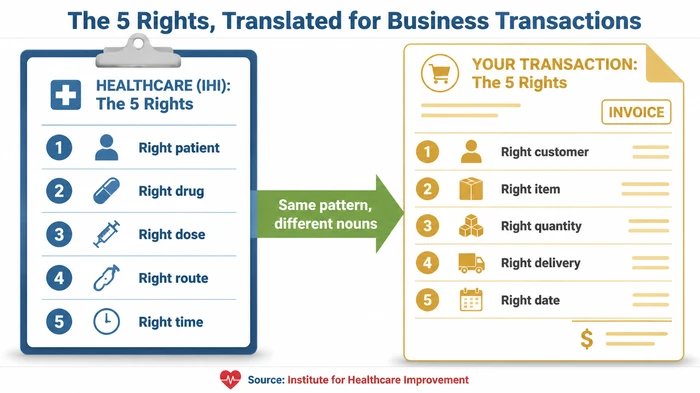
What we see most often in small-business processes is checklists which have grown to twenty or thirty items because every past mistake added a line. Long checklists don’t get followed; they get pencil-whipped. The fix is to cut the checklist back to the five fields where errors actually do damage and let the rest live in the standard operating procedure rather than in the runtime check. A short checklist getting used beats a long one getting ignored every time.
A checklist also requires three other ingredients to work: someone responsible for the check, a defined moment when the check happens, and a defined behaviour when the check fails. “I checked it” isn’t a check unless somebody can describe what they did. Approval steps lacking those ingredients are the rubber-stamp anti-pattern — they add latency without reducing the error rate, and they let the actual checker off the hook because the form was signed.
When does automation actually reduce errors — and when does it lock them in?
Automation reduces errors when three pre-conditions hold: the inputs are stable, the output is defined, and the edge-case rate is low. Outside those conditions, automation locks errors in by running the broken process faster and more confidently than a human would.
The headline number you’ll see quoted around automation is generous. Fujifilm Better Business NZ’s Struggling With Inefficient Business Processes? Fix It Now, accessed in 2026, asserts that “automation can reduce errors by up to 90%” betterbusiness-fbnz.fujifilm.com. That figure is a vendor claim, not a house fact. It’s also conditional on the underlying process being worth automating in the first place. Automate a redundant step and the 90% reduction applies to a step which should not have existed; the savings are real on paper and zero in operational reality.
The contrast worth holding in mind: the vendor’s “up to 90% reduction” holds when the three pre-conditions are in place and the process has been redesigned beforehand. Without those, the same automation can produce a small reduction, no reduction, or a higher net error rate once you count the new failure modes (silent sync failures, orphaned records, duplicate writes when retries fire). Treat any vendor percentage as the ceiling under ideal conditions, not the realistic outcome of dropping software onto your current workflow.
Stable inputs means the data going into the step looks the same most of the time. Customer names spelled the same way, dates in the same format, SKUs from a fixed list. If your inputs vary day to day, automation will mishandle the variations and the errors will be hidden inside the system rather than caught at the keyboard.
Defined output means there is one right result, not a judgement call. “Issue an invoice for the agreed amount” is defined. “Apply an appropriate discount” isn’t. Automating a defined output saves time and reduces error. Automating a judgement call codifies whatever the developer thought the right answer was on the day they wrote the rule.
Low edge-case rate means most of the time the process runs the same way. Edge cases aren’t bad — every business has them — but automation is brittle around them. If 30% of your transactions have something unusual about them, automating the other 70% may be worth doing, but you need the edge cases to land in front of a human, not silently into an exception queue nobody reads.
The honest test before any automation purchase is to write down what the system will do when the edge case shows up. If the answer is “we’ll design that later” or “the user can override it,” you aren’t ready to automate yet. Redesign first.
What are the seven steps to fix a repetitive process?
The seven steps to fix a repetitive process are: pick one process, map it as it runs, mark the error-prone steps, apply the lever sequence, define the control, measure before and after, and repeat on the next-highest-cost process. The Kissflow framework What Are the 7 Steps of the Business Process? describes a similar improvement loop and forms the basis for the structure here, with our own additions for measurement and lever-sequencing kissflow.com.
- Pick one process. Highest frequency multiplied by highest cost-per-error wins. Resist the urge to fix three at once — the second-best fix on the right process beats the best fix on the wrong one.
- Map the steps as they actually run. Not the flowchart on the wall. Sit with the person doing the work, watch a real transaction, write down every step, every hand-off, every system, and every workaround. The map of the real process is rarely the map of the documented process.
- Mark the error-prone steps. Tag each error from the past four weeks against the step where it occurred. Classify by root-cause pattern: re-keying, ambiguous step, or dirty input. The classification tells you which lever applies before you’ve made any commitments.
- Apply the lever sequence. Redesign first (can the step be removed or merged?), automate next (can a stable defined step run end-to-end without a human?), protect last (point-of-action checklist on the human steps remaining).
- Define the control. For every check surviving, write down what is being checked, by whom, at what point, and what happens when the check fails. A check without those four answers is theatre.
- Measure error rate before and after. Defects per 100 transactions, baselined over four weeks before the fix and four weeks after. If the after number isn’t better than the before number, the fix didn’t work — go back to step 2 with what you learned.
- Repeat on the next process. Pick the next-highest product of frequency and cost-per-error, run the loop, and so on. One process at a time, fixed properly, beats five processes touched lightly.
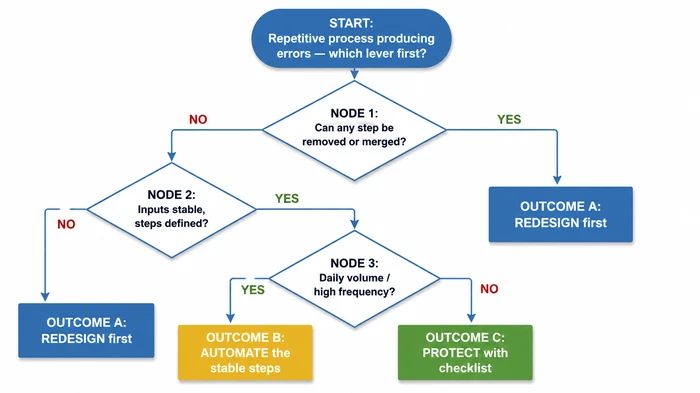
If you want to score your own process before applying the loop, use the interactive scorecard below. It walks the same diagnostic — frequency, re-keying load, ambiguity, error stakes, removable steps, input quality — and lands on a recommended lever.
Worked example — what does a 50% error-rate cut actually save?
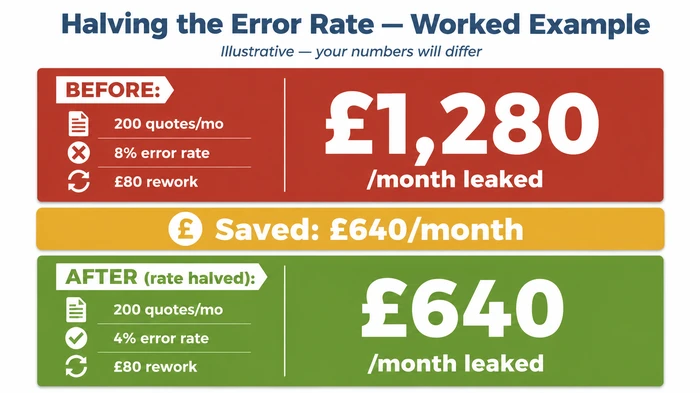
Suppose your firm sends 200 quotes a month, the mispricing rate sits at 8%, and the average rework cost — staff time, customer call, discount applied to keep the deal — runs at £80 per mispriced quote. The leaked cost is the product of the three:
Monthly Error Cost = Transactions per month × (Error rate / 100) × Rework cost per error
200 × (8 / 100) × £80 = 200 × 0.08 × £80 = £1,280 per month
Now suppose a redesign-and-checklist combination halves the error rate from 8% to 4%. The same calculation runs again:
200 × (4 / 100) × £80 = 200 × 0.04 × £80 = £640 per month
Saving = £1,280 − £640 = £640 per month
Plug in your own numbers — transactions, error rate, rework cost — and the calculation tells you how much budget the fix has to come in under to be worth doing. If the leaked cost in your scenario is £200 a month, a £30-a-month checklist tool pays back; a £500-a-month workflow platform doesn’t. If the leaked cost is £2,000 a month, the maths supports more serious investment.
Why this calculation matters: most other guides on this topic skip monetising the error. The advice arrives in the abstract — “errors are bad, automation reduces them” — and the reader is left to guess whether a fix is worth more than its price tag. Doing the multiplication for your own process is the fastest way to tell the difference between a problem deserving a software purchase and one deserving a five-line checklist.
Use the calculator block above on each of your candidate processes before you commit to any tool. The rank-order of the leaked-cost numbers becomes your fix priority list.
When does the lever framework not apply?
The redesign-then-automate-then-protect sequence is a strong default for repetitive back-office processes, but three categories of work sit outside it.
Low-frequency, high-stakes processes — an annual audit, a regulatory filing, a once-a-year insurance renewal — don’t generate enough volume for automation investment to pay back. The lever here is a thorough checklist, treated as a serious artefact rather than a tick-box, and reviewed against last year’s filing before this year’s begins.
Creative or judgement-heavy processes — pricing strategy, copywriting, design approval, hiring decisions — should not be automated. Automation locks in whatever judgement was current when the rule was written, which ages badly. The lever for judgement work is to narrow the range with explicit decision thresholds (escalate above a threshold, decline below another) and protect with a checklist listing the criteria, not the answer.
Two-person businesses rarely need any of the three levers in their software-tooling forms. The act of writing down the steps — the redesign step done with paper — is usually the entire fix. Workflow software, integration platforms, and even most checklist apps are overhead at that scale until the process runs consistently and the volume justifies the tooling.
The framework is a default, not a law. If your process has any of those three characteristics, the dominant lever differs from the back-office quoting and invoicing flows the framework was built for. Recognising the mismatch early saves the cost of pointing the wrong tool at the wrong job.
The common mistake. When errors keep recurring, the instinct is to buy automation software — “the computer won’t make that mistake.” The mistake is skipping the step coming before software: examining whether the process itself is worth automating.
Why it’s dangerous. Automation runs steps faster and more consistently than a human. If the step being automated is the wrong step — a redundant hand-off, an unnecessary re-key, an ambiguous decision — automation now performs the wrong step perfectly, every time, at speed. The errors don’t disappear; they become embedded and harder to detect because the process “runs smoothly.”
The expert alternative. Sequence matters. Redesign first (remove or merge unnecessary steps). Automate second (only when inputs are stable, output is defined, and edge-case rate is low). Protect third (point-of-action checklists on the human steps remaining).
Red flags. Someone says “just automate it” without watching the process run end-to-end. The process has undocumented exceptions someone “always handles.” You’re automating a re-keying step which could be eliminated by integration. The error rate has never been measured. An approval step is proposed without specifying what is being checked.
Frequently Asked Questions
Q: What are three ways of reducing errors? The three ways are redesign, automation, and protection — applied in that sequence. Redesign removes or merges unnecessary steps. Automation runs the surviving steps end-to-end without re-keying. Protection puts a point-of-action checklist on the human steps remaining. Skipping redesign and going straight to automation is the most common waste of automation budget.
Q: What are the 5 core business processes? The Kissflow vendor framework names them as CRM, fulfilment, manufacturing, finance, and HR. For most small businesses, the customer-facing flow (sales, quoting, support) and the money flow (billing, payroll, accounting) are the two with the highest combined frequency and cost-per-error, so those are usually where to start. Treat the list as orientation, not law.
Q: What are the 4 types of processes? Customer-intensive, systems-intensive, document-intensive, and decisions-intensive, drawing on the Study.com taxonomy. Each type has a characteristic error mode: misquoted promises (customer), data drift between systems (systems), missing or stale clauses (document), and inconsistent judgement (decisions). The type tells you the dominant lever before you’ve committed to any tool.
Q: What are the 5 rights to reduce error? The Institute for Healthcare Improvement’s “5 rights” of medication administration — right patient, drug, dose, route, time. The pattern transfers to any business transaction: pick the small set of fields where a wrong answer produces the dominant error cost (for a quote: customer, item, quantity, price, delivery date) and check those fields at the point of action. Five fields, not forty.
Q: What are the 7 steps of the business process? Pick one process, map it as it actually runs, mark the error-prone steps, apply the lever sequence (redesign, automate, protect), define the control (what is checked, by whom, when, and what happens on failure), measure the error rate before and after, and repeat on the next-highest-cost process. The structure draws on the Kissflow improvement loop, with measurement added.
Conclusion — start with one process this week
Pick one process. The one whose last error you can name and roughly cost. Map it as it actually runs, find the error-prone step, apply the levers in sequence — redesign first, automate second, protect third. Measure the error rate for four weeks before the fix and four weeks after. If the number gets better, run the loop on the next process. If it doesn’t, the fix was wrong and the map needs another look.
The advantage of one-process-this-week is that it’s small enough to start and large enough to prove. By the time you’ve run the loop three times, you’ll have a working sense of which lever fits which error in your specific business — the kind of knowledge no general guide can give you, and the foundation of the wider operational efficiency work covered in our complete guide to operational efficiency for small businesses.
Sources
- Health and Safety Authority (Ireland) — Reducing Errors and Non-Compliances (retrieved 2026-05-09)
- Institute for Healthcare Improvement — Five Rights of Medication Administration (retrieved 2026-05-09)
- Kissflow — What Are the Five Core Business Processes? (retrieved 2026-05-09)
- Kissflow — What Are the 7 Steps of the Business Process? (retrieved 2026-05-09)
- Fujifilm Better Business NZ — Struggling With Inefficient Business Processes? Fix It Now (retrieved 2026-05-09)
Founder, Too Many Hats
Free tool
What it's costing you
See how many hours your manual tasks are really costing you.
Free tool
Problem Solver
Describe your biggest timewaster and get a personalised plan.
Related Guides
AI Sales Follow Up: Stop Ghosting Your Warm Leads
AI sales follow up for founder-sellers: score leads, fire triggers, draft the first touch, and call the right lead today — without burning your domain.
AI Customer Service for Small Business: 3 Modes, 30-Day Path
AI customer service for a small business in three modes — deflection, routing, AI assist — plus the handover seam that protects quality. 30-day path.
Hire or Systematize Your Business: Founder's Decision
Stuck choosing whether to hire or systematize your business? Use this 8-question decision matrix to pick the right move this week — not next quarter.